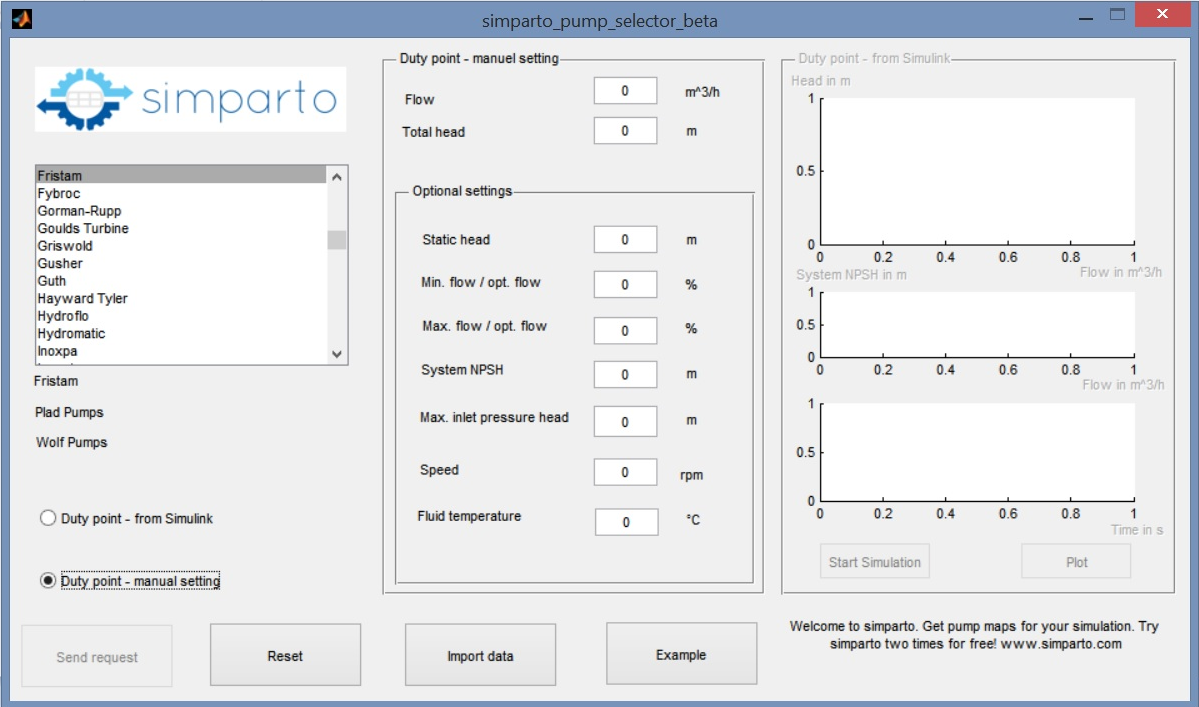
simparto pump selector beta

Get pump maps for your Matlab simulation and enjoy seamless data transfer.
870 download
Aggiornato 27 mar 2015

Visualizza la licenza

<b>Select a pump and get the curves for your simulation</b>
1. Download Matlab app
2. Install simparto pump selector app in Matlab

3. Run app:
4. Select up to 3 manufacturers from the selection list.

5a. Choose "Duty point - from Simulink":
get values from linked Simulink model;
click button "Start Simulation";
click button "Plot" to check your simulation results
or
5b. "Duty point - manual setting":
enter values in manual settings

6. Click button "Send request"
simparto pump selector will send your request via email (Microsoft Outlook required)
to simparto service center

7. Within 24h you will get pump curves, manufacturer and pump type, via email (Excel-Files).
The pump with the highest efficiency will be selected for you.

8. Click button "Import data" to import pump data to Matlab workspace.

Use button "Example" to open simulink model.
Do you need any help? Please do not hesitate to contact us.
service (at) simparto.com

Cita come

Felix Oehme (2026). simparto pump selector beta (https://it.mathworks.com/matlabcentral/fileexchange/50043-simparto-pump-selector-beta), MATLAB Central File Exchange. Recuperato .

Compatibilità della release di MATLAB
Creato con R2014a
Compatibile con qualsiasi release
Compatibilità della piattaforma
Windows macOS Linux
Categorie
Scopri di più su App Building in Help Center e MATLAB Answers
Riconoscimenti

Ispirato da: Simscape Simulation Results Explorer

Versione Pubblicato Note della release
1.2.0.0

no SimHydraulics need for request pump curve from Simulink

1.1.0.0

Change of description format

1.0.0.0