realizeModel
R2026bCreate Simulink block equivalent of CIC rate conversion and FIR filter objects
Since R2024a
Description
realizeModel( generates a Simulink® library block equivalent of the sysObj)dsp.CICDecimator, dsp.CICInterpolator, and dsp.FIRFilter objects. The properties and values of these objects define the
parameters of the resulting block.
Depending on the input filter object, realizeModel generates one of
the following:
A CIC Decimation block or an equivalent subsystem built from elementary operations for a
dsp.CICDecimatorobject. This option requires a Fixed-Point Designer™ license.A CIC Interpolation block or an equivalent subsystem built from elementary operations for a
dsp.CICInterpolatorobject. This option requires a Fixed-Point Designer license.A Discrete FIR Filter (Simulink) block or an equivalent subsystem built from elementary operations for a
dsp.FIRFilterobject. This option requires a Fixed-Point Designer license. (since R2026b)
realizeModel(
generates a Simulink library block for the input filter object with additional options specified by
one or more name-value arguments. sysObj,Name=Value)
The value of the UseLibraryBlocks argument determines how the
function implements the realized block. The value of this argument is
true by default, so the function generates the library block equivalent
of the object with default settings. If you set the UseLibraryBlocks
argument to false, the function generates a subsystem equivalent using
the Add (Simulink), Delay (Simulink), Gain (Simulink), and Data
Type Conversion (Simulink) blocks. To model rate conversion operations, the function uses the
Downsample and Upsample blocks.
Use the name-value arguments to control how the function generates the equivalent Simulink implementation. You can use these arguments to customize the block name, destination, and even optimize the block structure.
Examples
Create a dsp.CICDecimator object with custom fixed-point settings.
cicDecim = dsp.CICDecimator(5,2,3,...
    FixedPointDataType="Specify word lengths",...
    SectionWordLengths=18*ones(1,6))
cicDecim =
  dsp.CICDecimator with properties:

      DecimationFactor: 5
     DifferentialDelay: 2
           NumSections: 3
    FixedPointDataType: 'Specify word lengths'
    SectionWordLengths: [18 18 18 18 18 18]
      OutputWordLength: 32
Realize the equivalent library block by using the realizeModel function. Because the value of the UseLibraryBlocks argument is true by default, the function creates a block named Filter and adds it to a new Simulink model.
realizeModel(cicDecim)
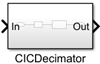
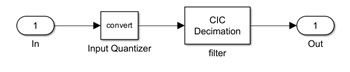
When you click this block, you can see that the equivalent implementation uses a Data Type Conversion block and a CIC Decimation block.
Call the realizeModel function again and set the UseLibraryBlocks argument to false.
The function generates a new subsystem block named Filter1 and adds this block to the existing model. To change the block name, set BlockName to a custom name.
realizeModel(cicDecim,UseLibraryBlocks=false,BlockName="Subsystem")When you click this block, you can see that the equivalent implementation contains a series of Add, Delay, and Data Type Conversion blocks. To implement the rate conversion, the model uses a Downsample block.

Create a dsp.CICInterpolator object with custom fixed-point settings.
cicInterp = dsp.CICInterpolator(5,6,2,...
    FixedPointDataType="Specify word lengths",...
    SectionWordLengths=[20 22 18 16])
cicInterp =
  dsp.CICInterpolator with properties:

    InterpolationFactor: 5
      DifferentialDelay: 6
            NumSections: 2
     FixedPointDataType: 'Specify word lengths'
     SectionWordLengths: [20 22 18 16]
       OutputWordLength: 32
Realize the equivalent library block by using the realizeModel function. Use the Destination name-value argument to place this block in an existing model. Then, specify the block name, input processing type, and the rate options.
new_system("cicInterpolationModel")
realizeModel(cicInterp,Destination="cicInterpolationModel",...
    UseLibraryBlocks=true,BlockName='CIC Interpolator Subsystem',...
    InputProcessing="Sample based",RateOptions="multirate");
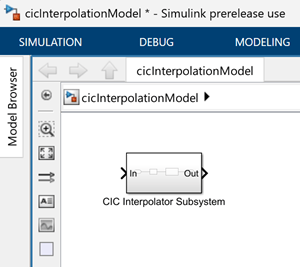
Click the CIC Interpolator Subsystem block.
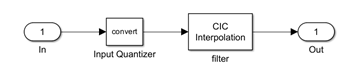
Open the CIC Interpolation block dialog box. The block dialog box is populated according to the settings of the dsp.CICInterpolator object and the realizeModel function.
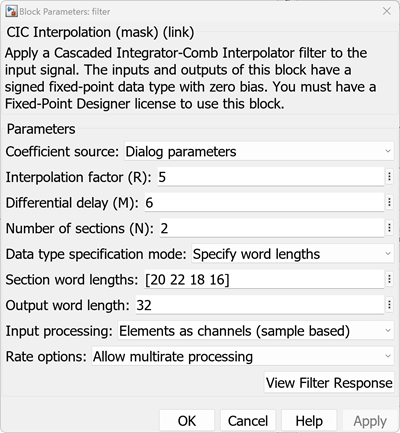
The Input Quantizer block casts the input data to the fixdt(1,16,15) data type by default. You can customize this data type by passing a custom fixed-point input signal to the dsp.CICInterpolator object.
Create fixed-point data with a word length of 21 and a fraction length of 12. Pass this data to the dsp.CICInterpolator object.
u = fi(ones(5,1),1,21,12);
y = cicInterp(u);
Now, realize the model again. Specify a new name to this block.
realizeModel(cicInterp,Destination="cicInterpolationModel",...
    UseLibraryBlocks=true,BlockName='Custom Input Type',...
    InputProcessing="Sample based",RateOptions="multirate")
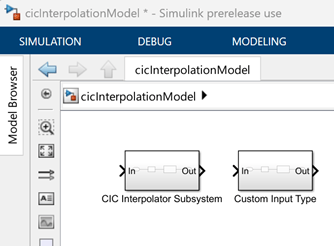
Click the Custom Input Type > Input Quantizer block. You can see that this block now casts the input data to fixdt(1,21,12), which is the data type of the input data.
Since R2026b
Create a fixed-point Simulink® block equivalent of a dsp.FIRFilter object with filter coefficients mapped to an input port. Mapping coefficients to an input port enables you to update the filter coefficients at run time during simulation.
Design a 30th-order lowpass FIR filter with a normalized cutoff frequency of 0.4 and create a dsp.FIRFilter object.
firFilt = designLowpassFIR(FilterOrder=30,...
    CutoffFrequency=0.4,SystemObject=true)
firFilt =
dsp.FIRFilter with properties:
Structure: 'Direct form'
NumeratorSource: 'Property'
Numerator: [-1.2498e-18 -0.0020 -0.0017 0.0026 0.0064 -4.8429e-18 -0.0134 -0.0115 0.0157 0.0345 -1.2029e-17 -0.0643 -0.0570 0.0900 0.3003 0.4008 0.3003 0.0900 -0.0570 -0.0643 -1.2029e-17 0.0345 0.0157 -0.0115 -0.0134 … ] (1×31 double)
InitialConditions: 0
Show all properties
Set the coefficients data type of the object to "custom". Optionally, specify the CustomCoefficientsDataType.
firFilt.CoefficientsDataType = "Custom";Create a new Simulink model to hold the realized block.
new_system("firTunableCoeffModel")Realize the filter as a fixed-point Simulink block with coefficients mapped to an input port. Set the CoefficientNames argument to specify the name of the coefficient port variable in the model workspace.
realizeModel(firFilt,...
    Destination="firTunableCoeffModel",...
    Arithmetic="fixed",...
    MapCoefficientsToPorts=true,...
    CoefficientNames={'MyCoeffs'})
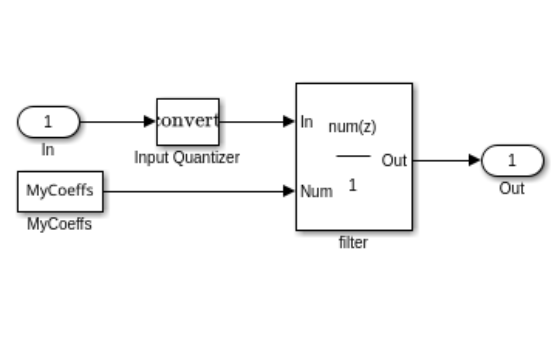
Open the model to see the realized block. The block has an input port named MyCoeffs that accepts filter coefficients at run time.
load_system("firTunableCoeffModel")
simulinkScreenshot("firTunableCoeffModel/FIRFilter")