Biquad Filter
R2026bBiquad Filter block
To add a block to a model, double-click the canvas and start typing the block name. Then, select the block from the list.
Libraries:
DSP HDL Toolbox /
Filtering
Description
A biquad filter is a form of infinite-impulse response (IIR) filter that separates the numerator and denominator and implements each part as a series of second-order sections connected by scaling operations. This type of filter can replace a large FIR filter that uses an impractical amount of hardware resources. Designs often use biquad filters as DC blocking filters or to meet a specification originally implemented with an analog filter, such as a pre-emphasis filter.
The Biquad Filter block provides transposed architectures, a pipelined architecture to optimize throughput, or a serial minimum resource architecture that also supports multichannel input.
Note
You can also generate HDL code for this hardware-optimized algorithm, without creating a Simulink® model, by using the DSP HDL IP Designer app. The app provides the same interface and configuration options as the Simulink block.
Examples
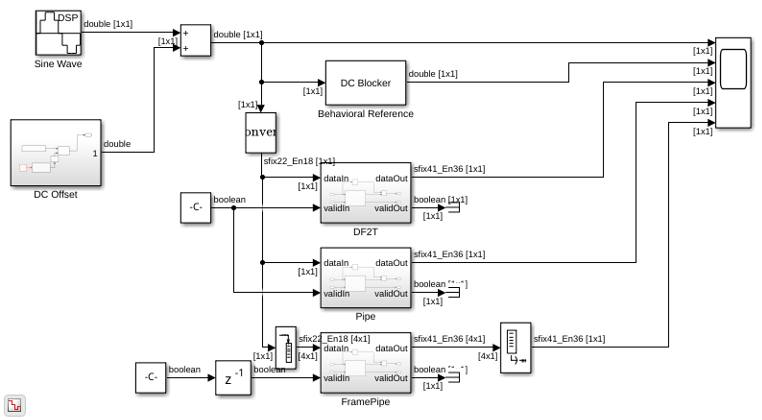
High Performance DC Blocker for FPGA
Create a DC blocking filter for a hardware communications system.
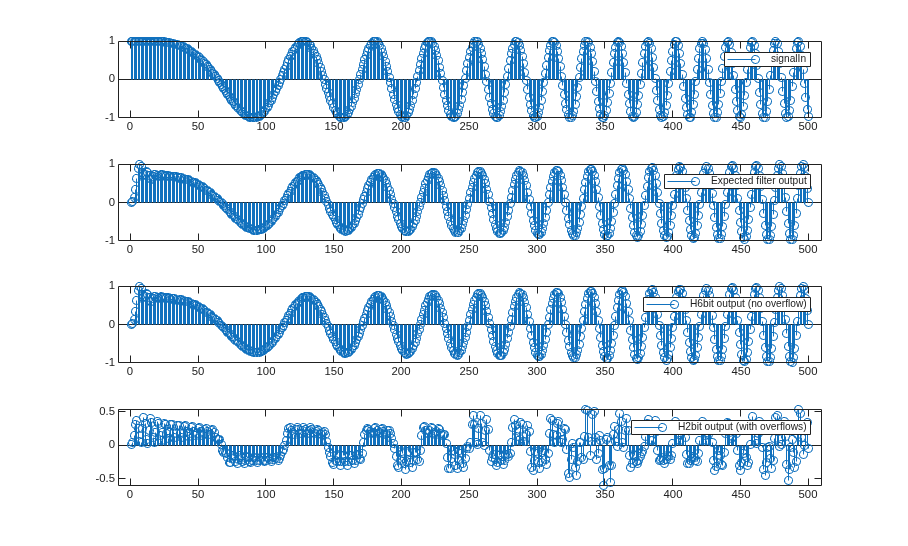
Choose Data Types for Biquad Filter
Choose fixed-point data types for biquad filter implementation on hardware.
Ports
Input
Output
Parameters
Note
These parameters apply when configuring a block in Simulink or an algorithm in the DSP HDL IP Designer app.
Limitation: You cannot specify three-dimensional coefficient values or scale values in the DSP HDL IP Designer app. In the app, you can design a multichannel biquad filter with the same coefficients for all channels, or you can export a multichannel biquad filter design to Simulink and then modify the coefficients parameters.
Main
Both the Direct form II and Direct form II
transposed architectures are pipelined and quantized to fit well into
FPGA DSP blocks. The output of these filters matches the output of the DSP System Toolbox™ System objects dsp.SOSFilter
and dsp.FourthOrderSectionFilter. These architectures minimize the number of
multipliers used by the filter but have a critical path through the feedback loop and
sometimes cannot achieve higher clock rates. These architectures do not support vector
input.
Pipelined feedback form implements a pipelined
architecture that uses more multipliers than either direct-form II structure, but
achieves higher clock rates after synthesis. This architecture supports scalar or
column vector (frame-based) input and does not support row vector (multichannel)
input. The output of the pipelined filter is slightly different than the DSP System Toolbox functions dsp.SOSFilter
and dsp.FourthOrderSectionFilter because of the timing of data samples applied
in the pipelined filter stages.
Direct form I fully serial implements a fully serial
architecture that uses only one multiplier. This architecture supports scalar or row
vector (multichannel) input and does not support column vector (frame-based) input.
When you select this option, the block stores the numerator, denominator, and scale
values in the same ROM. You can control the data type of the ROM by using the
Coefficients data type parameter. When you select this
architecture, the output ready port appears on the block.
Specify the numerator coefficients as a matrix of NumSections-by-3 values, or for a multichannel filter as a NumSections-by-3-by NumChannels matrix. NumSections is the number of second-order filter sections. The block infers the number of filter sections from the size of the numerator and denominator coefficients. The numerator coefficient and denominator coefficient matrices must be the same size. The default filter has one section.
Dependencies
To specify multichannel coefficients, you must set Filter
structure to Direct form I fully
serial.
Specify the denominator coefficients as a matrix of
NumSections-by-3 values, or for a multichannel filter as a
NumSections-by-3-by NumChannels matrix. The
block assumes the first denominator coefficient of each section is
1.0. NumSections is the number of second-order
filter sections. The block infers the number of sections from the size of the
numerator and denominator coefficients. The numerator coefficient and denominator
coefficient matrices must be the same size. The default filter has one section.
Dependencies
To specify multichannel coefficients, you must set Filter
structure to Direct form I fully
serial.
Specify the gain values as a vector of up to NumSections+1 values or a matrix of up to (NumSections+1)-by-NumChannels values. NumSections is the number of second-order filter sections. The block infers the number of sections from the size of the numerator and denominator coefficients. If the vector has only one value, the block applies that gain before the first section. If you specify fewer values than there are filter sections, the block sets the remaining section gain values to one. The diagram shows a three-section filter and the locations of the four scale values before and after the sections.

Applying these gain factors outside the filter sections reduces the multipliers needed to implement the numerator of the filter.
Dependencies
To use this parameter when you set Filter structure to
Direct form I fully serial, select Specify
scale values.
To specify multichannel scale values, you must set Filter
structure to Direct form I fully
serial.
Since R2026b
When you clear this parameter, the filter assumes the scale values are all equal to 1 and reduces latency by omitting the scaling calculation.
When you select this parameter, the serial filter applies the specified Scale values between each filter section. This selection matches the filter implementation and latency before R2026b.
For more information about the latency of the serial filter, see the Algorithms > Serial section on this page.
Dependencies
To enable this parameter, set Filter structure to
Direct form I fully serial.
Data Types
Rounding mode for type-casting the output and accumulator values to the data types specified by the Output and Accumulator parameters. When the input data type is floating point, the block ignores this parameter. For more details, see Rounding Modes.
Overflow handling for type-casting the output and accumulator values to the data types specified by the Output and Accumulator parameters. When the input data type is floating point, the block ignores this parameter. For more details, see Overflow Handling.
The block casts the numerator coefficients to this data type. The quantization rounds to the nearest representable value and saturates on overflow. When the input data type is floating point, the block ignores this parameter.
The block returns a warning if the data type of the coefficients does not have enough fractional length to represent the coefficients accurately.
If you specify an unsigned data type for this parameter, the filter uses the unsigned values and converts them to a signed data type. The signed data type is required to map the design onto DSP slices on an FPGA.
Dependencies
To enable this parameter, set Filter structure to
Direct form II transposed, Direct form
II, or Pipelined feedback form. When you
use the serial architecture, use the Coefficients data type
parameter.
The block casts the denominator coefficients to this data type. The quantization rounds to the nearest representable value and saturates on overflow. When the input data type is floating point, the block ignores this parameter.
The block returns a warning if the data type of the coefficients does not have enough fractional length to represent the coefficients accurately.
If you specify an unsigned data type for this parameter, the filter uses the unsigned values and converts them to a signed data type. The signed data type is required to map the design onto DSP slices on an FPGA.
Dependencies
To enable this parameter, set Filter structure to
Direct form II transposed, Direct form
II, or Pipelined feedback form. When you
use the serial architecture, use the Coefficients data type
parameter.
The block casts the scale values to this data type. The quantization rounds to the nearest representable value and saturates on overflow. When the input data type is floating point, the block ignores this parameter.
Dependencies
To enable this parameter, set Filter structure to
Direct form II transposed, Direct form
II, or Pipelined feedback form. When you
use the serial architecture, use the Coefficients data type
parameter.
The block casts the numerator, denominator, and scale values to this data type and stores them in an eight-element memory of this word length. The quantization rounds to the nearest representable value and saturates on overflow. When the input data type is floating point, the block ignores this parameter.
If you specify an unsigned data type for this parameter, the filter uses the unsigned values and converts them to a signed data type. The signed data type is required to map the design onto DSP slices on an FPGA.
Dependencies
To enable this parameter, set Filter structure to
Direct form I fully
                serial
.
The block casts the internal accumulator signals (as indicated in the diagrams in the Algorithms section) to this data type. The quantization uses the settings of the Rounding mode and Saturate on integer overflow parameters. When the input data type is floating point, the block ignores this parameter.
The block casts the output of the filter to this data type. The quantization uses the settings of the Rounding mode and Saturate on integer overflow parameters. When the input data type is floating point, the block ignores this parameter.
Algorithms
The direct form II and direct form II transposed architectures are pipelined and quantized to fit well into FPGA DSP blocks. The architecture diagrams show the accumulator quantization points and pipeline registers for the direct form II and direct form II transposed architectures. The dashed lines indicate how the multiply-add operation fits into a DSP block on an FPGA.
|
|
|
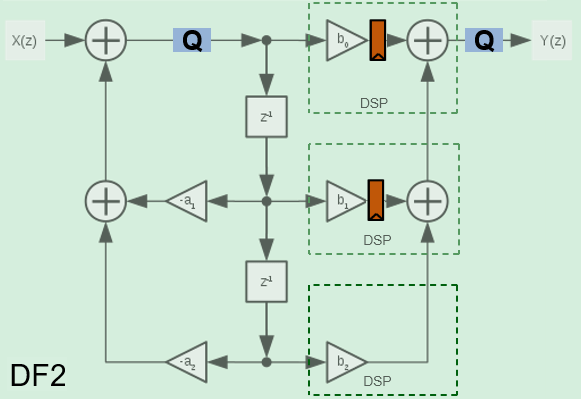
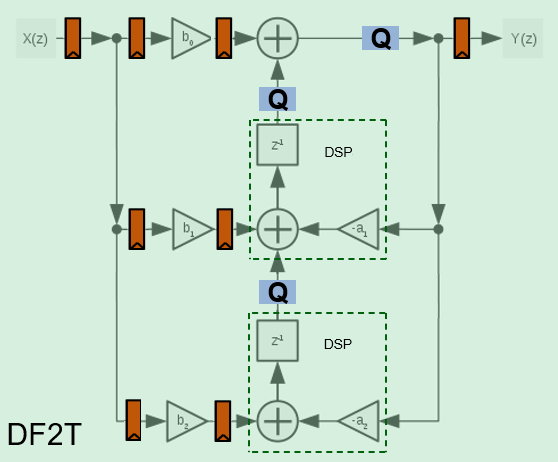
The transposed biquad filter implementations have a long critical path through the feedback loop between poles z-1 and z-2. They use the lowest number of multipliers but are not suitable for high-speed applications.
The fully serial architecture implements a direct form I architecture that uses one multiplier.
When you use the serial architecture, you can apply the next data only after the block
has finished calculations on the previous input sample. Use the signal from the
ready port to determine when the block is ready to accept the next
data sample, or get the expected number of cycles between valid inputs by calling the
getLatency
function on a similarly-configured dsphdl.BiquadFilter
System object™.
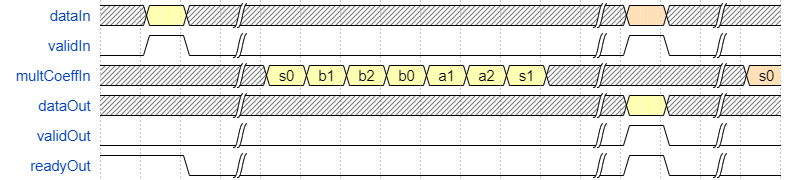
This waveform shows the serial multiplier operation for a single-section filter when you
select the Specify scale values parameter. The
multCoeffIn signal is the internal input to the multiplier. Because the
first denominator value is always 1, the filter skips that
multiplication. The filter has pipeline delays before and after the multiplier. The latency
of this filter configuration is 16 cycles.
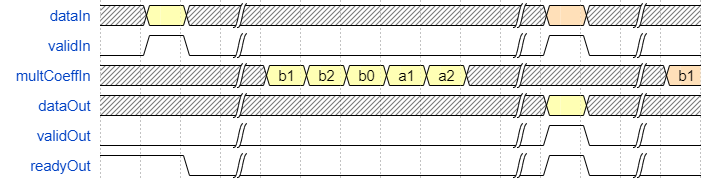
This waveform shows the multiplier operation for a single-section filter
when you clear the Specify scale values parameter. The filter assumes
the scale values are 1 and skips those multiply cycles. So, the latency
for this filter configuration is reduced to 11 cycles.
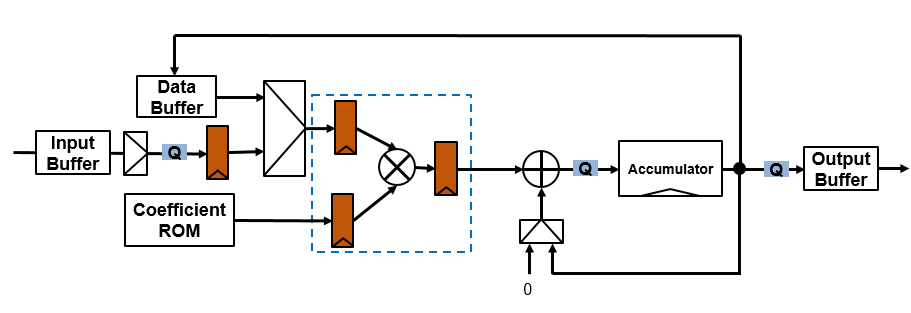
This diagram shows the serial filter architecture with quantization points and pipeline registers. The multiplier is pipelined to fit to a DSP block on an FPGA, as shown by the dashed line box.
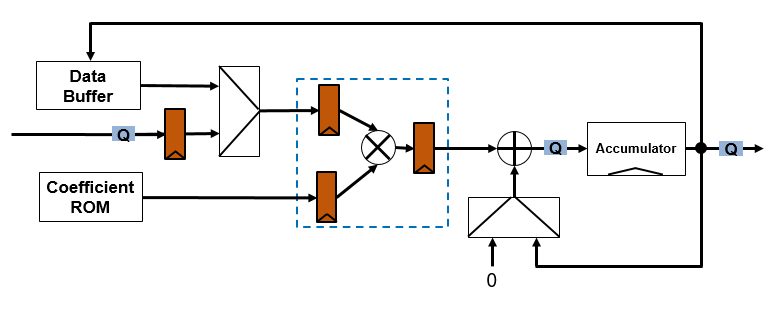
The filter extends the input data type to match the accumulator output, uses full-precision data types in the multiplier, and quantizes the data path before the accumulator. The coefficient ROM stores the coefficients and scale values and has eight elements for each filter section. The data buffer implements the input and output delay lines and maintains the data type from the accumulator output.
For a multichannel filter, the block uses the same serial architecture and buffers the input and output vectors to create a serial data stream. The ROM has eight elements for each filter section for each channel, even if you use the same coefficients for all channels.
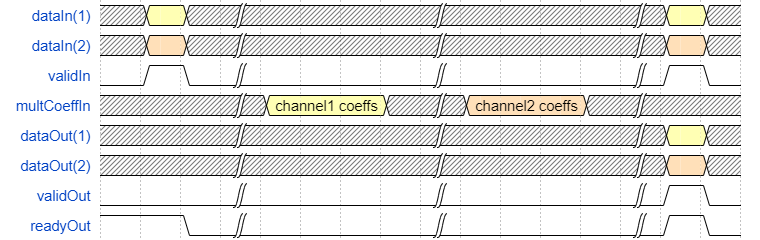
When you implement a multichannel filter, you must leave time between valid input
samples for the filter to process all channels serially. Use the signal at the
ready port to determine when the block is ready to accept the next
data sample, or get the expected number of cycles between valid inputs by calling the
getLatency
function on a similarly-configured dsphdl.BiquadFilter
System object. This waveform shows the serial multiplier operation for a two-channel
single-section filter. For each channel, the coefficient multiplication order is the same as
shown in the previous waveforms. The latency of this filter configuration when you select
the Specify scale values parameter is 27 cycles. The latency of this
filter configuration when you clear the Specify scale values parameter
is 17 cycles.
References
[1] Chung, Jin-Gyun, and Keshab K. Parhi. Pipelined Lattice and Wave Digital Recursive Filters. Boston: Springer US, 1996. https://doi.org/10.1007/978-1-4613-1307-6.

