Generate MATLAB Tests from Missing Coverage
R2026bIf you have a MATLAB®
Test™ license, you can create tests for your source code directly from an
interactive HTML code coverage report. For example, when you select a missed statement
in the report, you can generate a starter test (placeholder Test
method) in an existing or new test file and then add code to exercise the statement when
the test runs. If you also have a MATLAB Copilot license, you can generate completed tests without manually writing the
test logic. Adding tests from the coverage report improves project quality and helps
increase code coverage.
This example shows how to create a test for a missed statement in a MATLAB project. First, you run the existing tests and generate an interactive code coverage report. Then, you create a starter test for a missed statement in the report and add code to complete the test. When you run the updated test suite, the regenerated coverage report reflects the improved coverage metrics and marks the previously missed statement as covered.
You can also improve code coverage by filtering blocks of source code that are not intended to be covered by automated tests. For more information, see Justify Missing Coverage for MATLAB Source Code.
Generate Code Coverage Report
To create tests from missing coverage, first generate an interactive HTML code coverage report so that you can visualize and interact with missed executables.
For illustrative purposes, open the ShortestPath project, which
includes a function named shortest_path in its
src folder and tests for the function in its
tests folder. The shortest_path function
returns the length of the shortest path between two nodes in a graph.
openExample("matlabtest/ShortestPathExample")Generate a code coverage report that includes information on
all structural coverage types for the source code in the
src folder.
import matlab.unittest.plugins.CodeCoveragePlugin
import matlab.unittest.plugins.codecoverage.CoverageReport

runner = testrunner("minimal");
format = CoverageReport("report");
plugin = CodeCoveragePlugin.forFolder("src",Producing=format);
addPlugin(runner,plugin)

suite = testsuite;
results = run(runner,suite);
MATLAB code coverage report has been saved to:
 C:\work\Examples\matlabtest\ShortestPathExample\MATLABShortestPath\report\index.html
Open the report. The Overall Coverage Summary section of the report indicates that the tests in the project achieve full function coverage. However, the tests do not achieve full coverage for the remaining coverage types.

Create Test from Missing Coverage
To add a test from a missed executable:
Select the executable in the code coverage report.
Using the button that appears on click, create a starter test or create a completed test using MATLAB Copilot:
To create a starter test, click Generate Test .
To create a completed test (requires MATLAB Copilot), click Generate Test > Generate Using Copilot.
In the Generate Test dialog box, choose whether to create a new test file or add the test to an existing test file. If you create a new test file in a MATLAB project, remember to add the file to the project.
Note
In some cases, MATLAB generates more than one test for the selected code. For example, if
you select a completely missed decision, MATLAB adds two tests to exercise both the true and
false decision outcomes.
For example, in the statement coverage view of the code coverage report, identify the first missed statement in the Source Details section. Select the statement, and then click Generate Test to create a starter test for the missed statement.
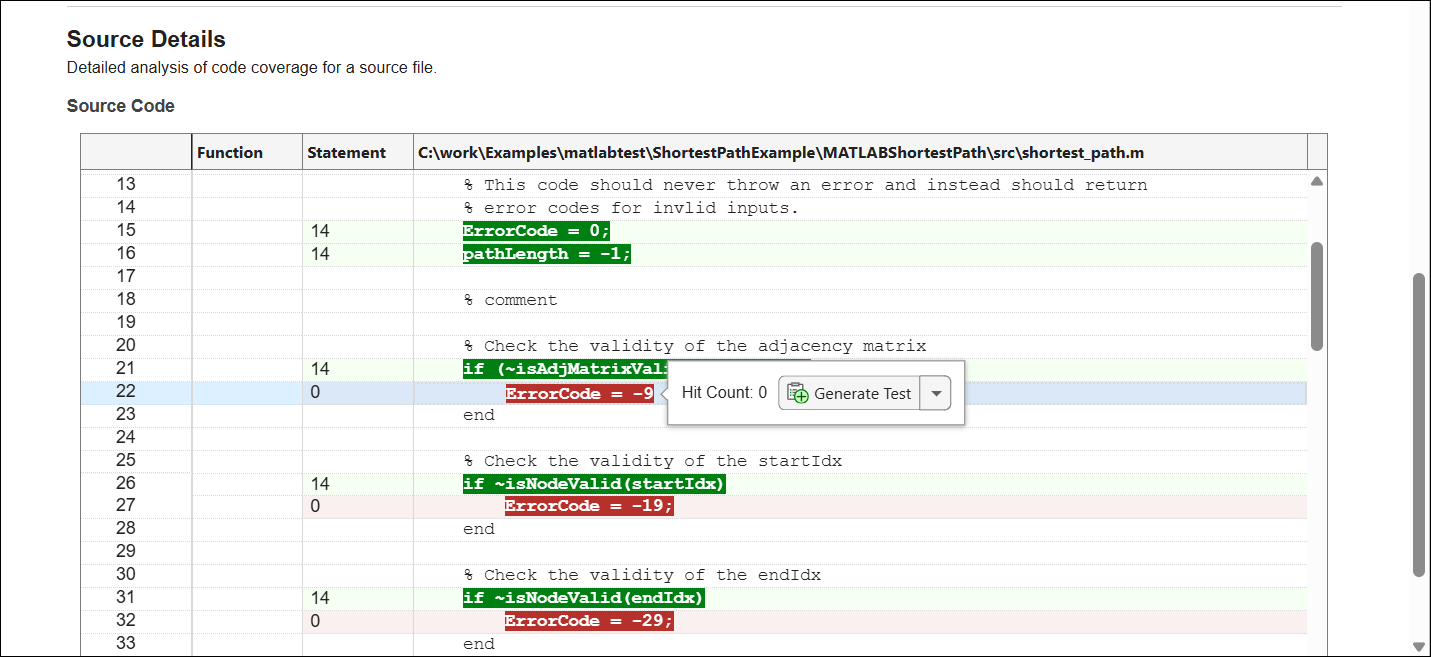
You can save a generated test to a new or existing test file. In the Generate Test
dialog box, click Add to Existing File, and then select the
graph_unit_tests.m file in the tests folder of
the project. MATLAB adds the new Test method to the file and opens the file
with the added code in focus. The starter test does not include test logic, but it
includes comments that describe how to add code to achieve the desired coverage.
    function testMissingCoverageLine22Hit(testCase)
        % Exercise shortest_path.m such that:
        % (Line: 22) -> hit
    end
Complete or Verify Generated Test
If you create starter tests, complete them to properly exercise the source code. If you create completed tests using MATLAB Copilot, verify that the generated test code behaves as intended.
Complete Starter Test
Starter tests generated from missing coverage do not include test logic. Instead, they serve as placeholders for adding test code as needed. These starter tests include high‑level comments that describe how to add code to achieve the desired coverage. You can use qualification methods in your implementations. For examples of writing simple tests to exercise source code, see Write Simple Test Case Using Classes and Create Starter Tests for MATLAB Source Code.
For this example, implement the generated
testMissingCoverageLine22Hit method to exercise the selected
statement. The statement is exercised when the adjacency matrix passed to the
shortest_path function is invalid. So, create an invalid
matrix in the test and use it to call the function. For improved readability, use a
more descriptive name for the Test method.
    function check_invalid_matrix(testCase)
        adjMatrix = ones(10,20);
        startIdx = 1;
        endIdx = 20;
        expOut = -9;
        verify_path_length(testCase,adjMatrix,startIdx,endIdx,expOut,"Invalid adjacency matrix");
    end
Verify Test Generated Using MATLAB Copilot
MATLAB Copilot attempts to generate test code that exercises the selected source code without any additional input from you. However, the generated code might contain errors or might not correctly exercise the source code.
Validate the generated tests before use, and check that the tests qualify the expected functional behavior. To use MATLAB Copilot to explain a generated test, open the test file, place your cursor in the test in the MATLAB Editor, and on the Editor tab, select Copilot > Explain Code.
Inspect Updated Code Coverage
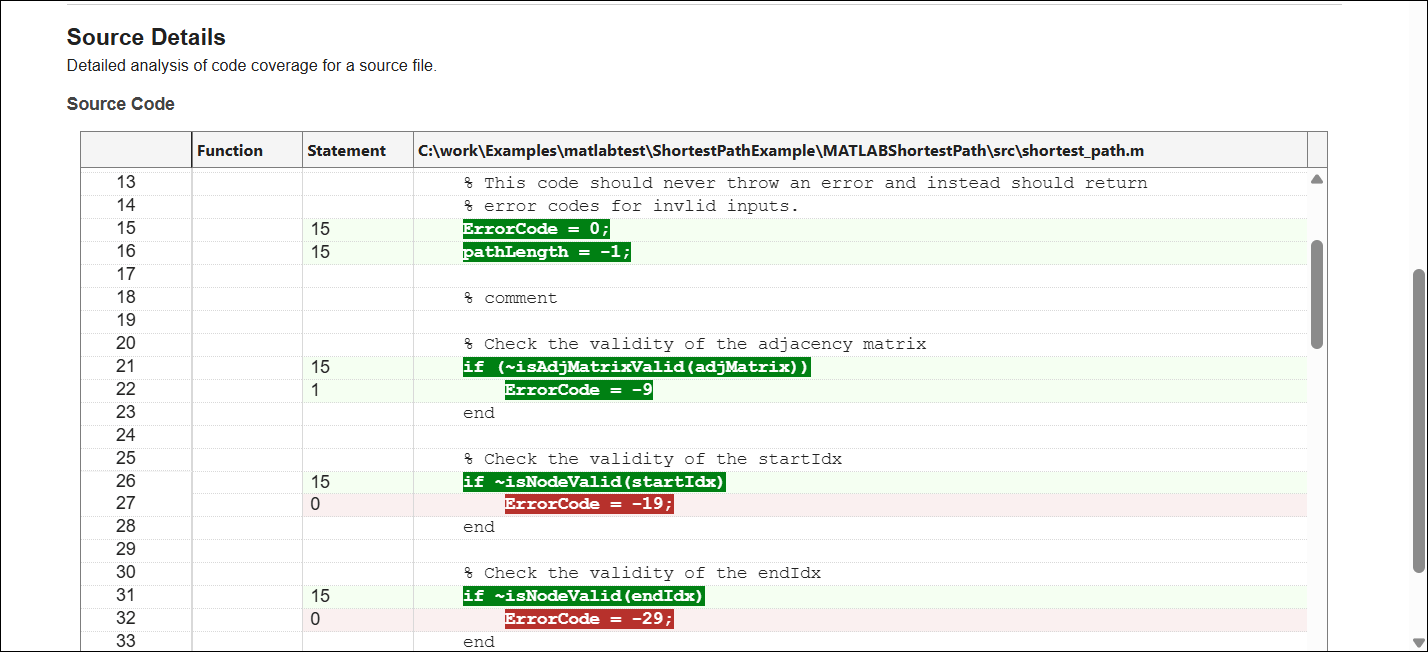
To see the impact of added tests on code coverage, generate a new HTML coverage report by running the updated test suite. The added tests exercise additional parts of the source code and improve the coverage metrics. In this example, the statement used to create the test is covered in the new report.
suite = testsuite;
results = run(runner,suite);
MATLAB code coverage report has been saved to:
 C:\work\Examples\matlabtest\ShortestPathExample\MATLABShortestPath\report\index.html
You can iteratively improve code coverage for the project by following the steps in this example. Identify missed executables, create tests for them, run the updated test suite, and inspect the coverage metrics. Once the metrics exceed the target thresholds, you can consider the source code adequately tested.

