Edit Optimization Options
R2026bThe settings in the Optimization Options dialog box are algorithm-specific.
If you edit the settings and want to reset to the defaults, select Optimization > Reset Options. If you add parameters to user-defined optimization scripts, you might need to use this reset option to make all new parameters appear in the dialog box.
fmincon Optimization Parameters
The fmincon optimization algorithm in CAGE uses the
fmincon function in the Optimization Toolbox™. In CAGE, the fmincon algorithm wraps up the
fmincon function so that you can use the function for maximizing
and minimizing. See fmincon and options.
Parameter | Description |
|---|---|
Constrained optimization algorithm |
|
Display | Determines the level of diagnostic information displayed in the workspace.
|
Maximum iterations | Maximum number of iterations allowed. |
Maximum function evaluations | Maximum number of function evaluations allowed. |
Function tolerance | Termination tolerance on the function value. |
Variable tolerance | Termination tolerance on the optimization variables. |
Constraint tolerance | Termination tolerance on the constraint violation. |
Sub algorithm | Select Note The Sub algorithm parameter only
applies if the |
| Barrier update method | Select Note The Barrier update method parameter
only applies if the |
Number of start points | Positive integer, N. Optimization generates (N-1) start points per run in addition to the starting value specified in the Input Variable Values pane. The optimization runs from each of the N start points and chooses the best solution. To generate the N-1 extra start points:
Note For point optimization problems, set Number of
start points to |
Run from feasible start points only | Select this option to terminate all runs that start with an
initial value that does not satisfy the constraints. In the
Solution Information pane of the
Optimization Output view, the Output message
reports the termination. |
Soft constraints weighting | Weighting factor that the optimization uses for soft
constraints. By default, the value is |
Make table gradient constraints feasible | Select this option to make constraints feasible for sum optimizations with table gradient constraints on the optimization variables. Consider clearing this option if the table gradient constraints are soft. |
ga Optimization Parameters
The ga optimization algorithm in CAGE uses the
ga function in the Global Optimization Toolbox. In CAGE, the ga algorithm wraps up the
ga function so that you can use the function for maximizing and
minimizing. See ga (Global Optimization Toolbox) and options (Global Optimization Toolbox).
Parameter | Description |
|---|---|
Generations | Algorithm stops when the number of generations exceeds specified value. |
Population size | Number of population members that the algorithm uses. For
guidelines on setting the populating size, see |
Display | Determines the level of diagnostic information displayed in the workspace.
|
Crossover function | Function that generates new population members from the
existing GA population by crossover. For more information on
each function, see |
Crossover fraction | Fraction of the next generation, other than elite children, produced by crossover. |
Mutation function | Function that generates new population members from the
existing GA population by mutation. The fraction of the next
generation, other than elite children, produced by mutation is
one minus the value of Crossover fraction.
For nonlinearly constrained problems, select
|
Selection function | Function that selects the population members that are the parents for the crossover and selection functions. |
Hybrid function | Optimization function that runs after the GA termination to
try to improve the value of the objective function. If the
algorithm has nonlinear constraints, the hybrid function cannot
be |
Stall generations | Algorithm stops when the weighted average change in the objective function over the value of Stall generations is less than the value of Function tolerance. |
Stall time limit | Algorithm stops if there is no improvement in the objective function during the specified time stall time limit, in sec. |
Function tolerance | Algorithm runs until the weighted average change in the fitness function value over the value of Stall generations is less than the value of Function tolerance. |
Constraint tolerance | Tolerance that determines whether a population member is feasible with respect to the nonlinear constraints. |
Time limit | Time to stop the algorithm. |
Soft constraints weighting | Weighting factor that the optimization uses for soft constraints. |
patternsearch Optimization Parameters
The patternsearch optimization algorithm in CAGE uses the
patternsearch function in the Global Optimization Toolbox. In CAGE, the patternsearch algorithm wraps up the
patternsearch function so that you can use the function for
maximizing and minimizing. See patternsearch (Global Optimization Toolbox) and options (Global Optimization Toolbox).
Parameter | Description |
|---|---|
Display | Determines the level of diagnostic information displayed in the workspace.
|
Time limit | Time to stop the algorithm. |
Maximum number of iterations | Maximum number of algorithm iterations. |
Maximum function evaluations | Algorithm stops if the number of function evaluations reaches this value. |
Variable tolerance | Algorithm stops if the distance between two consecutive optimization variable values is less than the variable tolerance. |
Function tolerance | Algorithm stops if the distance between two consecutive objective function values and the mesh size are both less than the value of Function tolerance. |
Constraint tolerance | Determine feasibility with respect to the nonlinear constraints. |
Mesh tolerance | Algorithm stops if the mesh size is smaller than this value. |
Initial mesh size | Sets the initial size of the mesh for the pattern search algorithm. Setting this value too small can lead to the algorithm getting trapped in local optima. |
Poll method | Sets the polling strategy that used by the pattern search
algorithm. Generally, the
|
Search method | Select the function that performs a search, in addition to
that performed by the pattern search algorithm. For automotive
problems, |
Soft constraints weighting | Weighting factor that the optimization uses for soft constraints. |
MultiStart Optimization Parameters
The MultiStart optimization algorithm in CAGE uses the
MultiStart function in the Global Optimization Toolbox. The MultiStart algorithm tries to identify multiple
optimal solutions for each operating point. You can set a subset of the algorithm
options in CAGE.
In CAGE, the MultiStart algorithm generates Sobol design points and
chooses the best one to start the optimization. You can specify the number of start
points and other options in the Optimization Parameters dialog box.
To change the number of start points to run:
In the Optimization view, select Optimization > Optimization Options, or click the Set up optimization toolbar button.
The Optimization Options dialog box opens.
Change the value of Number of start points. This setting determines how many optimizations to run for each point.
Click OK.
Parameter | Description |
|---|---|
Number of start points | Number of start points per operating point (default is
|
Start point set type | Choose |
Start points to run | Choose |
| Run start points in parallel | Choose |
| Tolerance for separate objective values | Specify how far apart objective values must be to qualify as separate local optima. |
| Tolerance for separate solutions | Specify how far apart solution-optimization variable values must be to qualify as separate solutions. |
| Local optimization solver | Specify |
NBI Optimization Parameters
Use the NBI algorithm for multiobjective optimizations.
Parameter | Description |
|---|---|
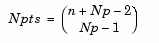
Tradeoff points per objective pair,
| Specify how many tradeoff solutions you want the optimization to find per run. To determine the
number of tradeoff solutions between the objectives,
Note
|
Shadow minima options and NBI subproblem options | The |


gamultiobj Optimization Parameters
The gamultiobj algorithm uses the gamultiobj
function in the Global Optimization Toolbox. This algorithm is recommended for multiobjective optimizations.
Use a point optimization to find feasible start points for a sum optimization, and
then select Solution > Create Sum Optimization. CAGE sets a default population size of 200 for the
gamultiobj sum optimization. If CAGE does not find a feasible
solution, try increasing the population size in the Optimization Parameters dialog box.
Larger populations increase the chance of finding feasible points but take longer to
compute. See gamultiobj (Global Optimization Toolbox) and options (Global Optimization Toolbox).
paretosearch Optimization Parameters
The paretosearch algorithm uses the
paretosearch function in the Global Optimization Toolbox.
Use the paretosearch algorithm to find the optimal tradeoffs
between competing objective functions. See paretosearch (Global Optimization Toolbox)
and options (Global Optimization Toolbox).
Modal optimization Parameters
Use the Modal optimization algorithm with a composite model to
select the best operating mode for each operating point. The algorithm uses the
fmincon algorithm to optimize an objective for each operating
mode and select the best solution.
Modal optimization has the same parameters as
fmincon, plus two additional parameters.
Parameter | Description |
|---|---|
Mode variable index | Specify mode variable. The Optimization Quick Start Tool sets up the mode variable as the first optimization variable. |
Objective to determine best mode (index) | (Optional) If you have multiple CAGE objectives, choose
which objective to use to select best mode. The default is
|
For more information, see Set Up Modal Optimizations.
Scale Optimization
The Optimization menu contains the option to Scale Optimization Items — Select this to toggle scaling on and off. When you select scaling on, objective and constraint evaluations are (approximately) scaled onto the range [-1 1]. With scaling off, when you run the optimization the objective and constraint evaluations return their raw numbers.
This setting is not recommended. Instead, try running your optimization with scaling turned off to see whether the optimization converges to a satisfactory solution. Check the output flags and the contour view for confirmation. If your optimization solution is unsatisfactory, check to see if the objective and constraint functions have different scales. In this case, try turning on scaling.
The output view always shows the solutions in raw, unscaled values, whether or not you use scaling to evaluate the problem.
See Also
fmincon | ga (Global Optimization Toolbox) | gamultiobj (Global Optimization Toolbox) | MultiStart (Global Optimization Toolbox) | patternsearch (Global Optimization Toolbox) | paretosearch (Global Optimization Toolbox)

