bioformatsread
R2026bDescription
Add-On Required: This feature requires the Medical Imaging Toolbox Interface for Whole Slide Imaging File Reader add-on.
bim = bioformatsread(filename)filename using the Bio-Formats
library and returns the main image data series as a blockedImage
object or array of blockedImage objects.
bim = bioformatsread(filename,Name=Value)ImageType="thumbnail" reads the associated thumbnail image,
if present in the file.
Examples
Run this code to download a whole slide image from the MathWorks® website and unzip the downloaded folder. The image, stored in the NDPI format, contains an H&E stained microscopy slide provided by the OpenSlide library test data set [1].
zipFile = matlab.internal.examples.downloadSupportFile("image","data/CMU-1.zip");
filepath = fileparts(zipFile);
if ~exist(filepath)
    unzip(zipFile,filepath)
end

filename = fullfile(filepath,"CMU-1.ndpi");
Read the image data by using the Bio-Formats library. The function returns a blockedImage object.
im = bioformatsread(filename);
The blocked image contains multiple resolution levels, which is common for whole slide images, as it helps to manage performance and avoid out-of-memory issues. View the number of resolution levels by checking the NumLevels property.
im.NumLevels
ans =
4
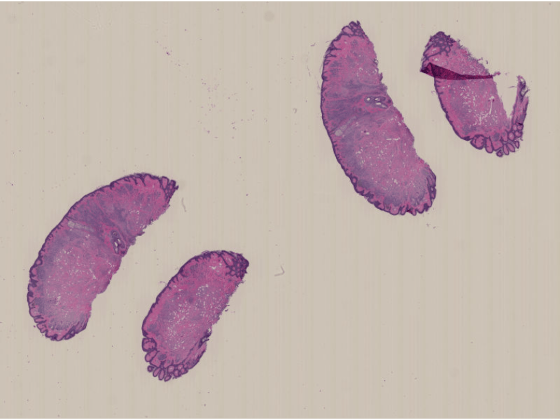
Display the image by using the imageshow function. The function picks the resolution level to display based on the current viewer size and your screen size. As you zoom in, the resolution level automatically adjusts to a finer resolution.
imageshow(im)
Run this code to download a whole slide image (WSI) from the MathWorks website and unzip the downloaded folder. The image, stored in the NDPI format, contains an H&E stained microscopy slide provided by the OpenSlide library test data set [1].
zipFile = matlab.internal.examples.downloadSupportFile("image","data/CMU-1.zip");
filepath = fileparts(zipFile);
if ~exist(filepath)
unzip(zipFile,filepath)
end
filename = fullfile(filepath,"CMU-1.ndpi");
Read the metadata from the file. The function returns a structure, info, that contains fields for the filename, vendor name, associated images, and raw metadata.
info = bioformatsinfo(filename);
Check the AssociatedImages field to see if the file includes a label, macro, or thumbnail image. The file used in this example includes a macro image.
info.AssociatedImages
ans =
"macro image"
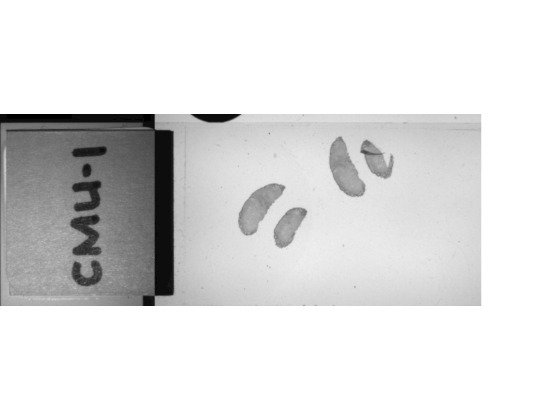
Read the macro image by specifying the ImageType argument. If you specify an image type that is not present in the file, the function returns an error.
macroIm = bioformatsread(filename,ImageType="macro");Display the macro image. The macro image provides an overview of the slide, including the label.
imageshow(macroIm)
Run this code to download a whole slide image from the MathWorks website and unzip the downloaded folder. The image is available in the OpenSlide library test data set [2]. The file is in the CZI format, which is associated with ZEISS microscope cameras. The image shows trichrome stain on a mouse kidney sample.
zipFile = matlab.internal.examples.downloadSupportFile("image","data/Zeiss-5-JXR.zip/Zeiss-5-JXR.zip");
zipPath = fileparts(zipFile);
filepath = fileparts(zipPath);
if ~exist(filepath)
    unzip(zipFile,filepath)
end

filename = fullfile(filepath,"Zeiss-5-JXR.czi");
Read the file metadata. The function returns a structure, info, that contains metadata about the file.
info = bioformatsinfo(filename);
View the SeriesImages value, which indicates the file contains two image series corresponding to two different scan regions.
info.SeriesImages
ans = 2×1 string array
    "scanregion0"
    "scanregion1"
The core metadata indicates that all images in the file are 2-D RGB images with one time point. There are 12 rows, indicating a total of 12 resolution levels across the image series and associated images.
info.RawMetadata.CoreInfo
ans = 1×12 struct array with fields:
    11323    11338    1    3    1     "uint8"    1    "XYCZT"
     5661     5669    1    3    1     "uint8"    1    "XYCZT"
     2830     2834    1    3    1     "uint8"    1    "XYCZT"
     1415     1417    1    3    1     "uint8"    1    "XYCZT"
      707      708    1    3    1     "uint8"    1    "XYCZT"
    11300    11335    1    3    1     "uint8"    1    "XYCZT"
     5650     5667    1    3    1     "uint8"    1    "XYCZT"
     2825     2833    1    3    1     "uint8"    1    "XYCZT"
     1412     1416    1    3    1     "uint8"    1    "XYCZT"
      706      708    1    3    1     "uint8"    1    "XYCZT"
      640      515    1    3    1     "uint8"    1    "XYCZT"
     1260      615    1    3    1    "uint16"    1    "XYCZT"
Read the image series from the file. By default, the bioformatsread function reads all image series, excluding any associated images. If a file contains multiple image series, the function returns them as an array of blockedImage objects, where each object represents one series.
bimSeries = bioformatsread(filename)
bimSeries =
  1×2 blockedImage array with properties:

   Read only properties
             Source: 'Various'
            Adapter: [1×1 wsi.blocked.BioFormatsAdapter]
    ClassUnderlying: [5×1 string]

   Settable properties
    No properties.
View the number of resolution levels for the first series.
bimSeries(1).NumLevels
ans =
5
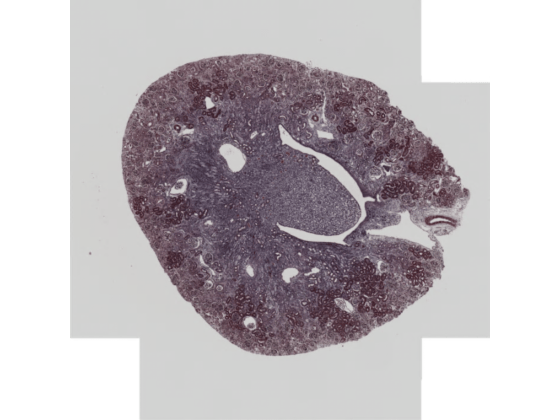
Display the first series by using the imageshow function.
imageshow(bimSeries(1))
Specify the name of an OME-TIFF file containing a simulated multi-time point whole slide image (WSI) provided by The Open Microscopy Environment [3]. The image is attached to this example as a supporting file.
filename = fullfile(pwd,"multi-channel-time-series.ome.tif");Read the metadata from the file.
info = bioformatsinfo(filename);
View the RawMetadata.CoreInfo field, which shows that the image contains one 2-D image with three channels and seven time points.
info.RawMetadata.CoreInfo
ans = struct with fields:
             SizeX: 439
             SizeY: 167
             SizeZ: 1
             SizeC: 3
             SizeT: 7
         PixelType: "int8"
        ImageCount: 21
    DimensionOrder: "XYZCT"
By default, the bioformatsread function reads the image from the first time point in a series.
imIdx1 = bioformatsread(filename);
To read a different time point, specify the TimeSeriesIdx argument. Read the third time point.
imIdx3 = bioformatsread(filename,TimeSeriesIdx=3);
Input Arguments
Name-Value Arguments
Output Arguments
References
[1] "CMU‑1.ndpi". OpenSlide Test Data. Accessed November 10, 2025. https://openslide.cs.cmu.edu/download/openslide-testdata/Hamamatsu/.
[2] Venklab, Pathology, UT Health San Antonio. "Zeiss‑5‑JXR.czi". OpenSlide Test Data. Accessed November 10, 2025. https://openslide.cs.cmu.edu/download/openslide-testdata/Zeiss/.
[3] "multi-channel-time-series.ome.tif". Open Microscopy Environment Sample Images. Accessed November 10, 2025. https://downloads.openmicroscopy.org/images/OME-TIFF/2016-06/bioformats-artificial/.

