openslideread
R2026bDescription
Add-On Required: This feature requires the Medical Imaging Toolbox Interface for Whole Slide Imaging File Reader add-on.
bim = openslideread(filename)filename using the OpenSlide
library and returns the main image data series as a blockedImage
object.
Examples
Run this code to download a whole slide image from the MathWorks® website, and unzip the downloaded folder. The image, stored in the NDPI format, contains an H&E stained microscopy slide provided by the OpenSlide library test data set [1].
zipFile = matlab.internal.examples.downloadSupportFile("image","data/CMU-1.zip");
filepath = fileparts(zipFile);
if ~exist(filepath)
    unzip(zipFile,filepath)
end
filename = fullfile(filepath,"CMU-1.ndpi");
Read the image data from the file. The function returns a blockedImage object.
im = openslideread(filename);
The blocked image contains multiple resolution levels, which is common for whole slide images, as it helps to manage performance and avoid out-of-memory issues. View the number of resolution levels by checking the NumLevels property.
im.NumLevels
ans =
9
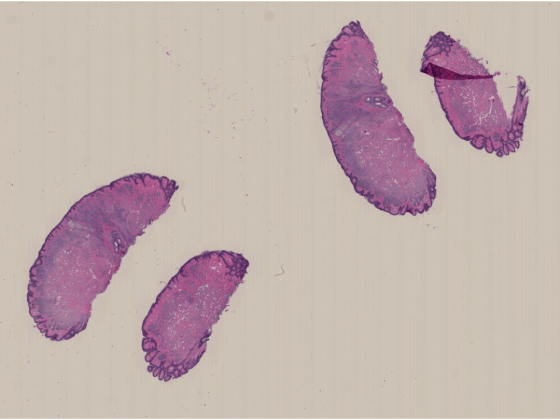
Display the image by using the imageshow function. The function picks the resolution level to display based on the current viewer size and your screen size. As you zoom in, the resolution level automatically adjusts to a finer resolution.
imageshow(im)
Run this code to download a whole slide image (WSI) from the MathWorks website, and unzip the downloaded folder. The image, stored in the NDPI format, contains an H&E stained microscopy slide provided by the OpenSlide library test data set [1].
zipFile = matlab.internal.examples.downloadSupportFile("image","data/CMU-1.zip");
filepath = fileparts(zipFile);
if ~exist(filepath)
    unzip(zipFile,filepath)
end
filename = fullfile(filepath,"CMU-1.ndpi");
Read the metadata from the file. The function returns a structure, info, that contains fields for the filename, vendor name, associated images, and raw metadata.
info = openslideinfo(filename);
Check the AssociatedImages field to see if the file includes a label, macro, or thumbnail image. The file used in this example includes a macro image.
info.AssociatedImages
ans =
"macro"
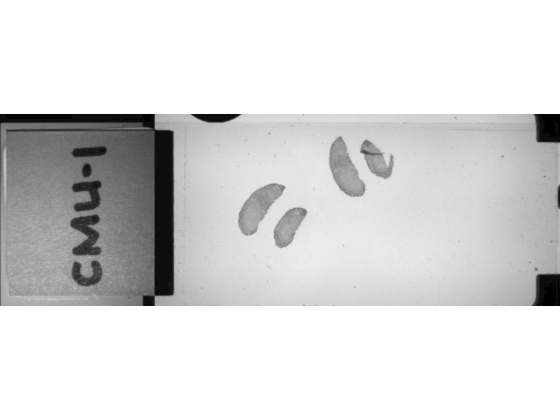
Read the macro image by specifying the ImageType argument. If you specify an image type that is not present in the file, the function returns an error.
macroIm = openslideread(filename,ImageType="macro");Display the macro image. The macro image provides an overview of the full slide, including the label.
imageshow(macroIm)
Input Arguments
Output Arguments
Tips
The
openslidereadfunction reads image data using the OpenSlide library. Reading the same file using another library, such as Bio-Formats, or reading a whole slide image in the TIFF format directly using theblockedImagefunction, can yield different results. To learn more about how OpenSlide interprets image data, including edge cases for specific formats, see the OpenSlide documentation.
References
[1] "CMU‑1.ndpi". OpenSlide Test Data. Accessed November 10, 2025. https://openslide.cs.cmu.edu/download/openslide-testdata/Hamamatsu/.
Version History
Introduced in R2026a

