Contenuto principale

matlab.system.display.Header Class

Namespace: matlab.system.display

Specify header and mask type for MATLAB System block

Description

Use the matlab.system.display.Header class to specify the content of the header in the Block Parameters dialog box for a MATLAB System block. The header includes a title, descriptive text, and a link to the code that defines the System object™ for the block. Additionally you can specify mask type for the MATLAB® system block mask.

Create an instance of this class within the getHeaderImpl method for the block.

Class Attributes

Sealed
true

For information on class attributes, see Class Attributes.

Creation

Description

h = matlab.system.display.Header creates an instance of the Header class.

h = matlab.system.display.Header(Name=Value) creates an instance of the Header class with property values defined using one or more name-value arguments.

h = matlab.system.display.Header(sysObj) creates an instance of the Header class and configures the properties based on the System object sysObj.

h = matlab.system.display.Header(sysObj,Name=Value) creates an instance of the Header class and configures properties based on the System object sysObj and one or more name-value arguments. The name-value arguments you specify override the property values that come from the System object.

example

Input Arguments

expand all

System object for MATLAB System block, specified as a System object. When you specify a System object as the input for the Header class constructor, the instance created by the constructor has properties set based on the System object.

  • Title — System object name

  • Text — Help summary for System object

  • ShowSourceLinktrue unless the System object code is P-coded so that the source code is not available

  • Type — The mask type property helps you to identify blocks having a specific mask type within a model.

You can specify this argument as mfilename('class').

Properties

expand all

Title for header in Block Parameters dialog box, specified as a string or a character vector. By default, the title is an empty character vector ('').

Example: "AlternativeTitle"

Attributes:

GetAccess
public
SetAccess
public

Data Types: string | char

Descriptive text to display below title in Block Parameters dialog box, specified as a string or a character vector. By default, the text is an empty character vector ('').

Example: "An alternative class description"

Attributes:

GetAccess
public
SetAccess
public

Data Types: string | char

Option to show link to source code in Block Parameters dialog box, specified as 'true' or 'false'.

Attributes:

GetAccess
public
SetAccess
public

Data Types: string | char

Mask type of the masked block specified, as a string or a character vector. The type property helps you to identify blocks having a specific mask type within a model.

Attributes:

GetAccess
public
SetAccess
public

Data Types: string | char

Examples

collapse all

Define a header in class definition file.

 methods (Access = protected, Static)
        function header = getHeaderImpl
                header = matlab.system.display.Header(mfilename('class'), ...
                "Title","AlternativeTitle",...
                "Text","An alternative class description","Type","Aero");
        end
    end
  Mask with properties:

                             Type: 'Aero'
                      Description: 'An alternative class description'
                             Help: ''
                   Initialization: ''
                   SelfModifiable: 'on'
                     BlockDVGIcon: ''
                          Display: 'disp('MaskEditorDialogBoxBase');↵'
           SaveImageFileWithModel: 'off'
                        IconFrame: 'on'
                       IconOpaque: 'transparent'
             RunInitForIconRedraw: 'off'
                       IconRotate: 'none'
                       PortRotate: 'default'
                        IconUnits: 'autoscale'
         SkipCallbackOptimization: 'off'
        SaveCallbackFileWithModel: 'off'
                     CallbackFile: ''
             ParameterConstraints: [0×0 Simulink.Mask.Constraints]
                  PortConstraints: [0×0 Simulink.Mask.PortConstraint]
                       Parameters: [1×6 Simulink.MaskParameter]
                  PortIdentifiers: [0×0 Simulink.Mask.PortIdentifier]
        CrossParameterConstraints: [0×0 Simulink.Mask.CrossParameterConstraints]
             CrossPortConstraints: [0×0 Simulink.Mask.CrossPortConstraint]
    CrossPortParameterConstraints: [0×0 Simulink.Mask.CrossPortParameterConstraint]
                         BaseMask: [0×0 Simulink.Mask]

The header appears above the Parameters section in the Block Parameters dialog box. This example creates a header that includes a link to the source code.
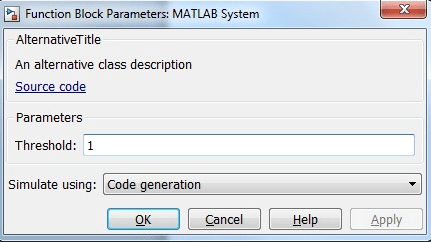
The Block Parameters dialog box for a MATLAB System block has a header with the title AlternativeTitle, the text "An alternative class description," and a link to the source code.

Version History

Introduced in R2013b

expand all