sdo.requirements.PhasePlaneRegion
R2026bImpose region bound on phase plane trajectory of two signals
Description
Use the sdo.requirements.PhasePlaneRegion object
to impose a region bound on the phase plane trajectory of two signals in a Simulink® model. The phase plane trajectory is a plot of the two signals against each
other. In the object, you can specify the bounded region as a single edge, or multiple
piecewise-linear edges. You specify the starting and ending x and
y coordinates of the bound edges, where the X-Y plane is the phase plane
defined by the two signals. You also specify whether you require the trajectory of the two
signals to lie inside or outside the bounded region specified by the edges.
You can use the object as an input to your cost function, and use the evalRequirement
command in the cost function to evaluate whether your test signals satisfy the specified
requirement. You can then use the cost function and sdo.optimize to perform parameter estimation or response optimization, subject
to the satisfaction of the specified requirement. If you are performing sensitivity analysis,
after you generate parameter samples, you can use the cost function and sdo.evaluate to evaluate the requirement for each generated sample.
Creation
Syntax
Description
region_req =
sdo.requirements.PhasePlaneRegionsdo.requirements.PhasePlaneRegion requirement object and assigns
default values to its properties. Use dot notation to customize the properties of the
object, except bound edges. To specify the bound edges simultaneously, use the set command. Use the evalRequirement
command to evaluate whether test signals satisfy the specified requirement.
region_req =
sdo.requirements.PhasePlaneRegion(PropertyName=Value)region_req =
sdo.requirements.PhasePlaneRegion("OpenEnd",[1 1]) creates an
sdo.requirements.PhasePlaneRegion object and extends the first and last
edge of the bound to infinity.
Output Arguments
Properties
X-coordinates of edges that define the bounded region, specified as an
n-by-2 array with finite values, where n is the
number of edges in the bound. Each row of BoundX specifies the
starting and ending x-coordinate values of an edge. The number of rows must match the
number of rows in the BoundY property, which specifies the
y-coordinates of the edges.
You must specify the BoundX and BoundY
properties simultaneously, either using name-value arguments during object construction,
or using the set command after object
construction.
Data Types: double
Y-coordinates of edges that define the bounded region, specified as an
n-by-2 array with finite values, where n is the
number of edges in the bound. Each row of BoundY specifies the
starting and ending y-coordinate values of an edge. The number of rows must match the
number of rows in the BoundX property, which specifies the
x-coordinates of the edges.
You must specify the BoundX and BoundY
properties simultaneously, either using name-value arguments during object construction,
or using the set command after object
construction.
Data Types: double
Extension of first and last bound edges to infinity, specified as a 1-by-2 logical array.
If the first element of OpenEnd is true, the
beginning of the first edge in the piecewise-linear bound extends to infinity. If the
second element of OpenEnd is true, the end of
the last edge in the piecewise-linear bound extends to infinity.
For an example, see Create a Phase Plane Region Bound with Edge Extending to Infinity.
Data Types: logical
Type of bound, specified as one of the following:
'<='— The out-of-bound region is always to the left of each edge, where the forward direction is the direction of creation of the edge.For example, consider a single-edge bound between the point A located at (-1,1) and point B at (3,1). Suppose you specify the coordinates of point A before you specify point B. That is, you specify
BoundXas[-1 3]andBoundYas[1 1]. The black arrow in the left plot shows the direction of creation of the edge, and the yellow region above the edge is the out-of-bound region whenTypeis'<='. Now suppose you instead specify point B before point A. That is, you specifyBoundXis[3 -1]andBoundYis[1 1]. The right plot shows that the out-of-bound region is now below the edge because the direction of creation of the edge has reversed.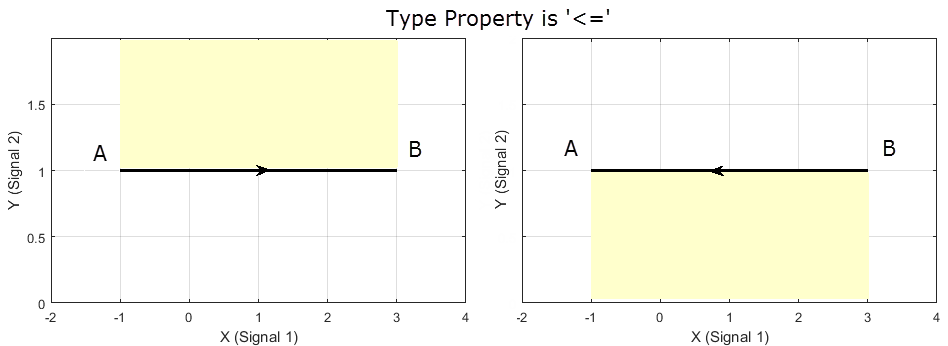
'>='— The out-of-bound region is always to the right of each edge.For the single-edge example, suppose that you specify the coordinates of point A before you specify point B. In the left plot you can see that the yellow out-of-bound region is below the edge when
Typeis'>='. This is because the yellow region is to the right of the edge, in the direction of creation of the edge. If you instead specify point B before point A, the right plot shows that the out-of-bound region is now above the edge.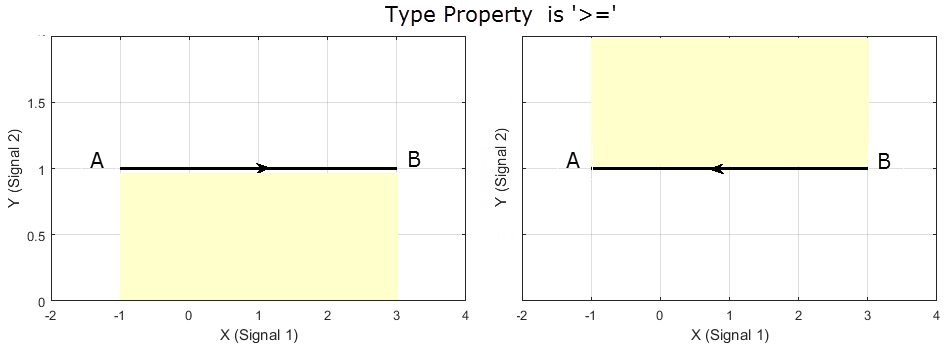
For an example with multiple bound edges, see Specify Bounding Region with Multiple Edges and Evaluate the Requirement.
Data Types: char
Object Functions
copy | Copy design requirement |
get | Get design requirement property values |
set | Set design requirement property values |
evalRequirement | Evaluate design requirement |
Examples
Create a phase plane region requirement object with default properties. The object specifies a piecewise-linear bound on the phase plane trajectory of two signals. The phase plane is the X-Y plane defined by the two signals.
Requirement = sdo.requirements.PhasePlaneRegion;
Specify a piecewise-linear bound with two edges. The (x,y) coordinates for the beginning and end of the first edge are (1,1) and (2,1). The second edge extends from (2,1) to (2,0). You must specify the BoundX and BoundY properties simultaneously.
set(Requirement,'BoundX',[1 2; 2 2],'BoundY',[1 1; 1 0])
Specify that the beginning of the first edge extends to infinity.
Requirement.OpenEnd = [1 0];
The first edge now extends from (-Inf,1) to (2,1).
You can now use the evalRequirement command to evaluate whether test data from two signals satisfy the requirement.
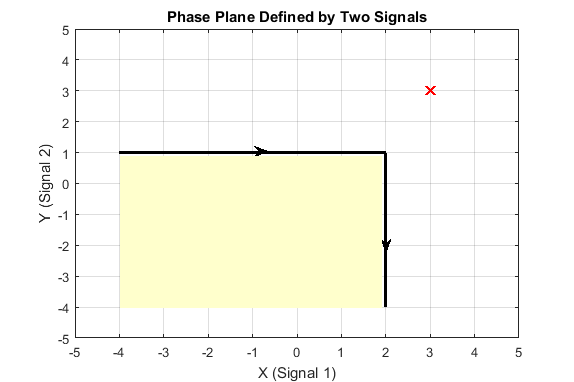
Create a requirement object to specify a piecewise-linear bound on the phase plane trajectory of two signals. The bound has two edges. The first edge extends from (-4,1) to (2,1). The second edge extends from (2,1) to (2,-4).
Requirement = sdo.requirements.PhasePlaneRegion('BoundX',[-4 2; 2 2],...
    'BoundY',[1 1; 1 -4]);
Specify the bound type as '>='.
Requirement.Type = '>=';The plot below shows the bounding edges in black. The arrows indicate the direction in which the edges were specified. When you specify the Type property as '>=', the out-of-bound area is always to the right of each edge, where the forward direction is the direction of creation of the edge. As a result, the out-of bound region is the yellow shaded area, and a trajectory point located at (3,3) is in the bounded region.
Evaluate the requirement for the phase plane trajectory point located at (3,3).
Evaluation = evalRequirement(Requirement,[3 3])
Evaluation =
-0.6389
evalRequirement returns a negative number, indicating the requirement is satisfied.
Now create the requirement by changing the order of specification of the edges.
set(Requirement,'BoundX',[2 2; 2 -4],'BoundY',[-4 1;1 1]);
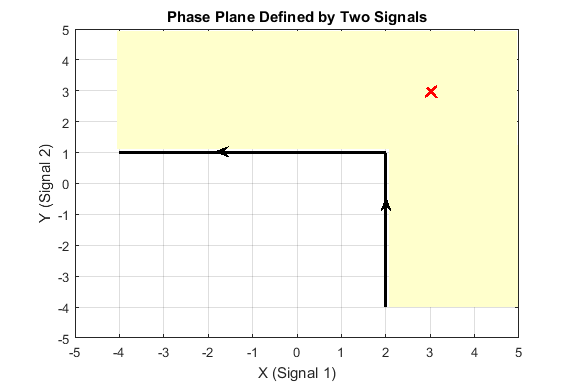
The plot shows that the edges were created in the opposite order. So, even though the requirement type is still '>=', the out-of-bound region, which is always to the right of the edges, is now flipped.
Evaluate the requirement.
Evaluation = evalRequirement(Requirement,[3 3])
Evaluation =
0.1087
A positive Evaluation value indicates the requirement has been violated. Thus, for the same requirement type, the trajectory point at (3,3) is out of bounds when the edges are defined in the reverse order.
Version History
Introduced in R2016b

