Contenuto principale

instanceSegmentationTrainingData

R2026b

Create training data for instance segmentation from ground truth

Since R2026b

Description

The instanceSegmentationTrainingData function converts polygon ROI labels in a groundTruth object into a training‑ready datastore that provides images, bounding boxes, class labels, and instance masks. You can pass the output datastore directly to train Mask R-CNN and SOLOv2 networks using the trainMaskRCNN and trainSOLOV2 functions respectively.

The instanceSegmentationTrainingData function requires a groundTruth object containing polygon ROI labels. You can create the groundTruth object by exporting labels from the Image Labeler or Video Labeler apps, or by importing COCO JSON annotations using the groundTruthFromCOCO function.

ds = instanceSegmentationTrainingData(gTruth) creates a datastore of instance segmentation training data ds from the ground truth object gTruth. The function converts polygon annotations to binary instance masks, derives bounding boxes from polygon extents, and returns the results into a training-ready datastore ds. The function includes only images that contain at least one annotated polygon instance in the returned datastore.

example

ds = instanceSegmentationTrainingData(gTruth,Name=Value) specifies options using one or more name-value arguments in addition to the input argument in the previous syntax. For example, SamplingFactor=5 extracts every fifth frame from video-based ground truth sources.

example

[ds,arrds] = instanceSegmentationTrainingData(___) also returns an attribute datastore arrds containing per-instance attributes and sublabels associated with the polygon labels. Use this syntax when your ground truth includes attribute or sublabel definitions, such as occlusion level or object color.

Examples

collapse all

Convert polygon ground truth labels into a training datastore and use the datastore to train a Mask R-CNN network.

Load a groundTruth object that contains polygon labels exported from the Image Labeler app.

load("myGroundTruth.mat","gTruth");

Create instance segmentation training data from the ground truth. The returned CombinedDatastore reads as {image, boxes, labels, masks}.

ds = instanceSegmentationTrainingData(gTruth);

Verify the format of the training data by reading the first observation.

data = preview(ds)
data =

  1×4 cell array

    {480×640×3 uint8}    {4x4 double}    {4×1 categorical}    {480×640×4 logical}

Each observation contains an image, an M-by-4 bounding box matrix, an M-by-1 categorical label vector, and an H-by-W-by-M logical mask array, where M is the number of polygon label instances in that image.

Visualize the instance masks over the image using the insertObjectMask function. You can specify a colormap so that each instance appears in a different color.

imOverlay = insertObjectMask(data{1},data{4},Color=lines(4));
imshow(imOverlay);
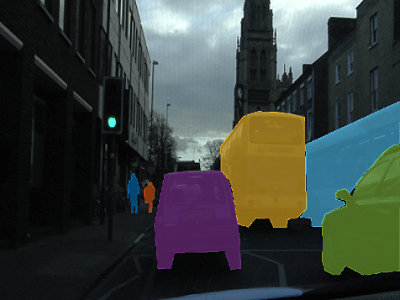
Each pedestrian and vehicle has a unique falsecolor hue over the RGB image

Visualize the bounding boxes with labels over the image using the showShape function.

imshow(imOverlay)
showShape("rectangle",data{2},Label=data{3},Color="red");
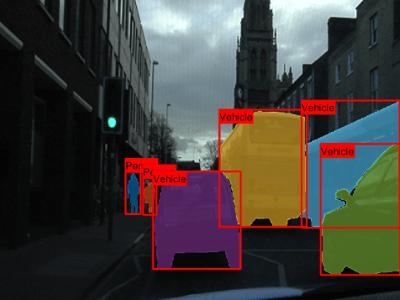
Red rectangles labeled 'Pedestrian' and 'Vehicle' surround instances of each object

Create a Mask R-CNN network and train it using the training datastore. The datastore output format matches the input expected by the trainMaskRCNN function.

classNames = ["person","car"];
net = maskrcnn("resnet50-coco",classNames);
options = trainingOptions("sgdm",MaxEpochs=10);
[net,info] = trainMaskRCNN(ds,net,options);

Import COCO JSON annotations as ground truth, convert polygon labels in the ground truth to a training datastore for function.

Import COCO JSON annotations as a groundTruth object using the groundTruthFromCOCO function.

gTruth = groundTruthFromCOCO("instances_train2017.json","/data/coco/train2017");

Create instance segmentation training data from the imported ground truth.

ds = instanceSegmentationTrainingData(gTruth);

Train a SOLOv2 network with the training datastore using the trainSOLOV2 function.

classNames = ["person","car"];
net = solov2("resnet50-coco",classNames);
options = trainingOptions("sgdm",MaxEpochs=10);
[net,info] = trainSOLOV2(ds,net,options);

Input Arguments

collapse all

Ground truth data containing polygon labels, specified as a groundTruth object or an array of groundTruth objects. The ground truth must contain at least one polygon-type label definition with at least one annotated instance across all images.

When you specify gTruth as an array, all elements must have the same polygon label names. The function merges the data from all the elements into a single output datastore. If the gTruth array does not have the same polygon label names, use the merge object function before calling instanceSegmentationTrainingData function.

You can create a groundTruth object by using any of these methods:

The function supports ground truth objects created from image collections, image sequences, video files, image datastores, and custom data sources.

If you want training data only for a select subset of polygon labels, use the selectLabelsByName function on the gTruth object before calling instanceSegmentationTrainingData function.

Name-Value Arguments

collapse all

Specify optional pairs of arguments as Name1=Value1,...,NameN=ValueN, where Name is the argument name and Value is the corresponding value. Name-value arguments must appear after other arguments, but the order of the pairs does not matter.

Example: instanceSegmentationTrainingData(gTruth,SamplingFactor=5,WriteLocation="/data/output")

Folder path where the function writes output files, specified as a string scalar or character vector. The function creates a subfolder named instanceSegTrainingData within the specified location. If this subfolder already exists, the function appends a numeric (instanceSegTrainingData_1, instanceSegTrainingData_2, etc.) to avoid overwriting previous results.

Inside this subfolder, the function creates these subdirectories:

  • masks/ — One MAT file per image containing the binary instance masks for each data source in the input ground truth. The binary masks are stored as an H-by-W-by-M logical matrices , where M is the number of polygon label instances in the image.

  • images/ — Image frames extracted from video or custom data sources only.

For image collection or image sequence sources, images are referenced in place — only mask data is written.

Ensure that the specified WriteLocation exists and has write permissions.

Number of frames to skip between sampled frames when reading data from a video-based groundTruth source, specified as a positive integer. A SamplingFactor of N extracts every Nth frame from the video. Frames with no polygon annotations are excluded regardless of the sampling factor.

Use sampled data to reduce redundant training images from video sequences where consecutive frames contain similar scenes and labels. Increase the sampling factor to decrease the number of training images, which reduces training time.

Dependencies

This argument applies only for groundTruth objects created using a video file or custom data source.

File format used when writing extracted images to disk, specified as a string scalar or character vector. The format must be supported by imwrite.

Dependencies

This argument applies only for:

  • groundTruth objects created using a video file or a custom data source.

  • An array of groundTruth objects created using imageDatastore with different custom read functions.

The function ignores this argument when:

  • The input groundTruth was created from an image sequence data source.

  • The array of input groundTruth objects all contain image datastores using the same custom read function.

  • Any of the input groundTruth objects containing datastores use the default read functions.

Prefix for output image and mask file names, specified as a string scalar or character vector. When specified, image files are named as <prefix>_<source_number>_<image_number>.<format>.

By default, the function uses these prefixes:

  • Video and custom data sources — Name of the data source extracted from strcat(sourceName,"_"))

  • Image datastores — "datastore"

  • Image collection and image sequence sources (mask files only) — "objectMasks"

Dependencies

This argument applies only for:

  • groundTruth objects created using a video file or a custom data source.

  • An array of groundTruth objects created using imageDatastore with different custom read functions.

The function ignores this argument when:

  • The input groundTruth was created from an image sequence data source.

  • The array of input groundTruth objects all contain image datastores using the same custom read function.

  • Any of the input groundTruth objects containing datastores use the default read functions.

Display progress information during mask computation and data extraction, specified as a logical scalar. Set to false to suppress progress messages during mask generation when running in automated workflows or scripts.

Option to perform computations in parallel using a parallel pool of workers, specified as one of these values:

  • "off" — Run in serial on the MATLAB client.

  • "auto" — Use a parallel pool if one is open or if MATLAB can automatically create one. If a parallel pool is not available, run in serial on the MATLAB client.

  • "on" — Use a parallel pool if one is open or if MATLAB can automatically create one. If a parallel pool is not available, throw an error.

If you do not have a parallel pool open and automatic pool creation is enabled, MATLAB opens a pool using the default cluster profile. Using parallel computing requires Parallel Computing Toolbox™. For more information, see Run MATLAB Functions with Automatic Parallel Support (Parallel Computing Toolbox).

Dependencies

To enable parallel processing, change the default cluster profile to use a local cluster.

Data Types: char | string

Output Arguments

collapse all

Instance segmentation training data, returned as a datastore object. Each call to read on ds returns a 1-by-4 cell array {image, boxes, labels, masks} stored as:

  1. Image — An H-by-W-by-C numeric array.

  2. Boxes — An M-by-4 double matrix of bounding boxes in [x, y, w, h] format, where M is the number of annotated instances in the image. Bounding boxes are computed as the tightest axis-aligned rectangle enclosing each polygon.

  3. Labels — An M-by-1 categorical vector of instance class labels.

  4. Masks — An H-by-W-by-M logical array of binary instance masks.

The output datastore is compatible with trainMaskRCNN and trainSOLOV2 functions.

Attribute and sublabel data, returned as an arrayDatastore object. Each element is a struct array whose fields correspond to the attribute and sublabel names defined for the polygon labels. The datastore has one entry per image, and within each entry, the struct array has one element per annotated instance, matching the row ordering of boxes, labels, and masks in ds.

Instances from labels with no attributes have empty fields ([]). When the groundTruth has no attributes or sublabels defined, arrds contains empty struct arrays.

Tips

  • The function writes output files to <WriteLocation>/instanceSegTrainingData/ with images/ and masks/ subfolders. Repeated calls automatically create instanceSegTrainingData_1, instanceSegTrainingData_2, and so on — previous results are never overwritten.

  • The function skips images that contain no annotated polygon instances. If all images in the groundTruth are not annotated, the function throws an error.

  • When you specify gTruth as an array, all elements must have the same polygon label names. If the label definitions do not match, the function throws a validation error.

  • For training functions that require a different column order than {image, boxes, labels, masks}, extract the underlying datastores from ds using ds.UnderlyingDatastores and recombine them with combine.

    • ds.UnderlyingDatastores{1} — imageDatastore containing image files.

    • ds.UnderlyingDatastores{2} — boxLabelDatastore containing bounding boxes and labels.

    • ds.UnderlyingDatastores{3} — fileDatastore containing binary instance mask MAT files.

  • For large data sets, set UseParallel to "auto" or "on" to parallelize mask generation across workers.

Extended Capabilities

expand all

Version History

Introduced in R2026b