inverseNormalizationLayer
Description
An inverse normalization layer transforms predictions for neural networks trained using normalized targets.
If the training process uses normalized targets, then the neural network learns to make predictions that closely match the normalized targets. To make the neural network output predictions in the space of unnormalized values at prediction time, include an inverse normalization layer.
To normalize targets at training time, set the NormalizeTargets argument of the trainingOptions function to 1
(true).
Creation
Syntax
Description
layer = inverseNormalizationLayer creates an inverse
normalization layer that transforms data over the channel dimension.
layer = inverseNormalizationLayer(
specifies options using one or more name-value arguments in addition to any of the input
argument combinations in previous syntaxes. For example, Name=Value)Name="invnorm"
specifies the name "invnorm".
Example: inverseNormalizationLayer(Name="invnorm") creates an
inverse normalization layer with the name "invnorm".
Input Arguments
Operation dimension, specified as one of these values:
"channel"— Operate over the channel dimension.Positive integer — Operate over the specified dimension.
This argument sets the OperationDimension property.
Data Types: single | double | int8 | int16 | int32 | int64 | uint8 | uint16 | uint32 | uint64 | char | string
Name-Value Arguments
Specify optional pairs of arguments as
Name1=Value1,...,NameN=ValueN, where Name is
the argument name and Value is the corresponding value.
Name-value arguments must appear after other arguments, but the order of the
pairs does not matter.
Example: inverseNormalizationLayer(Name="invnorm") creates an
inverse normalization layer with the name "invnorm".
Target normalization mode to apply inverse operation of.
To transform the data, the layer uses the inverse of the operation used to normalize the
targets. This table shows the normalization operations and the corresponding inverse
operations that the Normalization argument supports.
Normalization Value | Normalization Operation | Inverse Normalization Operation |
|---|---|---|
"zscore" | Y = (X-Mean) ./ StandardDeviation | Y = X.*StandardDeviation + Mean |
"zerocenter" | Y = X - Mean | Y = X + Mean |
"rescale-zero-one" | Y = (X - Min) ./ (Max - Min) | Y = X.*(Max - Min) + Min |
"rescale-symmetric" | Y = 2*(X - Min) ./ (Max - Min) - 1 | Y = 0.5*(X + 1).*(Max - Min) + Min |
If the input data is complex-valued, then the Normalization argument must be "zerocenter" or "zscore".
This argument sets the Normalization property.
Mean for zero-center and z-score normalization, specified as a numeric array.
To specify the Mean property, the Normalization
property must be "zerocenter" or "zscore". If
Mean is [], then the software
automatically sets the property at training or initialization time:
At training time, the training function uses the mean of the training targets.
At initialization time, the software sets the property to
0.
This argument sets the Mean
property.
Data Types: single | double
Complex Number Support: Yes
Standard deviation for Z-score normalization, specified as a numeric array.
To specify the StandardDeviation property, the Normalization property must be "zscore". If
StandardDeviation is
[], then the software automatically sets the property at
training or initialization time:
At training time, the training function uses the standard deviation of the training targets.
At initialization time, the software sets the property to
1.
This argument sets the StandardDeviation property.
Data Types: single | double
Complex Number Support: Yes
Minimum value for rescaling, specified as a numeric array.
To specify the Min property, the Normalization
must be "rescale-symmetric" or "rescale-zero-one". If
Min is [], then the software
automatically sets the property at training or initialization time:
At training time, the training function uses the minimum value of the training targets.
At initialization time, the software sets the property to
-1and0whenNormalizationis"rescale-symmetric"and"rescale-zero-one", respectively.
This argument sets the Min
property.
Data Types: single | double
Maximum value for rescaling, specified as a numeric array.
To specify the Max property, the Normalization
must be "rescale-symmetric" or "rescale-zero-one". If
Max is [], then the software
automatically sets the property at training or initialization time:
At training time, the training function uses the standard deviation of the training targets.
At initialization time, the software sets the property to
1.
This argument sets the Max
property.
Data Types: single | double
Properties
Inverse Normalization
This property is read-only after object creation. To set this property, use the
dim
argument when you create the InverseNormalizationLayer object.
Operation dimension, specified as one of these values:
"channel"— Operate over the channel dimension.Positive integer — Operate over the specified dimension.
Data Types: single | double | int8 | int16 | int32 | int64 | uint8 | uint16 | uint32 | uint64 | char | string
This property is read-only after object creation. To set this property, use the corresponding
name-value argument when you create the InverseNormalizationLayer object.
Target normalization mode to apply inverse operation of.
To transform the data, the layer uses the inverse of the operation used to normalize the
targets. This table shows the normalization operations and the corresponding inverse
operations that the Normalization argument supports.
Normalization Value | Normalization Operation | Inverse Normalization Operation |
|---|---|---|
"zscore" | Y = (X-Mean) ./ StandardDeviation | Y = X.*StandardDeviation + Mean |
"zerocenter" | Y = X - Mean | Y = X + Mean |
"rescale-zero-one" | Y = (X - Min) ./ (Max - Min) | Y = X.*(Max - Min) + Min |
"rescale-symmetric" | Y = 2*(X - Min) ./ (Max - Min) - 1 | Y = 0.5*(X + 1).*(Max - Min) + Min |
If the input data is complex-valued, then the Normalization argument must be "zerocenter" or "zscore".
The InverseNormalizationLayer object stores this property as a string scalar.
This property is read-only after object creation. To set this property, use the corresponding
name-value argument when you create the InverseNormalizationLayer object.
Mean for zero-center and z-score normalization, specified as a numeric array.
To specify the Mean property, the Normalization
property must be "zerocenter" or "zscore". If
Mean is [], then the software
automatically sets the property at training or initialization time:
At training time, the training function uses the mean of the training targets.
At initialization time, the software sets the property to
0.
Data Types: single | double
Complex Number Support: Yes
This property is read-only after object creation. To set this property, use the corresponding
name-value argument when you create the InverseNormalizationLayer object.
Standard deviation for Z-score normalization, specified as a numeric array.
To specify the StandardDeviation property, the Normalization property must be "zscore". If
StandardDeviation is
[], then the software automatically sets the property at
training or initialization time:
At training time, the training function uses the standard deviation of the training targets.
At initialization time, the software sets the property to
1.
Data Types: single | double
Complex Number Support: Yes
This property is read-only after object creation. To set this property, use the corresponding
name-value argument when you create the InverseNormalizationLayer object.
Minimum value for rescaling, specified as a numeric array.
To specify the Min property, the Normalization
must be "rescale-symmetric" or "rescale-zero-one". If
Min is [], then the software
automatically sets the property at training or initialization time:
At training time, the training function uses the minimum value of the training targets.
At initialization time, the software sets the property to
-1and0whenNormalizationis"rescale-symmetric"and"rescale-zero-one", respectively.
Data Types: single | double
This property is read-only after object creation. To set this property, use the corresponding
name-value argument when you create the InverseNormalizationLayer object.
Maximum value for rescaling, specified as a numeric array.
To specify the Max property, the Normalization
must be "rescale-symmetric" or "rescale-zero-one". If
Max is [], then the software
automatically sets the property at training or initialization time:
At training time, the training function uses the standard deviation of the training targets.
At initialization time, the software sets the property to
1.
Data Types: single | double
Layer
This property is read-only.
Number of inputs to the layer, stored as 1. This layer accepts a
single input only.
Data Types: double
This property is read-only.
Input names, stored as {'in'}. This layer accepts a single input
only.
Data Types: cell
This property is read-only.
Number of outputs from the layer, stored as 1. This layer has a
single output only.
Data Types: double
This property is read-only.
Output names, stored as {'out'}. This layer has a single output
only.
Data Types: cell
Examples
Create an inverse normalization layer.
layer = inverseNormalizationLayer
layer =
InverseNormalizationLayer with properties:
Name: ''
Normalization: 'zscore'
OperationDimension: 'channel'
State Parameters
Mean: []
StandardDeviation: []
Include an inverse normalization layer in a layer array.
layers = [
sequenceInputLayer(3,Normalization="zscore")
lstmLayer(100)
fullyConnectedLayer(3)
inverseNormalizationLayer]layers =
4×1 Layer array with layers:
1 '' Sequence Input Sequence input with 3 channels
2 '' LSTM LSTM with 100 hidden units
3 '' Fully Connected Fully connected layer with output size 3
4 '' Inverse Normalization Inverse "zscore" normalization
Create an inverse normalization layer that applies the inverse zero-center normalization operation over the third dimension of the data.
layer = inverseNormalizationLayer(3,Normalization="zerocenter")layer =
InverseNormalizationLayer with properties:
Name: ''
Normalization: 'zerocenter'
OperationDimension: 3
State Parameters
Mean: []
Train a regression neural network using normalized numeric targets.
Load the waveform data.
load WaveformDataSet aside data for validation and testing. Partition the data into a training set containing 80% of the data and a test set containing the remaining 20% of the data.
numObservations = numel(data); [idxTrain,idxTest] = trainingPartitions(numObservations, [0.8 0.2]); XTrain = data(idxTrain); XTest = data(idxTest); TTrain = freq(idxTrain); TTest = freq(idxTest);
Create an LSTM regression network.
Use a sequence input layer with an input size that matches the number of channels of the input data. Normalize the input data using -score normalization.
Use an LSTM layer with 100 hidden units that outputs the last time step of each sequence.
For regression, include a fully connected layer with an output size that matches the number of responses.
In this example, the training process uses normalized targets in the loss function. Using normalized targets results in training predictions that closely match the normalized targets. To make the neural network output predictions in the space of unnormalized values at prediction time, include an inverse normalization layer.
numChannels = size(XTrain{1},2);
numResponses = size(TTrain,2);
layers = [
sequenceInputLayer(numChannels,Normalization="zscore")
lstmLayer(100,OutputMode="last")
fullyConnectedLayer(numResponses)
inverseNormalizationLayer];Specify the training options.
Train using the Adam optimizer.
Normalize the training targets.
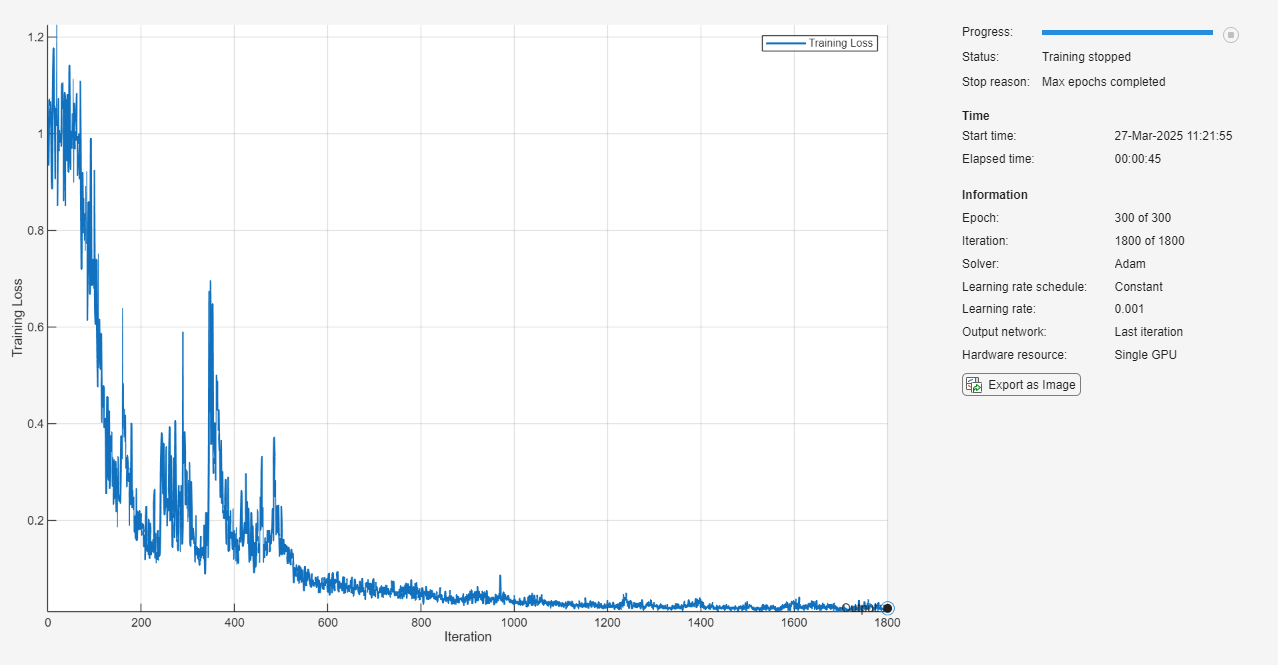
Train for 300 epochs.
Monitor the training progress in a plot.
Disable the verbose output.
options = trainingOptions("adam", ... NormalizeTargets=true, ... MaxEpochs=300, ... Shuffle="every-epoch", ... Plots="training-progress", ... Verbose=false);
Train the neural network using the trainnet function. For regression, use mean squared error (MSE) loss. By default, the trainnet function uses a GPU if one is available. Using a GPU requires a Parallel Computing Toolbox™ license and a supported GPU device. For information on supported devices, see GPU Computing Requirements (Parallel Computing Toolbox). Otherwise, the function uses the CPU. To select the execution environment manually, use the ExecutionEnvironment training option.
net = trainnet(XTrain,TTrain,layers,"mse",options);
Make predictions using the trained neural network with the test data.
YTest = minibatchpredict(net,XTest);
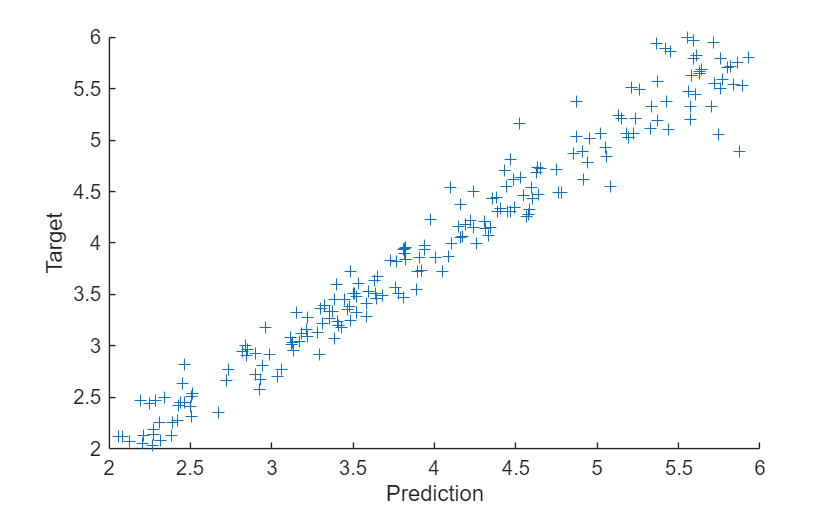
Compare the predicted values with the target values. Because the neural network has an inverse normalization layer, the predicted values do not fall in the normalized space.
figure scatter(YTest,TTest,"+") xlabel("Prediction") ylabel("Target")
Algorithms
An inverse normalization layer transforms predictions for neural networks trained using normalized targets.
The layer approximates the normalization statistics during training using a running estimate and, after one epoch, sets the normalization statistic properties to the latest values of the running estimates. The layer does not transform the data during training. The layer applies the inverse normalization operation during prediction only.
To transform the data, the layer uses the inverse of the operation used to normalize the
targets. This table shows the normalization operations and the corresponding inverse
operations that the Normalization argument supports.
Normalization Value | Normalization Operation | Inverse Normalization Operation |
|---|---|---|
"zscore" | Y = (X-Mean) ./ StandardDeviation | Y = X.*StandardDeviation + Mean |
"zerocenter" | Y = X - Mean | Y = X + Mean |
"rescale-zero-one" | Y = (X - Min) ./ (Max - Min) | Y = X.*(Max - Min) + Min |
"rescale-symmetric" | Y = 2*(X - Min) ./ (Max - Min) - 1 | Y = 0.5*(X + 1).*(Max - Min) + Min |
Most layers in a layer array or layer graph pass data to subsequent layers as formatted
dlarray objects.
The format of a dlarray object is a string of characters in which each
character describes the corresponding dimension of the data. The format consists of one or
more of these characters:
"S"— Spatial"C"— Channel"B"— Batch"T"— Time"U"— Unspecified
For example, you can describe 2-D image data that is represented as a 4-D array, where the
first two dimensions correspond to the spatial dimensions of the images, the third
dimension corresponds to the channels of the images, and the fourth dimension
corresponds to the batch dimension, as having the format "SSCB"
(spatial, spatial, channel, batch).
InverseNormalizationLayer objects support input data of any format. The layer does not add
or remove any dimensions, so it outputs data with the same format as its inputs.
Extended Capabilities
When you load a neural network in an entry-point function for code generation, updating
the normalization statistics using the State property of the
dlnetwork object is not supported.
When you load a neural network in an entry-point function for GPU code generation,
updating the normalization statistics using the State property of the
dlnetwork object is not supported.
Version History
Introduced in R2026a
MATLAB Command
You clicked a link that corresponds to this MATLAB command:
Run the command by entering it in the MATLAB Command Window. Web browsers do not support MATLAB commands.
Seleziona un sito web
Seleziona un sito web per visualizzare contenuto tradotto dove disponibile e vedere eventi e offerte locali. In base alla tua area geografica, ti consigliamo di selezionare: .
Puoi anche selezionare un sito web dal seguente elenco:
Come ottenere le migliori prestazioni del sito
Per ottenere le migliori prestazioni del sito, seleziona il sito cinese (in cinese o in inglese). I siti MathWorks per gli altri paesi non sono ottimizzati per essere visitati dalla tua area geografica.
Americhe
- América Latina (Español)
- Canada (English)
- United States (English)
Europa
- Belgium (English)
- Denmark (English)
- Deutschland (Deutsch)
- España (Español)
- Finland (English)
- France (Français)
- Ireland (English)
- Italia (Italiano)
- Luxembourg (English)
- Netherlands (English)
- Norway (English)
- Österreich (Deutsch)
- Portugal (English)
- Sweden (English)
- Switzerland
- United Kingdom (English)