Programmatically Select ARIMA Model for Time Series Using Box-Jenkins Methodology
R2026bThis example shows how to programmatically apply the Box-Jenkins model selection method [1] to select an ARIMA model for the log quarterly Australian Consumer Price Index (CPI) measured from 1972 and 1991. For an interactive example, see Implement Box-Jenkins Model Selection and Estimation Using Econometric Modeler App.
Select ARIMA Model for Quarterly Australian CPI Using Box-Jenkins Method
Load Data
Load and plot the Australian CPI data.
load Data_JAustralian
y = DataTimeTable.PAU;
times = DataTimeTable.Time;
T = numel(y);

figure
plot(times,y)
title("Log Quarterly Australian CPI")
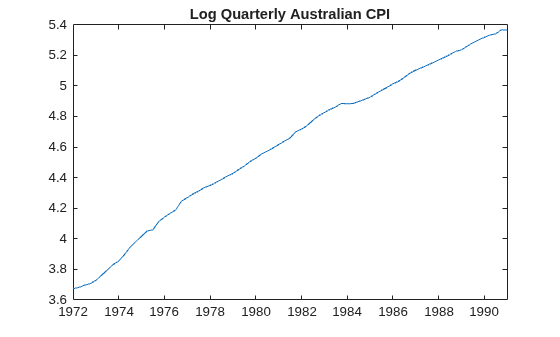
The series has a prominent upward trend, indicating that it is nonstationary.
Stabilize the Series
Take a first difference of the data. Plot the differenced series.
dY = diff(y);
dTimes = times(2:end);

figure
plot(dTimes,dY)
title("Log Australian CPI - Quarterly Chnages")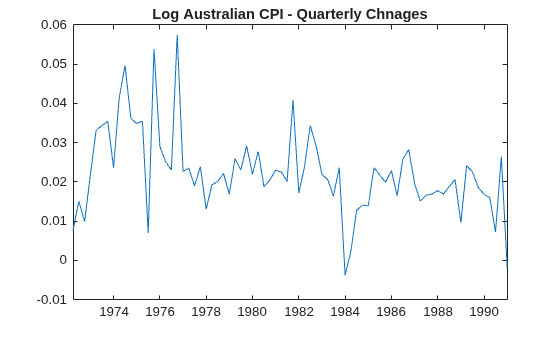
Differencing removes the upward trend, the result appears stationary with possible drift (nonzero mean).
Plot Sample ACF and PACF
For illustration, plot the sample autocorrelation function (ACF) and partial autocorrelation function (PACF) for the undifferenced CPI series.
figure
tiledlayout(2,1)
nexttile
autocorr(y)
nexttile
parcorr(y)
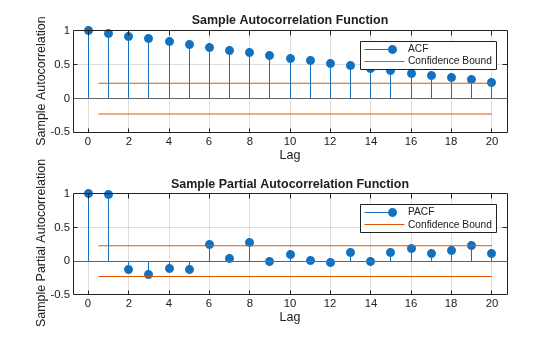
The significant, linearly decaying sample ACF indicates a nonstationary process.
Plot the sample ACF and PACF of the differenced, stationary series.
figure
tiledlayout(2,1)
nexttile
autocorr(dY)
nexttile
parcorr(dY)
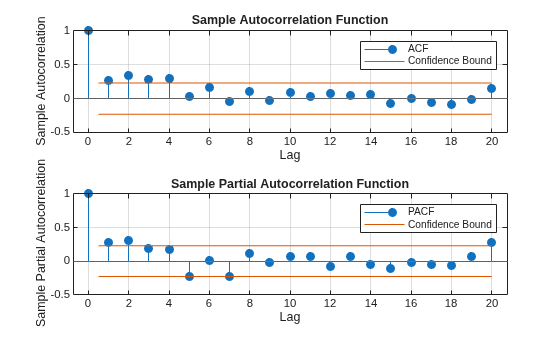
The sample ACF of the differenced series decays quickly. The sample PACF cuts off after lag 2. This behavior is consistent with a second-degree autoregressive (AR(2)) model.
Estimate ARIMA(2,1,0) Model
Specify, and then estimate, an ARIMA(2,1,0) model for the log quarterly Australian CPI. This model has one degree of nonseasonal differencing and two AR lags. By default, the innovation distribution is Gaussian with a constant variance and a constant is included in the model (the constant absorbs the drift).
Mdl = arima(2,1,0);
EstMdl = estimate(Mdl,y);
    ARIMA(2,1,0) Model (Gaussian Distribution):

                  Value       StandardError    TStatistic      PValue
                __________    _____________    __________    __________

    Constant      0.010072      0.0032802        3.0707       0.0021356
    AR{1}          0.21206       0.095428        2.2222         0.02627
    AR{2}          0.33728        0.10378        3.2499       0.0011543
    Variance    9.2302e-05     1.1112e-05        8.3066      9.8491e-17
Both AR coefficients are significant at the 0.05 significance level.
Check Goodness of Fit
Infer the residuals from the fitted model. Check that the residuals are normally distributed and uncorrelated.
res = infer(EstMdl,y);
stdres = res./sqrt(EstMdl.Variance); % Standardized residuals

figure
tiledlayout(2,2)
nexttile
plot(times,stdres)
title("Standardized Residuals")
nexttile
qqplot(res)
nexttile
autocorr(res)
nexttile
parcorr(res)

% Reduce title and label font
hvec = findall(gcf,'Type','axes');
set(hvec,'TitleFontSizeMultiplier',0.8,...
    'LabelFontSizeMultiplier',0.8);
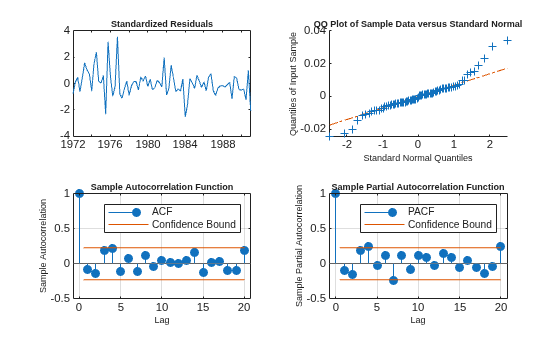
The residuals are approximately normally distributed and uncorrelated.
Generate Forecasts
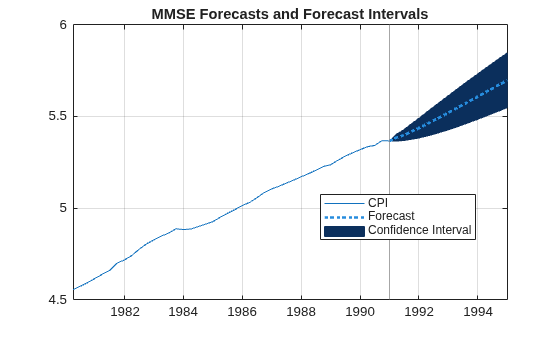
Generate forecasts and approximate 95% forecast intervals for the next 4 years (16 quarters).
fh = 16;
[fY,fMSE] = forecast(EstMdl,fh,y);
alpha = 0.05;
FYCI = fY + norminv(alpha/2)*[1 -1].*sqrt(fMSE);

endT = times(T);
fht = endT + calquarters((1:fh))';
int = times > datetime(1980,1,1);

figure
p1 = plot(times(int),y(int));
hold on
xline(endT,Color=[0.5 0.5 0.5])
p2 = patch([endT; fht; flipud(fht); endT], [y(end); FYCI(:,2); flipud(FYCI(:,1)); y(end)],"k");
p2.FaceColor = [0.0431 0.1843 0.3608];
p2.EdgeColor = [0.0431 0.1843 0.3608];
p3 = plot([endT; fht],[y(end); fY],":",LineWidth=2,Color=[0.1490 0.5490 0.8660]);
hold off
legend([p1 p3 p2],["CPI" "Forecast" "Confidence Interval"],Location="best")
grid on
title("MMSE Forecasts and Forecast Intervals")
What Is the Box-Jenkins Model Selection Method?
The Box-Jenkins model selection method is the following three-step, iterative procedure used to identify, estimate, and assess univariate, dynamic, linear conditional mean models (for example, ARIMA models) for time series data.
Identify Model Candidates — Determine a subset of models for the series by conducting an exploratory data analysis. The goals of the analysis are to determine whether the series is stationary (which trends are present), whether the series is seasonal, which transformations are required, and which lags are significant. These characteristics suggest a structure for the models.
Estimate Candidate Models — Fit each candidate model to the data. The goals are to obtain model parameter estimates, standard errors, and associated likelihood function values. The estimation method should use the data efficiently. Although several efficient methods exist, the
estimatefunction uses maximum likelihood to estimate parameters and the outer product of gradients to obtain estimated parameter covariances. For details, see Maximum Likelihood Estimation for Conditional Mean Models and Covariance Matrix Estimation.Diagnose Fitted Models — Evaluate model assumptions and fit. The goals are to determine whether the fitted model residuals are an iid Gaussian series and whether the fitted models generalize well (not over- or underfit). This analysis can suggest ways to improve the candidates, in which case you can iterate the procedure.
The model or models you choose ultimately depend on your analysis goals. You can further reduce the number of models by comparing their information criteria or by assessing their predictive performance.
Identify Model Candidates
The exploratory analysis is iterative and includes visually inspecting the data for particular features, such as trends, preprocessing or transforming the data, and conducting statistical hypothesis tests to detect particular features.
The following procedure illustrates the typical tasks.
Address deterministic trends in the data — Deterministic trends in a time series distort the extent of serial correlation present in the series, causing difficulty in determining a lag structure for the model. A time series plot of the series can indicate whether the series has a trend, either exponential, seasonal, linear (deterministic), or a combination. If the series has a deterministic trend, you can transform it, continue analyzing the transformation, and then back transform to draw conclusions on the original scale of the series. For more details, see Data Transformations.
Address stochastic trends in the data — A series containing a stochastic trend is nonstationary. Like deterministic trends, stochastic trends distort the extent of serial correlation in the series. A shock to a series with a stochastic trend persists forever, which is unlike a series containing only a deterministic trend, where a shocked series eventually reverts to its mean (see Trend-Stationary vs. Difference-Stationary Processes). Economic series often have a until root and seasonality, which are types of stochastic trends (see Unit Root Nonstationarity). Although a time series plot can indicate whether a series has a unit root or seasonality, Econometrics Toolbox™ has several functions that conduct statistical tests for unit roots, for example, the
adftestfunction conducts the augmented Dicky-Fuller test (see Unit Root Tests).You can address a unit root by differencing the data (see Nonseasonal and Seasonal Differencing). The degree and type of differencing required to stabilize the series indicate the order of integration D and seasonality s for the model.
Chose candidate model structures — After attaining a stationary series, determine whether to include a model constant, which nonseasonal and seasonal AR and MA lags to include (minimally, determine the lag polynomial orders p, q, ps, and qs), which innovations distribution to assume, and whether to include exogenous predictors. Although some coefficient and distribution specifications are guided by economic theory or experimentation, the sample autocorrelation and partial autocorrelation functions (ACF and PACF) are visual tools to help with lag order selection (see Autocorrelation and Partial Autocorrelation).
Estimate Model Candidates
Model estimation follows this general procedure.
Create
arimamodel templates — MATLAB® requires the structure of each model you plan to estimate. Specifically, you must specify or MATLAB must be able to infer, the values of all nonestimable parameters, which includes the orders of the lag polynomials and the innovations distribution. To do this, you create anarimamodel template for estimation by using thearimafunction (see Represent Univariate Dynamic Conditional Mean Models in MATLAB). The following conditions apply:When you estimate nonstationary models, you do not need to manually difference the series and fit a stationary model. Instead, you can use the series on the original or log scale, and specify the appropriate degree of nonseasonal integration and seasonality when you create the model template.
If a candidate model describes the data poorly, the estimation procedure can issue errors or provide poor results.
Reserve a large enough presample at the beginning of the series to initialize all candidate models from the same initial conditions. If you plan to measure the predictive performance of each model, also reserve a holdout sample from the end of the series. See Time Base Partitions for ARIMA Model Estimation.
Fit each candidate model to the data by passing the associated model template, in-sample data, and presample data to the
estimatefunction.estimateuses maximum likelihood for estimation (see Maximum Likelihood Estimation for Conditional Mean Models); it applies constrained optimization to the likelihood function by usingfmincon. To improve estimation,estimateenables you to supply initial parameter values and adjust the optimization algorithm (see Initial Values for Conditional Mean Model Estimation and Optimization Settings for Conditional Mean Model Estimation). However, when the model is a poor description of the data, the estimates or inferences might be of poor qualify regardless any adjustments you make to the optimization algorithm.
Diagnose Fitted Models
A good quality fit produces a stationary, homoscedastic, independent, Gaussian
residual series with a mean of 0. Goodness-of-fit model checks
include focus on analyzing the residuals from each fitted model by using the infer function. For details, see Goodness of Fit and
Residual Diagnostics.
Characteristics of the residuals that represent departures from a good quality fit can
suggest how to improve, or even discard, the model candidate. For example, a remedy for
leptokurtic residuals (residuals that have a fat-tailed distribution) is to set a
Student's t distribution for the innovations.
Additional Model Selection Steps
The following additional steps complement the Box-Jenkins model selection procedure.
Compare information criteria among the model candidates. Models that yield smaller fit statistics balance minimal likelihood with model complexity (see Information Criteria for Model Selection).
Compare model candidates by conducting statistical hypothesis tests (see Model Comparison Tests).
When you reserve a holdout sample, compare the predictive performance of the model candidates by forecasting the model into the holdout sample period by using the
forecastfunction, and then computing the forecast MSE. The model that yields the lowest forecast MSE generalizes the best.
References
[1] Box, George E. P., Gwilym M. Jenkins, and Gregory C. Reinsel. Time Series Analysis: Forecasting and Control. 3rd ed. Englewood Cliffs, NJ: Prentice Hall, 1994.
See Also
Apps
Objects
Functions
Topics
- Implement Box-Jenkins Model Selection and Estimation Using Econometric Modeler App
- Detect Serial Correlation Using Econometric Modeler App
- Box-Jenkins Differencing vs. ARIMA Estimation
- Nonseasonal Differencing
- Infer Residuals for Diagnostic Checking
- Represent Univariate Dynamic Conditional Mean Models in MATLAB
- Trend-Stationary vs. Difference-Stationary Processes
- Goodness of Fit
- Forecast Conditional Mean Model Programmatically

