coder.varsize
R2026bResolve size incompatibility errors and declare upper bounds
Syntax
Description
coder.varsize( instructs
the code generator to allow the dimensions of variables
varName1,...,varNameN)varName1,...,varNameN to change size at run time. The code generator
attempts to determine the upper bound for each dimension of each variable. Dimensions with
size 1, also known as singleton dimensions, remain
fixed size. To instruct the code generator to allow singleton dimensions to vary in size,
you must specify variable-size upper bounds by using the upperBounds and
variableSize arguments. For more information about variable-size data
in MATLAB® code for code generation, see Generate Code for Variable-Size Arrays (MATLAB Coder).
coder.varsize(
specifies an upper bound for each dimension of the variables
varName1,...,varNameN,upperBounds)varName1,...,varNameN. Singleton dimensions remain fixed size. When you
specify an upper bound of Inf, the code generator attempts to determine
the upper bound of that dimension.
coder.varsize(
specifies whether each upper bound in varName1,...,varNameN,upperBounds,variableSize)upperBounds is fixed size or
variable size. To instruct the code generator to allow a singleton dimension to vary in
size, explicitly specify a variable-size upper bound.
Examples
The code generator might produce a size incompatibility error when it
cannot recognize that a variable changes size. To resolve this type of error, use
coder.varsize to specify that the size of the variable can
change.
For example, this function defines the variable x as a 3-by-3
array, uses x by passing it to another function, and then changes the
size of x depending on the run-time input.
function out = changeSizeAfterUse(n) %#codegen
x = zeros(3,3);
numel(x); % use x by passing it to another function
if n < 10
    x = zeros(4,4); % change size of x depending on run-time input
end
out = x;
end
If you generate code for this function, the code generator produces a size
incompatibility error. To resolve this error, add the coder.varsize
directive after you define the variable, but before you use it.
function out = changeSizeAfterUse(n) %#codegen
x = zeros(3,3);
coder.varsize("x");
numel(x); % use x by passing it to another function
if n < 10
    x = zeros(4,4); % change size of x depending on run-time input
end
out = x;
end
The code generator might also produce size incompatibility errors when performing binary (two-array) operations, such as addition or multiplication. See Resolve Error: Arrays Have Incompatible Sizes (MATLAB Coder).
This function defines A as a scalar and then uses
coder.varsize to specify that A is a
variable-size row vector with a maximum length of 20.
function varSizeUpperBounds %#codegen
A = 0;
coder.varsize("A",[1 20]);
end
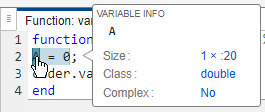
If you generate code for this function, the code generation report shows that the
code generator defines A as a 1x:20 array. When
you do not provide the variableSize argument,
the code generator defines non-singleton dimensions
as variable size and singleton dimensions as fixed size.
This function defines A as a 1-by-1-by-1 array and then uses
coder.varsize to specify that A has a first
dimension that is variable-size with a maximum of 1, a second dimension with a fixed
size of 3, and a third dimension that is variable-size with a maximum size of 20.
function varSizeMixed %#codegen
A = [0 0 0];
coder.varsize("A",[1 3 20],[true false true]);
end
If you generate code for this function, the code generation report shows that the
code generator defines A as a :1x3x:20 array. The
code generator defines the singleton dimension as variable size because the
coder.varsize directive explicitly specifies a variable-size
upper bound using the upperBounds and variableSize
arguments.

You can use coder.varsize to instruct the code
generator to allow structure fields to vary in size.
For example, this function defines a structure with the fields
observations1, observations2, and
values. The function uses coder.varsize to
define observations1 and observations2 as having a
fixed-size first dimension and an unbounded second dimension. It also uses
coder.varsize to define values as a
variable-size row vector with maximum length of 10.
function out = varSizeFields(n) %#codegen
s = struct("observations1",zeros(2,2),"observations2",zeros(2,2), ...
    "values",zeros(1,1));
coder.varsize("s.observations1","s.observations2",[2 Inf],[false true]);
coder.varsize("s.values",[1 10]);
if n <= 10
    s.observations1 = [1:n;rand(1,n)];
    s.values = randi(100,1,n);
end
if n > 0
    s.observations2 = [1:15;zeros(1,15)];
end
out = s;
end
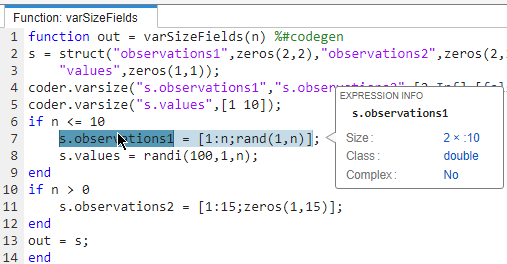
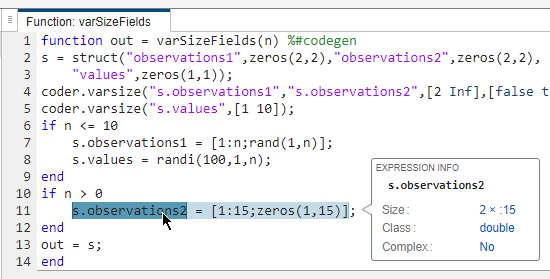
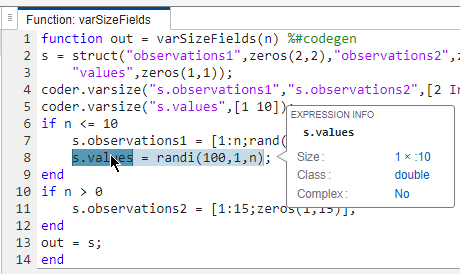
If you generate code for this function, the code generation report shows that the
code generator can determine the maximum size of the unbounded dimensions of
s.observations1 and s.observations2. The code
generator defines s.observations1 as an array with size
2x:10.
The code generator defines s.observations2 as an array with size
2x:15.
The code generator defines s.values as an array of size
1x:10.
You can apply the coder.varsize directive to
all cell array elements or to specific cell array
elements.
For example, this function defines two 1-by-3 cell arrays, each of which contains
three 1-by-2 arrays of doubles. The function uses coder.varsize to
specify that all elements of cell array
ca1 are variable-size row vectors with a maximum length of 5. The
function also uses the coder.varsize directive to specify that the
second element of ca2 is a variable-size matrix and that both
dimensions have a maximum size of 2.
function varSizeElement %#codegen
ca1 = {[1 2] [3 4] [5 6]};
ca2 = {[1 2] [3 4] [5 6]};
coder.varsize("ca1{:}",[1 5]);
coder.varsize("ca2{2}",[2 2]);
ca1{1} = 1;
ca1{2} = 1:5;
ca1{3} = 1:3;
ca2{1} = [5 6];
ca2{2} = [1 2;3 4];
ca2{3} = [7 8];
end
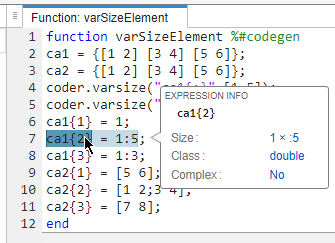
If you generate code for this function, the code generation report shows that the
code generator defines the elements of ca1 as variable-size
1x:5 arrays.
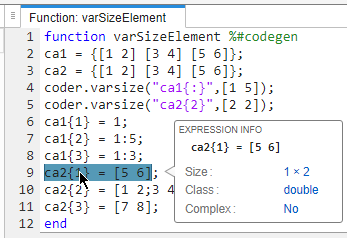
The code generator defines the first and third elements of ca2 as
fixed-size 1x2 arrays.
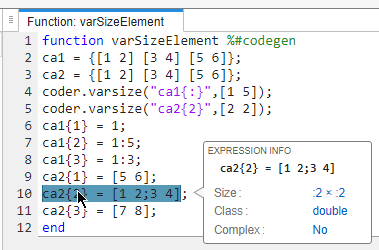
The code generator defines the second element of ca2 as a
variable-size :2x:2 matrix.
If you use coder.varsize to set the upper bounds
for a variable and the size of the variable depends on run-time input, you encounter
run-time overflow errors if the run-time input exceeds the upper bounds.
For example, this function uses coder.varsize to declare variable
x as a variable-size, two-dimensional array and to set an upper
bound of 5 for each dimension.
function out = boundedVarSize1(n) %#codegen
x = zeros(3,3);
coder.varsize("x",[5 5])
x = zeros(n,n);
out = x;
end
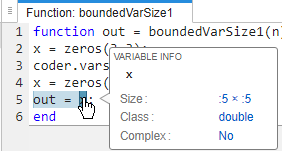
If you generate code for this function, the code generation report shows that the
code generator defines x as a :5x:5 array.
If you generate a MEX function and pass the MEX function a value greater than 5, the
MEX function produces a size overflow error. To avoid overflow errors,
ensure that run-time inputs do not exceed the upper
bounds defined by coder.varsize. Alternatively, rewrite your
MATLAB code to prevent run-time size overflow.
function out = boundedVarSize2(n) %#codegen
x = zeros(3,3);
coder.varsize("x",[5 5])
if n <= 5
    x = zeros(n,n);
else
    x = zeros(5,5);
end
out = x;
end
Input Arguments
Limitations
You cannot call
coder.varsizeon global variables or on MATLAB classes.Code generation supports variable-size properties in MATLAB classes. However, you cannot declare a variable-size class property by using
coder.varsize. See Resolve Error: coder.varsize Not Supported for Class Properties (MATLAB Coder).Code generation supports variable-size strings. However, you cannot declare a variable-size string by using
coder.varsize. See Resolve Error: coder.varsize Not Supported for Strings (MATLAB Coder).The
coder.varsizedirective instructs the code generator to allow the size of a variable to change. It does not change the size of the variable. Consider this code snippet:... x = 7; coder.varsize("x", [1 5]); disp(size(x)); ...
After the
coder.varsizedirective,xis still a 1-by-1 array. You cannot assign a value to an element beyond the current size ofx. For example, this code produces a run-time error because the index 3 exceeds the dimensions ofx.... x = 7; coder.varsize("x", [1,5]); x(3) = 1; ...
You cannot call
coder.varsizeon function input arguments. Instead:If the function is an entry-point function, specify that an input argument has a variable size by using
coder.typeof(MATLAB Coder) at the command line. Alternatively, specify that an entry-point function input argument has a variable size by using the Define Input Types step of the MATLAB Coder™ app.If the function is not an entry-point function, use
coder.varsizein the calling function with the variable that is the input to the called function.
For sparse matrices,
coder.varsizetreats variable-size dimensions as unbounded.To use
coder.varsizewith a cell array, the cell array must be homogeneous. See Cell Array Limitations for Code Generation.
Tips
In many cases, the code generator can determine that the size of a variable can change at run time. In such cases, you do not need to use the
coder.varsizedirective. Usecoder.varsizeonly if the code generator produces a size overflow error or if you want to specify upper bounds.To declare variable-size output variables in MATLAB Function blocks, use the Symbols pane and the Property Inspector. If you provide upper bounds in a
coder.varsizedeclaration, the upper bounds must match the upper bounds in the Property Inspector. See Declare Variable-Size MATLAB Function Block Variables.If you do not specify upper bounds in the
coder.varsizedeclaration and the code generator cannot infer upper bounds, the generated code uses dynamic memory allocation. Dynamic memory allocation might reduce the speed of the generated code. In some cases, you can avoid dynamic memory allocation by specifying upper bounds by using theupperBoundsargument.If you use
coder.varsizeto specify that the upper bound of a dimension is 1, the dimension has a fixed size of 1 by default. To specify that the dimension can be 0 or 1, set the corresponding element of thevariableSizevector totrue. For example, this directive specifies that the first dimension ofxhas a fixed size of 1 and the other dimensions have a variable size of5.coder.varsize("x",[1 5 5])In contrast, this code specifies that the first dimension of
xis variable size with an upper bound of 1.coder.varsize("x",[1 5 5],[true true true])When you use the output of an extrinsic function, the code generator cannot determine the size of this output at code generation time. Use
coder.varsizeto instruct the code generator to treat the variable you use to store this output as variable size. See Working With mxArray Outputs in Generated Code (MATLAB Coder).Under certain circumstances, you can force a cell array to be homogeneous by using
coder.varsize. See Control Whether a Cell Array Is Variable-Size.You can define all fields of a structure as variable-size simultaneously by using the colon (
:) operator. For example, this statement specifies that, for every element of structure arraycollectionand every element of structure arraydatain it, the fieldvaluesis variable size:coder.varsize("collection(:).data(:).values")
Version History
Introduced in R2011a
See Also
coder.typeof | coder.extrinsic
Topics
- Generate Code for Variable-Size Arrays (MATLAB Coder)
- Incompatibilities with MATLAB in Variable-Size Support for Code Generation (MATLAB Coder)
- Troubleshoot Replicated Functions in Generated Code (MATLAB Coder)
- Specify Upper Bounds for Variable-Size Arrays in Generated Code (MATLAB Coder)

