writeEncodedStrip
R2026bWrite data to specified strip
Description
writeEncodedStrip(
writes t,stripNumber,imageData)imageData to the strip specified by
stripNumber to the TIFF file associated with the
Tiff object t.
Examples
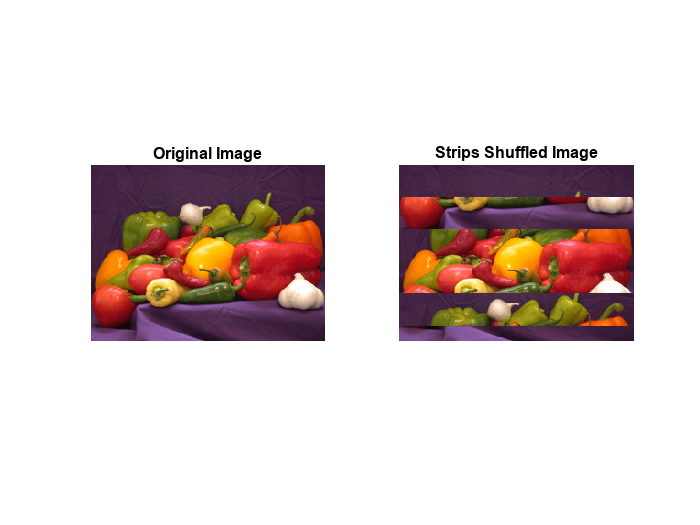
Read two strips from a TIFF file and write them to a new TIFF file in different positions.
Open a TIFF file with image data in stripped layout, get the image data and the number of strips in the image.
tr = Tiff('peppers_RGB_stripped.tif','r');
imageR = read(tr);
nStrips = numberOfStrips(tr)
nStrips =
6
Read the 2nd and 5th strips of the image.
stripTwo = readEncodedStrip(tr,2);
stripFive = readEncodedStrip(tr,5);
Create a Tiff object for a new file and copy the image and tag information from the first file.
tw = Tiff('write_strip.tif','w');
tagstruct.ImageLength = getTag(tr,'ImageLength');
tagstruct.ImageWidth =  getTag(tr,'ImageWidth');
tagstruct.Photometric = getTag(tr,'Photometric');
tagstruct.RowsPerStrip = getTag(tr,'RowsPerStrip');
tagstruct.BitsPerSample = getTag(tr,'BitsPerSample');
tagstruct.SamplesPerPixel = getTag(tr,'SamplesPerPixel');
tagstruct.PlanarConfiguration = getTag(tr,'PlanarConfiguration');
setTag(tw,tagstruct);
write(tw,imageR)
Write stripFive in the position for strip number 2 and stripTwo in the position for strip number 5.
writeEncodedStrip(tw,2,stripFive);
writeEncodedStrip(tw,5,stripTwo);
Read and display the new image next to the original image.
imageW = read(tw);
subplot(121);
imshow(imageR);
title('Original Image')
subplot(122);
imshow(imageW);
title('Strips Shuffled Image')
Close the Tiff objects.
close(tr);
close(tw);
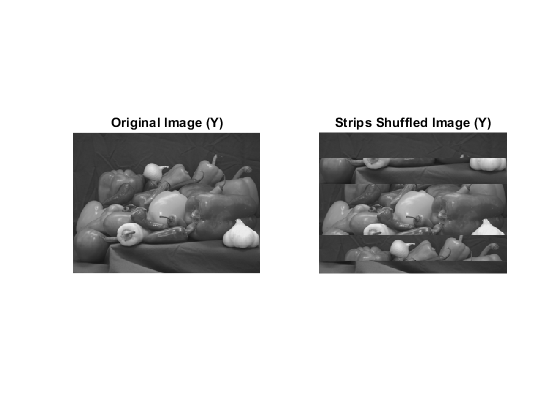
Read two strips from a YCbCr TIFF file and write them to a new TIFF file in different positions.
Open a TIFF file containing YCbCr image data in stripped layout, get the image data and the number of strips in the image.
tr = Tiff('peppers_YCbCr_stripped.tif','r');
[Yr,Cbr,Crr] = read(tr);
nStrips = numberOfStrips(tr)
nStrips =
6
Read the 2nd and 5th strips of the image.
[Y2,Cb2,Cr2] = readEncodedStrip(tr,2);
[Y5,Cb5,Cr5] = readEncodedStrip(tr,5);
Create a Tiff object for a new file and copy the image and tag information from the first file.
tw = Tiff('write_strip.tif','w');
tagstruct.ImageLength = getTag(tr,'ImageLength');
tagstruct.ImageWidth =  getTag(tr,'ImageWidth');
tagstruct.SampleFormat = getTag(tr,'SampleFormat');
tagstruct.Photometric = getTag(tr,'Photometric');
tagstruct.RowsPerStrip = getTag(tr,'RowsPerStrip');
tagstruct.BitsPerSample = getTag(tr,'BitsPerSample');
tagstruct.SamplesPerPixel = getTag(tr,'SamplesPerPixel');
tagstruct.YCbCrSubSampling = getTag(tr,'YCbCrSubSampling');
tagstruct.Compression = getTag(tr,'Compression');
tagstruct.PlanarConfiguration = getTag(tr,'PlanarConfiguration');
setTag(tw,tagstruct);
write(tw,Yr,Cbr,Crr)
Write strip number 5 in the position for strip number 2 and strip number 2 in the position for strip number 5.
writeEncodedStrip(tw,2,Y5,Cb5,Cr5);
writeEncodedStrip(tw,5,Y2,Cb2,Cr2);
Read and display the Y component of the new image next to the original image.
[Yw,Crw,Cbw] = read(tw);
subplot(121);
imshow(Yr);
title('Original Image (Y)')
subplot(122);
imshow(Yw);
title('Strips Shuffled Image (Y)')
Close the Tiff objects.
close(tr);
close(tw);
Input Arguments
Algorithms
Version History
Introduced in R2009b

