Contenuto principale

Risultati per

Pooja
Pooja
Ultima attività il 15 Apr 2026 alle 14:01

MATLAB EXPO India | 7 May | Bengaluru
Get inspired by the latest trends and real-world customer success stories transforming industries. Learn from trusted experts across 4 tracks.
  • AI & Autonomous Systems
  • Electrification
  • Systems & Software Engineering
  • Radar, Wireless & HDL
Digital Twin Development of PEARL Autonomous Surface System Thermal Management
The top session of the countdown showcases how the PEARL engineering team used a digital twin to solve real‑world thermal challenges in a solar‑powered autonomous marine platform operating in extreme environments. After thermal shutdown events in the field, the team built a model that predicts temperatures at multiple locations with ~1% accuracy, while balancing accuracy with model complexity.
Beyond the technology, this keynote delivers practical lessons for predictive modeling and digital twins that apply well beyond marine systems.
We hope you’ve enjoyed the Top 10 countdown series—and a big thank‑you to Olivier de Weck at Massachusetts Institute of Technology, for delivering such a compelling and insightful keynote.
🎥 If you missed it live, be sure to watch the recording to see why it earned the #1 spot at MATLAB EXPO 2026.
Pooja
Pooja
Ultima attività il 8 Apr 2026 alle 15:00

MATLAB EXPO India is Back!
This in-person events brings together engineers, scientists, and researchers to explore the latest trends in engineering and science, and discover new MATLAB and Simulink capabilities to apply to your work.
May 7, 2026 l Bengaluru
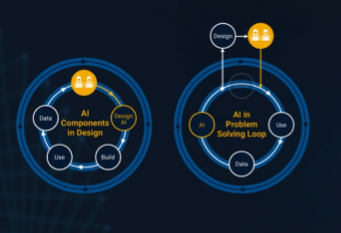
It’s no surprise this keynote landed at #2. MaryAnn Freeman, Senior Director of Engineering, AI, and Data Science explores how AI, especially generative AI, is transforming the way engineers design, build, and innovate. From accelerating the design loop with faster, data‑driven solutions, to blending human creativity with AI insights, to evolving engineering tools that turn ideas into build‑ready systems. This keynote shows how embedded intelligence helps engineers push past traditional limits and bridge imagination with real‑world impact.
If you’re curious about how AI is reshaping engineering workflows today (and what that means for the future of design), this is a must‑watch.
👉 Watch the keynote recording and see why it was one of the most popular sessions of MATLAB EXPO Online 2025.
Software‑defined vehicles are becoming reality—and this #3 ranked session shows how. In this keynote, Daniel Scurtu (NXP) demonstrates how MathWorks and NXP are working together to accelerate system‑level embedded development.
🔋 Using a vehicle electrification demo that runs across multiple NXP processors, you’ll see:
  • Model‑Based Design workflows from concept to deployment
  • Intelligent battery management and motor control
  • Automatic code generation and hardware deployment
  • ☁️ Real‑time cloud analytics and over‑the‑air updates
🛠️ Featuring MATLAB and Simulink products alongside NXP tools like Model-based Design Toolbox (MBDT), S32 Design Studio IDE, and Real-Time Drivers (RTD), this session highlights an end‑to‑end approach that reduces complexity and speeds the transition to software‑defined vehicles.
👉 Watch the session on demand and catch what you missed
What’s New in MATLAB and Simulink in 2025
If you missed this session live, this is one of those “everyone’s talking about it” updates you’ll want to catch up on. 👀
This session is packed with the kinds of enhancements that quietly (and not so quietly) change how you work every day.
Here’s why it earned a spot in our Top 4:
  • A redesigned MATLAB desktop with customizable sidebars and light/dark themes—built to adapt to how you work
  • New side panels for coding and development tasks, plus more control over organizing and customizing figures
  • MATLAB Copilot, a generative AI assistant optimized for MATLAB to help you explore ideas, learn techniques, and boost productivity directly in the desktop
  • Simulink workflow improvements like a redesigned Simulink scope, more detailed info in quick insert, and automatic signal line straightening
  • Enhanced Python integration across MATLAB and Simulink
  • New AI deployment options optimized for Qualcomm and Infineon hardware targets
If staying current with MATLAB and Simulink is part of your role—or your edge—this session is a must‑watch. Missing it means missing context for features that will shape how you work in 2026 and beyond.
🎥 Watch the recording and see what’s new.
💬 Discussion topic:
Which single update from this release do you think will most improve your day‑to‑day workflow, and why?
🤖 What does it take to make robotic motion feel… human?
In this session, Tetsushi Sotowa shares how NSK is combining advanced control techniques with deep learning to enable human‑like grasping in electric grippers
You’ll see a real‑world case study featuring:
  • Bilateral and force control systems developed in‑house
  • MATLAB and Simulink–based control workflows
  • Deep learning integration using Deep Learning Toolbox
  • A practical path from mechatronics research to intelligent actuation
The result: an AI‑enhanced actuator capable of more natural, responsive grasping—bringing robotics one step closer to human motion.
👉 Interested in AI‑driven robotics and advanced control? Check out the session now from MATLAB EXPO 2025.
Missed a crowd‑favorite session feautring Marko Gecic at Infineon and Lucas Garcia at MathWorks?
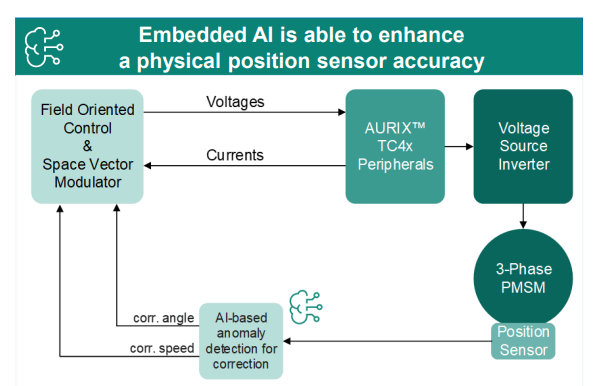
This talk shows how to verify and test AI for real‑time, safety‑critical systems using an AI virtual sensor that estimates motor rotor position on an Infineon AURIX TC4x microcontroller. Built with MATLAB and Simulink, the demo covers training, verification, and real‑time control across a wide range of operating conditions.
You’ll see practical techniques to test robustness, measure sensitivity to input perturbations, and detect out‑of‑distribution behavior—critical steps for meeting standards like ISO 26262 and ISO 8800. The session also highlights how Model‑Based Design leverages AURIX TC4x features such as the PPU and CDSP to deploy AI with confidence.
Featuring: Dr. Arthur Clavière, Collins Aerospace
How can we be confident that a machine learning model will behave safely on data it’s never seen—especially in avionics? In this session, Dr. Arthur Clavière introduces a formal methods approach to verifying maching learning generalization. The talk highlights how formal verification can be apploied toneural networks in safety-critical avionics systems.
💬 Discussion question:
Where do you see formal verification having the biggest impact on deploying ML in safety‑critical systems—and what challenges still stand in the way?
Join the conversation below 👇
🚀 Unlock Smarter Control Design with AI
What if AI could help you design better controllers—faster and with confidence?
In this session, Naren Srivaths Raman and Arkadiy Turevskiy (MathWorks) show how control engineers are using MATLAB and Simulink to integrate AI into real-world control design and implementation.
You’ll see how AI is being applied to:
🧠 Advanced plant modeling using nonlinear system identification and reduced order modeling
📡 Virtual sensors and anomaly detection to estimate hard-to-measure signals
🎯 Datadriven control design, including nonlinear MPC with neural statespace models and reinforcement learning
Productivity gains with generative AI, powered by MATLAB Copilot
I coded this app to solve the 20 or so test cases included with the Cody problem 'visually' and step-by-step. For extra fun, it can also be used to play the game... Any comments or suggestions welcome!
At #9 in our MATLAB EXPO 2025 countdown: From Tinkerer to Developer—A Journey in Modern Engineering Software Development
A big thank‑you to Greg Diehl at NAVAIR and Michelle Allard at MathWorks, the team behind this session, for sharing their multi‑year evolution from rapid‑fire experimenting to disciplined, scalable software development.
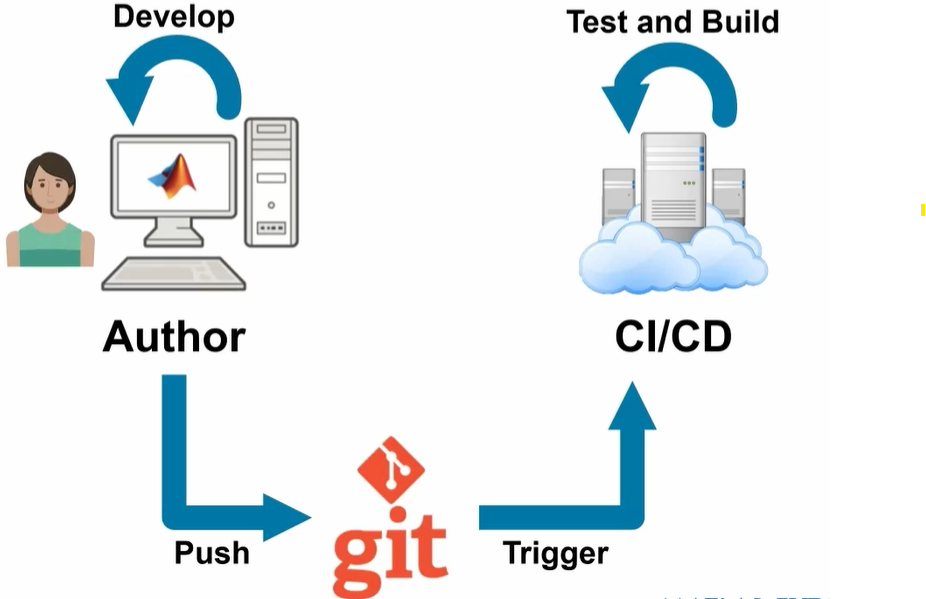
If you’ve ever wondered what it really takes to move MATLAB code from “it works!” to “it’s ready for production,” this talk captures that transition. The team highlights how improved testing practices, better structure, and close collaboration with MathWorks experts helped them mature their workflows and tackle challenges around maintainability and code quality.
Curious about the pivotal moments that helped them level up their engineering software practices?
Couldn’t catch everything at MATLAB EXPO 2025? You’re not alone. Across keynotes and track talks, there were too many gems for one sitting. For the next 9 weeks, we’ll reveal the "Top 10" sessions attended (workshops excluded)—one per week—so you can binge the best and compare notes with peers.
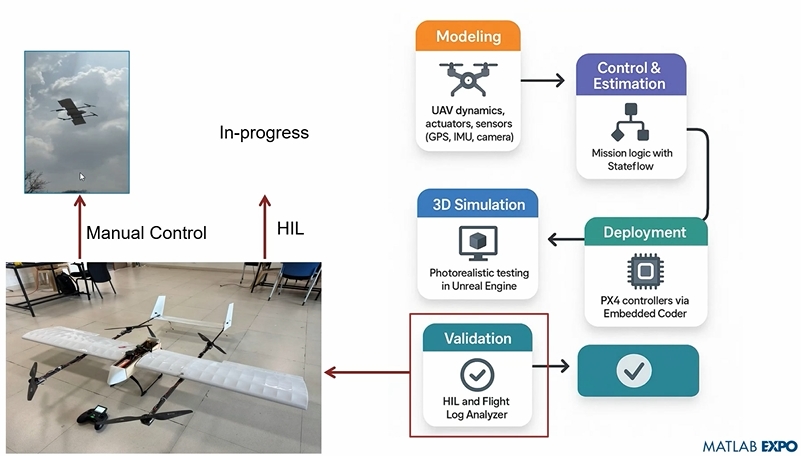
Starting at #10: Simulation-Driven Development of Autonomous UAVs Using MATLAB
A huge thanks to Dr. Shital S. Chiddarwar from Visvesvaraya National Institute of Technology Nagpur who delivered this presentation online at MATLAB EXPO 2025. Are you curious how this workflow accelerates development and boosts reliability?
Chen Lin
Chen Lin
Ultima attività il 28 Gen 2026

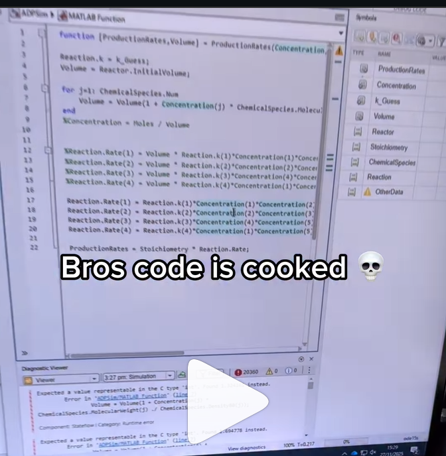
A coworker shared with me a hilarious Instagram post today. A brave bro posted a short video showing his MATLAB code… casually throwing 49,000 errors!
Surprisingly, the video went virial and recieved 250,000+ likes and 800+ comments. You really never know what the Instagram algorithm is thinking, but apparently “my code is absolutely cooked” is a universal developer experience 😂
Last note: Can someone please help this Bro fix his code?
In the sequence of previous suggestion in Meta Cody comment for the 'My Problems' page, I also suggest to add a red alert for new comments in 'My Groups' page.
Thank you in advance.
Missed a session or want to revisit your favorites? Now’s your chance!
Explore 42 sessions packed with insights, including:
4 inspiring keynotes
22 Customer success stories
5 Partner innovations
11 MathWorks-led technical talks
Each session comes with video recordings and downloadable slides, so you can learn at your own pace.
Walter Roberson
Walter Roberson
Ultima attività il 11 Dic 2025

I can't believe someone put time into this ;-)
The first round of the the Cody Contest 2025 is drawing to an end, and those who have tried to tackle Problem 61069. Clueless - Lord Ned in the Game Room with the Technical Computing Language probably didn’t think, like me initially, that a vectorized solution was feasible.
Indeed, the problem is difficult enough, so that the first solution is more easily drafted using lots of for loops and conditionals.
Yet studying in depth how to vectorize the solution and get rid of redundancies helped me uncover the deeper mechanics of the algorithm and see the problem in a new light, making it progressively appear simpler than on its first encounter.
Obstacles to overcome
Vectorization depends highly on the properties of the knowledge matrix, a 3D-matrix of size [n, 3, m] storing our current knowledge about the status for each card of each category for all players.
I remember that initially, I was intent on keeping close together these two operations: assigning a YES to a player for a given card and category, and consequently assigning NOs to all other players.
I did not want to set them apart. My fear was that, if you did not keep track and updated the knowledge matrix consistently, you might end up with a whole mess making it impossible to guess what’s in the envelope!
That seemed important because, as one gradually retrieves information from the turns and revisits them, one assigns more and more YESs and narrows down the possible candidates for the cards hidden in the envelope.
For example, @JKMSMKJ had successifully managed to combined those two instructions in one line (Solution 14889208), like this (here 0 encodes NO and 1 encodes YES):
allplayers = 1:(m+1);
K(card, category,:) = allplayers == player;
For some time, I thought that was the nicest way to express it, even though you had to handle the indivual card, category and player with lots of loops and conditionals.
Watching @JKMSMKJ’s repeated efforts to rewrite and improve his code showed me differents ways to arrange the same instructions. It appeared to me that there was indeed a way to vectorize the solution, if only we accept to separate the two distinct operations of assigning a value of YES and updating the knowledge matrix for consistency.
So let’s see how this can be done. We will use the following convention introduced by @Stefan Abendroth: NO = 0, MAYBE= 1, YES = values > 1. The reason for that choice is that it will greatly simplify computations, as it will become apparent later.
Initialisation
First, initialising a matrix of MAYBEs and adding in the information from our own cards is pretty straightforward:
K = ones(m,3,n);
K(:,:,pnum) = 0;
allcategories = 1:3;
for category = allcategories
K(yourcards{deck},deck,pnum) = 2; % = YES
end
The same thing can be done for the common cards considered as the (m+1)th player.
Next, we’d like to retrieve information for the turns and insert it into the matrix.
The 1rst column of the turn matrix gives us a vector of the players.
The 2nd to 4th columns conveniently give us a 3 column matrix of the values of the cards asked.
players = turns(:,1);
cards = turns(:,2:4);
result = turns(:,5);
Now suppose we have similar 3-column matrices of the exactsame size for the players and for the categories, such as:
categories =
1 2 3
1 2 3
1 2 3
1 2 3
1 2 3
1 2 3
1 ...
players =
5 5 5
6 6 6
1 1 1
2 2 2
6 6 6
4 ...
It would then be nice to be able to write something like:
K(cards, categories, players) = 0; % or 1 or 2 depending on the desired assignment according to result
Unfortunately that is not possible when we have multiple indexes that are not scalars.
A workaround is to use what is called linear indices, which are the indices of the matrix when considering a matrix as a very long 1-column vector, and which can be computed with the function sub2ind:
[categories, players] = meshgrid(1:3, turns(:,1));
sz = [n, 3, m];
ind = sub2ind(sz, cards, categories, players);
K(ind) = 0; % or 1 or 2 depending on the desired assignment according to result
Ensuring everybody else has a NO
Next, let’s see how to update the matrix. We now suppose the YESs have been correctly assigned into the matrix.
Wherever we’ve identified the location of a card (”a YES”), all other players must be assigned a NO. For each card, there can be only one YES across all players.
Because of that, that YES is the maximum value across all layers of the matrix K. Using the function max on K along it’s third dimension reduces the 3rd dimension to 1, yielding a 2d matrix. To locate it, we can then compare the value of that 2d matrix with all the layers of K.
maxcard = max(K,[],3); % returns a n-by-3 matrix
is_a_yes = K == maxcard;
K == maxcard compares maxcard with each layer of K, yielding a 3d matrix of logicals of the same size as K, where 1 indicates a YES and 0 indicates “not a YES”.
Ten years ago, we’d have needed to use the function bsxfun to perform that operation, but since then, Matrix Size Array Compatibility has been extended in MATLAB. Isn’t it nice?
Now, to transform any “MAYBE” (a 1) into a NO (a 0), while keeping the existing YESs, MAYBEs, and NOs unmodified, we need only need only multiply that matrix element-by-element with K !
%% Update knowledge matrix: if someone has a >1 ("YES"), everyone else must have a 0 ("NO")
maxcard = max(ans,[],3);
K = K .* (K == maxcard);
That expression can be read as “keep the value of K wherever K is equal to its max, but set 0 elsewhere”. If the maximum is a MAYBE, it will stay a MAYBE.
Getting one’s head around such an expression may take some getting used to. But such a one-liner is immensely powerful. Imagine that one day, the rules of the game change, or that this requirement is not useful any more (that happens all the time in real life), then we can very easily just comment out just that one line without impacting the rest of the program.
Confirming a player’s card hand when we determined (3n - ncards) they don’t have
After information was retrieved from the turns, we can examine each player’s hand and if we have narrowed a player’s cards to ncard possible candidates, excluding all others, then these must the cards that they hold. That means that their MAYBE cards becomes YESs.
Locating a player’s hand amounts to locating all the strictly positive values in the matrix:
playerhand = K(:,:,p);
player_complete = sum(playerhand(:)>0)) == ncards;
That operation can actually be vectorized along all players. Summing the matrix of logicals (K>0) along the first two dimensions yields a 1-by-1-by-(m+1) matrix, akin to a vector containing the number of card candidates for each player, which we can compare to ncards.
player_complete = sum(K>0, 1:2) == ncards;
We need to transform into YESs the MAYBEs of the players for which we have successfully deduced ncards, which can be written as a simple multiplication by 2:
K(:,:,player_complete) = 2 * K(:,:,player_complete)
The 0s (NOs) will remain 0s, the MAYBEs will become 2s, and the YESs will be multiplied too, but still stay YESs (>1).
But since 2 .^ 0 = 1 and 2 .^ 1 = 2, there’s an even nicer way to write that calculation:
K = K .* 2 .^ player_complete;
which reads like “we multiply K by 2 wherever a player’s hand is complete”. All thanks to Array Size Compatibility!
That expression is nicer because we need not explicitly assign the operation to the 3rd dimension of K. Suppose that one day, for whatever reason (performance optimisation or change of requirements), information about the players is not stored along the 3rd dimension any more, that code would NOT need to change, whereas K(:,:,player_complete) would need to be ajusted.
That’s how elegant MATLAB can be!
Checking whether a player’s hand is complete
What we checked previously is equivalent to checking that the number of NOs (the number of cards a player has not) was equal to 3*n - ncards.
What we didn’t do is check whether the sum of YESs if equal to ncards and then transform all MAYBEs for that player into NOs.
That will not be necessary because of the implementation of the next rule.
Because the information provided to play the game is assumed to be sufficient to guess the missing cards, it means that the YESs and NOs will gradually populate the matrix, so that any remaining MAYBE will be determined.
Identifying each category's missing card when (n-1) cards are known
Each category only has n cards, which means that once (n-1) cards are correctly located, the remaining card can only be a NO for everyone.
Because a card can only be in only one player’s hand, we can reuse the maximum of K across all players that we previously computed. It is a n-by-3 2d matrix where the values > 1 are the YESs. Using the function sum adds up all the YESs found for each category, yielding a vector of 3 values, containing the number of cards correctly located.
maxcard = max(K,[],3);
category_complete = sum(maxcard > 1) == n-1;
When a category is complete, the last remaining MAYBE should become a NO, without modifying the YESs. A clever way is to multiply the value by itself minus one:
K(:,category_complete,:) = K(:,category_complete,:) .* (K(:,category_complete,:) - 1)
which, using the same exponentiation technique as previously, can be nicely and compactly rewritten as:
K = K .* (K-1) .^ category_complete;
Because the YESs are > 1, we can even compute that more simply like this (as Stefan Abendforth put it in Solution 14900340):
K = K .* (category_complete < K);
Extracting the index of the missing cards
After looping several times to extract all possible information, the last thing that remains to be done is computing the values of the missings cards. They are the only NOs left in the knowledge matrix, and in the 2d matrix maxcard as well:
maxcard = max(K,[],3);
[sol,~] = find(maxcard == 0);
Conclusion
I previously mentioned being bothered by matrix indexing such as K(:,:,player) because it is code that seems fragile in case of change in the organisation of the matrix. Such an instruction would benefit from being "encapsulated" if the need arises.
One of my main concerns has always been writing maintainable MATLAB code, having worked in organisations where code piled up almost everyday, making it gradually more difficult and time-consuming to add and enhance functionalities if not properly managed.
On the one hand, elegant vectorization leads us to group things together and handle them uniformly and efficiently, “in batches”. On the other hand, “separation of concerns”, one of Software Development’s principles and good practices, would advise us to keep parts small and modular and that can take care of themselves on their own if possible, achieving higher abstraction.
How do we keep different requirements independent, so that they do not impact each other if any one of them needs to change? But how do we exploit vectorization extensively for performance? These two opposing forces is what makes developing modular and efficient MATLAB code a challenge that no other language faces in the same way, in my opinion.
Seeing the rules of the game as a sequence of multiplications applied to the matrix K simultaneously reduces code size and reveals a deeper aspect of the algorithm: because multiplication is commutative and associative, we can apply them in any order, and we could also see them as independant “operators” that we could apply elsewhere.
---
I hope those explanations can help you better appreciate the beauty of vectorization and make it seem less daunting.
There are many other strokes of inspiration that emerged from different solvers solving Problem 61069. Clueless - Lord Ned in the Game Room with the Technical Computing Language, and I am the first one to be amazed by them.
I wish to see more of such cooperative brilliance and sound emulation everywhere! Thanks so much to Cody Contest team for setting up such a fun and rewarding experience.

Building Transition Matrices for the Royal Game of Err

King Neduchadneddar the Procrastinator has devised yet another scheme to occupy his court's time, and this one is particularly devious. The Royal Game of Err involves moving pawns along a path of n squares by rolling an m-sided die, with forbidden squares thrown in just to keep things interesting. Your mission, should you choose to accept it, is to construct a transition matrix that captures all the probabilistic mischief of this game. But here's the secret: you don't need nested loops or brute force. With the right MATLAB techniques, you can build this matrix with the elegance befitting a Chief Royal Mage of Matrix Computations.

The heart of this problem lies in recognizing that the transition matrix is dominated by a beautiful superdiagonal pattern. When you're on square j and roll the die, you have a 1/m chance of moving to each of squares j+1, j+2, up to j+m, assuming none are forbidden and you don't overshoot. This screams for vectorized construction rather than element-by-element assignment. The key weapon in your arsenal is MATLAB's ability to construct multiple diagonals simultaneously using either repeated calls to diag with offset parameters, or the more powerful spdiags function for those comfortable with advanced matrix construction.

Consider this approach: start with a zero matrix and systematically add 1/m to each of the m superdiagonals. For a die with m sides, you're essentially saying "from square j, there's a 1/m probability of landing on j+k for k = 1 to m." This can be accomplished with a simple loop over k, using T = T + diag(ones(1,n-k)*(1/m), k) for each offset k from 1 to m. The beauty here is that you're working with entire diagonals at once, not individual elements. This vectorized approach is not only more elegant but also more efficient and less error-prone than tracking indices manually.

Figure 1: Basic transition matrix structure for n=8, m=3, no forbidden squares. Notice the three superdiagonals carrying probability 1/3 each.

Now comes the interesting part: handling forbidden squares. When square j is forbidden, two things must happen simultaneously. First, you cannot land ON square j from anywhere, which means column j should be entirely zeros. Second, you cannot move FROM square j to anywhere, which means row j should be entirely zeros. The naive approach would involve checking each forbidden square and carefully adjusting individual elements. The elegant approach recognizes that MATLAB's logical indexing was practically designed for this scenario.

Here's the trick: once you've built your basic superdiagonal structure, handle all forbidden squares in just two lines: T(nogo, :) = 0 to eliminate all moves FROM forbidden squares, and T(:, nogo) = 0 to eliminate all moves TO forbidden squares. But wait, there's more. When you zero out these entries, the probabilities that would have gone to those squares need to be redistributed. This is where the "stay put" mechanism comes in. If rolling a 3 would land you on a forbidden square, you stay where you are instead. This means adding those lost probabilities back to the main diagonal.

The sophisticated approach uses logical indexing to identify which transitions would have violated the forbidden square rule, then redirects those probabilities to the diagonal. You can check if a move from square j to square k would hit a forbidden square using ismember(k, nogo), and if so, add that 1/m probability to T(j,j) instead. This "probability conservation" ensures that each row still sums to 1, maintaining the stochastic property of your transition matrix.

Figure 2: Transition matrix with forbidden squares marked. Left: before adjustment. Right: after forbidden square handling showing probability redistribution. Compare the diagonal elements.

The final square presents its own challenge. Once you reach square n, the game is over, which in Markov chain terminology means it's an "absorbing state." This is elegantly represented by setting T(n,n) = 1 and ensuring T(n, j) = 0 for all j not equal to n. But there's another boundary condition that's equally important: what happens when you're on square j and rolling the die would take you beyond square n?

The algorithm description provides a clever solution: you stay put. If you're on square n-2 and roll a 4 on a 6-sided die, you don't move. This means that for squares near the end, the diagonal element T(j,j) needs to accumulate probability from all those "overshooting" scenarios. Mathematically, if you're on square j and rolling k where j+k exceeds n, that 1/m probability needs to be added to T(j,j). A clean way to implement this is to first build the full superdiagonal structure as if the board were infinite, then add (1:m)/m to the last m elements of the diagonal to account for staying put.

There's an even more elegant approach: build your superdiagonals only up to where they're valid, then explicitly calculate how much probability should stay on the diagonal for each square. For square j, count how many die outcomes would either overshoot n or hit forbidden squares, multiply by 1/m, and add to T(j,j). This direct calculation ensures you've accounted for every possible outcome and maintains the row-sum property.

Figure 3: Heat map showing probability distributions from different starting squares. Notice how probabilities "pile up" at the diagonal for squares near the boundary.

Now that you understand the three key components, the construction strategy becomes clear. Initialize your n-by-n zero matrix. Build the basic superdiagonal structure to represent normal movement. Identify and handle forbidden squares by zeroing rows and columns, then redistributing lost probability to the diagonal. Finally, ensure boundary conditions are met by setting the final square as absorbing and handling the "stay put" cases for near-boundary squares.

The order matters here. If you handle forbidden squares first and then build diagonals, you might overwrite your forbidden square adjustments. The cleanest approach is to build all m superdiagonals first, then make a single pass to handle both forbidden squares and boundary conditions simultaneously. This can be done efficiently with a vectorized check: for each square j, count valid moves, calculate stay-put probability, and update T(j,j) accordingly.

Figure 4: Complete transition matrix for a test case with n=7, m=4, nogo=[2 5]. Spy plot showing the sparse structure alongside a color-coded heat map. Notice the complex pattern of probabilities.

Before declaring victory over King Neduchadneddar, verify your matrix satisfies the fundamental properties of a transition matrix. First, every element should be between 0 and 1 (probabilities, after all). Second, each row should sum to exactly 1, representing the fact that from any square, you must end up somewhere (even if it's staying put). You can check this with all(abs(sum(T,2) - 1) < 1e-10) to account for floating-point arithmetic.

The provided test cases offer another validation opportunity. Start with the simplest cases where patterns are obvious, like n=8, m=3 with no forbidden squares. You should see a clean superdiagonal structure. Then progress to cases with forbidden squares and verify that columns and rows are properly zeroed. The algorithm description even provides example matrices for you to compare against. Pay special attention to the diagonal elements, as they're where most of the complexity hides.

Figure 5: Validation dashboard showing row sums (should all be 1), matrix properties, and comparison with expected structure for a simple test case.

For those seeking to optimize their solution, consider that for large n, explicitly storing an n-by-n dense matrix becomes memory-intensive. Since most elements are zero, MATLAB's sparse matrix format is ideal. Replace zeros(n) with sparse(n,n) at initialization. The same indexing and diagonal operations work seamlessly with sparse matrices, but you'll save considerable memory for large problems.

Another sophistication involves recognizing that the transition matrix construction is fundamentally about populating a banded matrix with some modifications. The spdiags function was designed for exactly this scenario. You can construct all m superdiagonals in a single call by preparing a matrix where each column represents one diagonal's values. While the syntax takes some getting used to, the resulting code is remarkably compact and efficient.

For debugging purposes, visualizing your matrix at each construction stage helps immensely. Use imagesc(T) with a colorbar to see the probability distribution, or spy(T) to see the non-zero structure. If you're not seeing the expected patterns, these visualizations immediately reveal whether your diagonals are in the right positions or if forbidden squares are properly handled.

Figure 6: Performance comparison showing construction time and memory usage for dense vs sparse implementations as n increases.

King Neduchadneddar may have thought he was creating an impossible puzzle, but armed with MATLAB's matrix manipulation prowess, you've seen that elegant solutions exist. The key insights are recognizing the superdiagonal structure, handling forbidden squares through logical indexing rather than explicit loops, and carefully managing boundary conditions to ensure probability conservation. The transition matrix you've constructed doesn't just solve a Cody problem; it represents a complete probabilistic model of the game that could be used for further analysis, such as computing expected game lengths or steady-state probabilities.

The beauty of this approach lies not in clever tricks but in thinking about the problem at the right level of abstraction. Rather than considering each element individually, you've worked with entire diagonals, rows, and columns. Rather than writing conditional logic for every special case, you've used vectorized operations that handle all cases simultaneously. This is the essence of MATLAB mastery: letting the language's strengths work for you rather than against you.

As Vasilis Bellos demonstrated with the Bridges of Nedsburg , sometimes the most satisfying part of a Cody problem isn't just getting the tests to pass, but understanding the mathematical structure deeply enough to implement it elegantly. King Neduchadneddar would surely be impressed by your matrix manipulation skills, though he'd probably never admit it. Now go forth and construct those transition matrices with the confidence of a true Chief Royal Mage of Matrix Computations. The court awaits your solution.

Note: This article provides strategic insights and techniques for solving Problem 61067 without revealing the complete solution. The figures reference MATLAB Mobile script created by me that demonstrate key concepts. For the full Cody Contest 2025 experience and to test your implementation, visit the problem page and may your matrices always be stochastic.

I believe that it is very useful and important to know when we have new comments of our own problems. Although I had chosen to receive notifications about my own problems, I only receive them when I am mentioned by @.
Is it possible to add a 'New comment' alert in front of each problem on the 'My Problems' page?