A Class Hierarchy for Heterogeneous Arrays
R2026bWith a heterogeneous class hierarchy, you can create arrays containing objects of different classes that are related through inheritance. You can define class methods that operate on these heterogeneous arrays as a whole. A heterogeneous array provides an easier interface to work with than, for example, extracting elements from a cell array and operating on these elements individually. For more information on the design of class hierarchies that support heterogeneous arrays, see Designing Heterogeneous Class Hierarchies.
Define a Heterogeneous Hierarchy
This example implements a hierarchy of classes that represent geometric shapes. Operations you might perform on a heterogeneous array of shapes include:
Calculating the total area of the shapes in the array
Scaling the size of the shapes in the array
These operations are implemented by the Shape class, which is the root
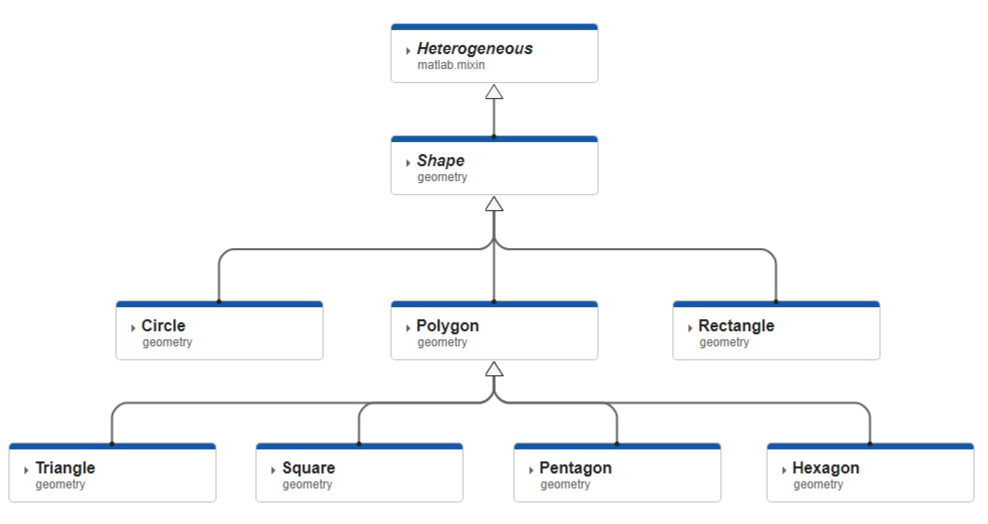
class of the hierarchy. The root class derives from matlab.mixin.Heterogeneous. This diagram shows the full heterogeneous
class hierarchy for this example. These classes are contained in a namespace called
geometry. For the code for all the classes in the hierarchy,
see Complete Code for the Shape Class Hierarchy.
Shape Class
The Shape class is the root of the heterogeneous hierarchy.
Shape derives from matlab.mixin.Heterogeneous and
is abstract.
classdef (Abstract) Shape < matlab.mixin.Heterogeneous
    properties (Abstract, SetAccess = private)
        Area (1,1) double
        Perimeter (1,1) double
    end

    % Concrete methods to call on an array of Shape objects
    methods (Sealed)
        function result = totalArea(array)
            result = sum([array.Area]);
        end

        function result = scale(array,factor)
            result = geometry.Shape.empty;
            for idx = 1:numel(array)
                result(idx) = scaleElement(array(idx),factor);
            end
            result = reshape(result,size(array));
        end
    end

    % Abstract methods that the subclasses must implement
    methods (Abstract, Hidden, Access = protected)
        result = scaleElement(obj,factor)
    end
end
The class of a heterogeneous array is the most specific superclass of the elements in the array. For example:
For an array that contains instances of
Circle,Rectangle, andHexagon, the class of the array isShape.For an array that contains only instances that are subclasses of
Polygon, such as an array containing onlyTriangleandSquareobjects, the class of the array isPolygon.
Shape Properties and Methods
The Shape class defines two abstract properties,
Area and Perimeter. Each concrete
subclass of Shape must define these inherited properties. The
subclasses also define additional properties that describe the specific shape
they represent, like Radius for
Circle.
As part of the heterogeneous hierarchy design, Shape defines
two groups of methods:
Concrete methods that you can call on a heterogeneous array of objects derived from
Shape.Abstract methods that subclasses must implement. These methods are protected so that they cannot be called on an array from outside the hierarchy.
When calling methods on a heterogeneous array, MATLAB® calls the methods defined by the class of the array. Concrete
methods defined by superclasses in a heterogeneous hierarchy must be sealed so
that there is only one implementation of each method to call on the array. The
concrete method totalArea sums the areas of all the individual
array elements by directly accessing their Area properties.
The concrete method scale uses a loop to call the subclass
implementations of scaleElement.
Shape Subclass Implementations
The subclasses of Shape are concrete and represent specific shapes.
They must implement the abstract properties Area and
Perimeter inherited from Shape. They must
also implement the scaleElement method to support the array method
scale.
Circle and Rectangle Classes
Circle implements the Area and
Perimeter properties, inherited from
Shape, as dependent properties with private set access. The
class also defines the property Radius, restricted to a
scalar double value that must be positive. (See Property Validation in Class Definitions for more information.)
properties (Dependent, SetAccess = private)
    Area
    Perimeter
end

properties
    Radius (1,1) double {mustBePositive} = 1
end
Circle uses Radius in the get methods for
Area and Perimeter.
methods
    function result = get.Area(obj)
        result = pi*(obj.Radius^2);
    end

    function result = get.Perimeter(obj)
        result = 2*pi*obj.Radius;
    end
end
Circle implements the scaleElement method
inherited from Shape. The method increases or decreases
Radius by a specified factor.
methods (Hidden, Access = protected)
   function obj = scaleElement(obj,factor)
      obj.Radius = factor*obj.Radius;
   end
end
The Rectangle class has a similar implementation, adding two
properties to represent the length and width of a rectangle. The
scaleElement method of Rectangle increases
or decreases both the length and width of the rectangle by a specified factor.
See Circle.m and Rectangle.m for the full class code.
Polygon Class
The Polygon class represents a regular polygon with any number
of sides. Like the Circle class, Polygon
implements the Area and Perimeter
properties, inherited from Shape, as dependent properties with
private set access. Polygon also defines the
LengthOfSide and NumSides
properties to represent the length of the sides and the number of sides of the
regular polygon it represents, respectively. NumSides has
private set access to prevent changing the number of sides after object
construction.
properties (SetAccess = private)
    NumSides (1,1) double {mustBeInteger, ...
                           mustBeGreaterThan(NumSides,2)} = 3
end

properties
    LengthOfSide (1,1) double {mustBePositive} = 1
end
Polygon uses these properties in the get methods for
Perimeter and
Area.
methods
    function result = get.Area(obj)
        N = obj.NumSides;
        S = obj.LengthOfSide;
        result = N*(S^2)/4/tan(pi/N);
    end

    function result = get.Perimeter(obj)
        result = obj.NumSides*obj.LengthOfSide;
    end
end
Polygon implements the scaleElement method
from Shape. The method increases or decreases
LengthOfSide by a specified factor.
methods (Hidden, Access = protected)
    function obj = scaleElement(obj,factor)
        obj.LengthOfSide = factor*obj.LengthOfSide;
    end
end
Polygon can represent any regular polygon, but it also has
subclasses that represent regular polygons with a specific number of sides, such
as Square and Pentagon. These classes inherit the
properties and methods of Polygon. The constructors of the
subclasses explicitly call the superclass constructor and pass it the user input
for LengthOfSide as well as the number of sides.
classdef (Sealed) Triangle < geometry.Polygon
    methods
        function obj = Triangle(lengthOfSide)
            obj@geometry.Polygon(3,lengthOfSide);
        end
    end
end
Create and Use Heterogeneous Arrays
Create several objects using the classes of the heterogeneous hierarchy.
c = geometry.Circle(2);
s = geometry.Square(4);
h = geometry.Hexagon(2);
nonagon = geometry.Polygon(9,3);
Because these objects are of classes in the heterogeneous hierarchy, you can
concatenate them into an array. The most specific superclass of this array is
Shape, so Shape is the class of the array.
shapes = [c s h nonagon]
shapes =

  1×4 heterogeneous Shape (Circle, Square, Hexagon, ...) array with no properties.
Call the totalArea method of Shape on the array.
totalArea sums the values of Area for the
entire array.
totalArea(shapes)
ans =

   94.5951
Call the scale method on the array with a factor of 2.
scale calls the scaleElement method defined by
the class of each element in the array. Compare the Radius of
the Circle instance before and after.
scaledShapes = scale(shapes,2);
shapes(1).Radius
scaledShapes(1).Radius
ans =

     2


ans =

     4
Define an array of only instances of Polygon and its subclasses.
The class of the heterogeneous array becomes Polygon instead of
Shape because Polygon is the most specific
superclass.
polygons = [h s nonagon]
polygons =

  1×3 heterogeneous Polygon (Hexagon, Square, Polygon) array with properties:

    Area
    Perimeter
    NumSides
    LengthOfSide
Additional Design Notes for the Shape Class Hierarchy
The constructors of all the classes require input arguments. The design encourages users to create fully configured shapes instead of shapes with arbitrary dimensions that must be configured after creation.
The current design does not define a default shape, so you cannot create a generic array of
Shapeobjects usingcreateArrayor array expansion. If you need this functionality, you can override the static methodmatlab.mixin.Heterogeneous.getDefaultScalarElementin your root class. See Default Object for more information.
Complete Code for the Shape Class Hierarchy
To work with the hierarchy of classes derived from Shape, create a
namespace folder called +geometry in a folder on your path. Save
each of the classes inside the +geometry folder.
Shape.m
classdef (Abstract) Shape < matlab.mixin.Heterogeneous
    properties (Abstract, SetAccess = private)
        Area (1,1) double
        Perimeter (1,1) double
    end

    % Concrete methods to call on an array of Shape objects
    methods (Sealed)
        function result = totalArea(array)
            result = sum([array.Area]);
        end

        function result = scale(array,factor)
            result = geometry.Shape.empty;
            for idx = 1:numel(array)
                result(idx) = scaleElement(array(idx),factor);
            end
            result = reshape(result,size(array));
        end
    end

    % Abstract methods that the subclasses must implement
    methods (Abstract, Hidden, Access = protected)
        result = scaleElement(obj,factor)
    end
end
Circle.m
classdef (Sealed) Circle < geometry.Shape
    properties (Dependent, SetAccess = private)
        Area
        Perimeter
    end

    properties
        Radius (1,1) double {mustBePositive} = 1
    end

    methods
        function obj = Circle(radius)
            obj.Radius = radius;
        end
    end

    methods
        function result = get.Area(obj)
            result = pi*(obj.Radius^2);
        end

        function result = get.Perimeter(obj)
            result = 2*pi*obj.Radius;
        end
    end

    methods (Hidden, Access = protected)
        function obj = scaleElement(obj,factor)
            obj.Radius = factor*obj.Radius;
        end
    end
end
Rectangle.m
classdef (Sealed) Rectangle < geometry.Shape
    properties (Dependent, SetAccess = private)
        Area
        Perimeter
    end

    properties
        Length (1,1) double {mustBePositive} = 1
        Width  (1,1) double {mustBePositive} = 1
    end

    methods
        function obj = Rectangle(length,width)
            obj.Length = length;
            obj.Width  = width;
        end
    end

    methods
        function result = get.Area(obj)
            result = obj.Length*obj.Width;
        end

        function result = get.Perimeter(obj)
            result = 2*obj.Length + 2*obj.Width;
        end
    end

    methods (Hidden, Access = protected)
        function obj = scaleElement(obj,factor)
            obj.Length = factor*obj.Length;
            obj.Width  = factor*obj.Width;
        end
    end
end
Polygon.m
classdef Polygon < geometry.Shape
    properties (Dependent, SetAccess = private)
        Area
        Perimeter
    end

    properties (SetAccess = private)
        NumSides (1,1) double {mustBeInteger, ...
                               mustBeGreaterThan(NumSides,2)} = 3
    end

    properties
        LengthOfSide (1,1) double {mustBePositive} = 1
    end

    methods
        function obj = Polygon(numSides,lengthOfSide)
            obj.NumSides = numSides;
            obj.LengthOfSide = lengthOfSide;
        end
    end

    methods
        function result = get.Area(obj)
            N = obj.NumSides;
            S = obj.LengthOfSide;
            result = N*(S^2)/4/tan(pi/N);
        end

        function result = get.Perimeter(obj)
            result = obj.NumSides*obj.LengthOfSide;
        end
    end

    methods (Hidden, Access = protected)
        function obj = scaleElement(obj,factor)
            obj.LengthOfSide = factor*obj.LengthOfSide;
        end
    end
end
Triangle.m
classdef (Sealed) Triangle < geometry.Polygon
    methods
        function obj = Triangle(lengthOfSide)
            obj@geometry.Polygon(3,lengthOfSide);
        end
    end
end
Square.m
classdef (Sealed) Square < geometry.Polygon
    methods
        function obj = Square(lengthOfSide)
            obj@geometry.Polygon(4,lengthOfSide);
        end
    end
end
Pentagon.m
classdef (Sealed) Pentagon < geometry.Polygon
    methods
        function obj = Pentagon(lengthOfSide)
            obj@geometry.Polygon(5,lengthOfSide);
        end
    end
end
Hexagon.m
classdef (Sealed) Hexagon < geometry.Polygon
    methods
        function obj = Hexagon(lengthOfSide)
            obj@geometry.Polygon(6,lengthOfSide);
        end
    end
end

