minibatchqueue
R2026bCreate mini-batches for deep learning
Description
Use a minibatchqueue object to create, preprocess, and manage
mini-batches of data for deep learning.
A minibatchqueue object iterates over a datastore or in-memory data arrays
to provide data in a suitable format for training or prediction. The object prepares a queue of
mini-batches that are preprocessed on demand. Use a minibatchqueue object to
automatically convert your data to dlarray or gpuArray,
convert data to a different precision, pad sequence data, encode categorical data, or apply a
custom function to preprocess your data. You can prepare your data in parallel in the
background.
You can manage your data in a custom training loop by using a
minibatchqueue object. You can shuffle the data at the start of each
training epoch using the shuffle function
and collect data from the queue for each training iteration using the next function. You
can check if any data is left in the queue using the hasdata function,
and reset the queue
when it is empty.
Creation
Syntax
Description
creates a mbq = minibatchqueue(ds)minibatchqueue object from the input datastore
ds. The mini-batches in mbq have the same number
of variables as the results of read on the input datastore.
creates a mbq = minibatchqueue(ds,numOutputs)minibatchqueue object from the input datastore
ds and sets the number of variables in each mini-batch. Use this
syntax when you use MiniBatchFcn to specify a mini-batch
preprocessing function that has a different number of outputs than the number of variables
of the input datastore ds.
creates a mbq = minibatchqueue(X1,...,XN)minibatchqueue object from one or
more in-memory data arrays X1,...,XN (since R2026b). When you use this
syntax, you must also specify the batch dimensions using the
BatchDimension name-value argument.
sets one or more properties using name-value arguments. For example,
mbq = minibatchqueue(___,Name=Value)minibatchqueue(ds,MiniBatchSize=64,PartialMiniBatch="discard") sets
the size of the returned mini-batches to 64 and discards any mini-batches with fewer than
64 observations.
Input Arguments
Input datastore, specified as a MATLAB® datastore or a custom datastore.
For more information about datastores for deep learning, see Datastores for Deep Learning.
Number of mini-batch variables, specified as a positive integer. By default, the number of mini-batch variables is equal to the number of variables of the input datastore.
You can determine the number of variables of the input datastore by examining the
output of read(ds). If your datastore returns a table, the number
of variables is the number of variables of the table. If your datastore returns a cell
array, the number of variables is the size of the second dimension of the cell array.
If you use the MiniBatchFcn name-value argument to specify a
mini-batch preprocessing function that returns a different number of variables than
the input datastore, you must set numOutputs to match the number of
outputs of the function.
Since R2026b
Input data arrays, specified as one or more numeric, logical, categorical, or cell arrays.
Each input array represents a data variable. The number of observations in each array must be the same.
When the input is a cell array, the software treats each element as a separate observation. Use cell arrays when observations have different sizes, such as sequences with different lengths.
When you specify input data arrays, you must also specify which dimension of each
array corresponds to the batch dimension using the BatchDimension
name-value argument.
Name-Value Arguments
Specify optional pairs of arguments as
Name1=Value1,...,NameN=ValueN, where Name is
the argument name and Value is the corresponding value.
Name-value arguments must appear after other arguments, but the order of the
pairs does not matter.
Example: minibatchqueue(ds,MiniBatchSize=64,PartialMiniBatch="discard")
sets the size of the returned mini-batches to 64 and discards any mini-batches with fewer
than 64 observations
Number of samples in each mini-batch returned by the next
function, specified as a positive integer.
Tip
For best performance, if the input datastore ds has a
ReadSize property, such as an imageDatastore, then set the
ReadSize property of the input datastore and the
MiniBatchSize property of the minibatchqueue
object to the same value. If the input datastore ds has a
MiniBatchSize property, such as an augmentedImageDatastore, then set the
MiniBatchSize property of the input datastore and the
MiniBatchSize argument value of
minibatchqueue to the same value.
This argument sets the MiniBatchSize property.
Mode of handling incomplete mini-batches when the total number of observations
is not exactly divisible by MiniBatchSize, specified as one of these:
"return"— Return incomplete mini-batches. The final mini-batch can contain fewer thanMiniBatchSizeobservations."discard"— Discard incomplete mini-batches. All mini-batches contain exactlyMiniBatchSizeobservations.
This argument sets the PartialMiniBatch property.
Mini-batch preprocessing function, specified as one of these:
"collate"— Concatenate mini-batch variables into arrays. If you specify theBatchDimensionargument, this function concatenates the mini-batch variables along the specified dimension. Otherwise, for scalars and row vectors, the function concatenates along the first dimension. For column vectors, the function concatenates along the second dimension. For all other arrays, the function concatenates along dimensionN+1, whereNis the number of dimensions of the array. To control the collation behavior, such as padding sequences, encoding categorical data, or specifying the batch dimension, use the collation argumentsBatchDimension,SequenceDimension,SequenceLength,SequencePaddingDirection,SequencePaddingValue,CategoricalEncoding, andChannelDimension.Function handle — Preprocess mini-batches for custom training workflows using the specified function. Custom mini-batch preprocessing functions require datastore input. If your data consists of cell arrays that contain arrays of different sizes and you do not specify padding using the
SequenceDimensionargument, then you must specify a custom function. The collation arguments do not support custom mini-batch preprocessing functions.The custom function must:
Accept at least as many inputs as the number of variables of the input datastore. The inputs are passed to the custom function as N-by-1 cell arrays, where N is the number of observations in the mini-batch.
Concatenate each batch of output variables into an array after preprocessing and return each variable as a separate function output.
The function can return as many variables as required. If the function specified by the
MiniBatchFcnvalue returns a different number of outputs than inputs, specifynumOutputsas the number of outputs of the function.
Do not use these actions inside the custom function. Instead, set the
corresponding argument when you create the minibatchqueue
object.
| Action | Recommended Argument |
|---|---|
| Cast variable to different data type. | OutputCast |
| Move data to GPU. | OutputEnvironment |
Convert data to dlarray. | OutputAsDlarray |
Apply data format to dlarray variable. | MiniBatchFormat |
This argument sets the MiniBatchFcn property.
Environment for fetching and preprocessing mini-batches, specified as one of these:
"serial"— Fetch and preprocess data in serial."background"— Fetch and preprocess data using the background pool. The mini-batch preprocessing functionMiniBatchFcnmust support thread-based environments. For more information, see Run MATLAB Functions in Thread-Based Environment."parallel"— Fetch and preprocess data using parallel workers. The software opens a parallel pool using the default profile, if a local pool is not currently open. Non-local parallel pools are not supported. Using this option requires Parallel Computing Toolbox™.
To use the "background" or "parallel"
options with datastore input, the input datastore must be subsettable or
partitionable. Custom datastores must inherit from the matlab.io.datastore.Subsettable class.
If you use the "background" or "parallel"
options, then the order in which the next function returns
mini-batches varies, making training a network using the
minibatchqueue nondeterministic even if you use the deep.gpu.deterministicAlgorithms function.
The preprocessing environment defines how the software applies the
MiniBatchFcn argument value but does not affect further
processing, including applying the effects of the OutputCast, OutputEnvironment, OutputAsDlarray, and MiniBatchFormat arguments.
Use the "background" option when your mini-batches require
significant preprocessing. If your preprocessing is not supported on threads, or if
you need to control the number of workers, then use the
"parallel" option. For more information about the preprocessing
environment, see Preprocess Data in the Background or in Parallel.
Before R2024a: To preprocess mini-batches in parallel,
set the DispatchInBackground argument value to
1 (true).
This argument sets the PreprocessingEnvironment property.
Since R2026b
Batch dimension of mini-batch variables, specified as one of these:
Positive integer — Concatenate observations along the specified dimension for all mini-batch variables to form a mini-batch.
Vector of positive integers — Concatenate observations along a different dimension for each mini-batch variable. The vector must have one element for each mini-batch variable.
NaN— Automatically determine the batch dimension. For scalars and row vectors, the default collation function concatenates along the first dimension. For column vectors, it concatenates along the second dimension. For all other arrays, it concatenates along dimensionN+1, whereNis the number of dimensions of the array. This option supports datastore input only.
When the input is in-memory data arrays, you must specify
BatchDimension as a positive integer or a vector of positive
integers.
For each mini-batch variable, the BatchDimension,
ChannelDimension, and SequenceDimension
argument values must be unique or NaN.
This argument only has an effect when the MiniBatchFcn
argument value is "collate".
This argument sets the BatchDimension property.
Since R2026b
Channel dimension of mini-batch variables, specified as one of these:
Positive integer — Expand one-hot encoded categories along the specified dimension for all mini-batch variables.
Vector of positive integers — Expand one-hot encoded categories along a different dimension for each mini-batch variable. The vector must have one element for each mini-batch variable.
NaN— No channel dimension. Do not expand one-hot encoded categories.
When the CategoricalEncoding argument value is
"one-hot", you must specify
ChannelDimension as a positive integer or a vector of
positive integers.
For each mini-batch variable, the BatchDimension,
ChannelDimension, and SequenceDimension
argument values must be unique or NaN.
This argument only has an effect when the MiniBatchFcn
argument value is "collate".
This argument sets the ChannelDimension property.
Since R2026b
Sequence dimension of mini-batch variables, specified as one of these:
Positive integer — Pad or truncate sequences along the specified dimension for all mini-batch variables, so that all observations in a mini-batch have the same length. Use the
SequenceLength,SequencePaddingDirection, andSequencePaddingValuearguments to control the padding behavior.Vector of positive integers — Pad or truncate sequences along a different dimension for each mini-batch variable. The vector must have one element for each mini-batch variable.
NaN— No sequence dimension. The software does not pad or truncate sequences.
For each mini-batch variable, the BatchDimension,
ChannelDimension, and SequenceDimension
values must be unique or NaN.
This argument only has an effect when the MiniBatchFcn
argument value is "collate".
This argument sets the SequenceDimension property.
Since R2026b
Method for handling variable-length sequences in a mini-batch, specified as one of these:
"longest"— Pad sequences to the length of the longest sequence in the mini-batch for all mini-batch variables."shortest"— Truncate sequences to the length of the shortest sequence in the mini-batch for all mini-batch variables.String array or cell array — Use a different sequence length method for each mini-batch variable. The array must have one element for each mini-batch variable, where each element is
"longest"or"shortest".
This argument only has an effect when the SequenceDimension
argument is not NaN and the MiniBatchFcn
argument value is "collate".
This argument sets the SequenceLength property.
Data Types: char | string | cell
Since R2026b
Value used for padding sequences, specified as one of these:
Scalar — Pad sequences with the specified value for all mini-batch variables.
Numeric vector — Pad sequences with a different value for each mini-batch variable. The vector must have one element for each mini-batch variable.
This argument only has an effect when the SequenceDimension
argument is not NaN and the MiniBatchFcn
argument value is "collate".
This argument sets the SequencePaddingValue property.
Since R2026b
Direction of sequence padding or truncation, specified as one of these:
"right"— Pad or truncate sequences on the right for all mini-batch variables. When padding, the padding value is added after the end of each sequence. When truncating, data is removed from the end of each sequence."left"— Pad or truncate sequences on the left for all mini-batch variables. When padding, the padding value is added before the start of each sequence. When truncating, data is removed from the start of each sequence.String array or cell array — Use a different padding direction for each mini-batch variable. The array must have one element for each mini-batch variable, where each element is
"right"or"left".
This argument only has an effect when the SequenceDimension
argument is not NaN and the MiniBatchFcn
argument value is "collate".
This argument sets the SequencePaddingDirection property.
Data Types: char | string | cell
Since R2026b
Encoding method for categorical data, specified as one of these:
"none"— Do not encode categorical data for all mini-batch variables. Categorical variables are left as categorical arrays."integer"— Encode categorical values as integers for all mini-batch variables. The encoded integer type is chosen automatically based on the number of categories. For example, if the number of categories is less than 254, the encoded type isuint8. The object applies theOutputCastargument value to the integer-encoded value, so the mini-batch queue output data type may differ from the encoded type."one-hot"— One-hot encode categorical values along the dimension specified byChannelDimensionfor all mini-batch variables. When you use this option, you must specifyChannelDimensionas a positive integer.String array or cell array of character vectors — Use a different encoding method for each mini-batch variable. The array must have one element for each mini-batch variable, where each element is
"none","integer", or"one-hot".
This argument only has an effect when the MiniBatchFcn
argument value is "collate".
This argument sets the CategoricalEncoding property.
Data Types: char | string | cell
Data type of each mini-batch variable, specified as one of these:
String scalar (
"single","double","int8","int16","int32","int64","uint8","uint16","uint32","uint64","logical", or"char") — Cast all mini-batch variables to the specified data type.""— Do not change the data type of any mini-batch variable.String array or cell array of character vectors — Cast each mini-batch variable to a different data type. The array must have one element for each mini-batch variable.
The value of OutputCast must not conflict with the values
of the OutputAsDlarray or
OutputEnvironment arguments. If
OutputAsDlarray is true, the data type
must be supported by dlarray.
If OutputEnvironment is "gpu" or
"auto" and a supported GPU is available, the data type must be
supported by gpuArray (Parallel Computing Toolbox).
This argument sets the OutputCast property.
Flag to convert mini-batch variables to dlarray, specified as
one of these:
1(true) — Convert all mini-batch variables todlarray.0(false) — Do not convert any mini-batch variables todlarray.Vector of logical values — Specify whether to convert each mini-batch variable to
dlarray. The vector must have one element for each mini-batch variable.
Variables that are converted to dlarray have the underlying
data type specified by the OutputCast argument.
This argument sets the OutputAsDlarray property.
Data format of mini-batch variables, specified as one of these:
String scalar or character vector — Apply the specified data format to all
dlarraymini-batch variables.String array or cell array of character vectors — Apply a different data format to each mini-batch variable. The array must have one element for each mini-batch variable. For any mini-batch variables that are not
dlarrayobjects, the format must be"".
If you specify more dimensions than are present in the data, they are added as
singleton dimensions. For example, to add a singleton channel dimension to the data,
add a trailing "C" dimension.
If you specify a format of "" for a mini-batch variable that
is a dlarray with an existing format, the
minibatchqueue does not remove the existing format.
A deep learning data format is a string of characters, where each character describes the type of the corresponding data dimension. The characters are:
"S"— Spatial"C"— Channel"B"— Batch"T"— Time"U"— Unspecified
For example, suppose you have an array that represents a batch of sequences where the
first, second, and third dimensions correspond to channels, observations, and time steps,
respectively. You can describe the data as having the format "CBT"
(channel, batch, time).
You can specify multiple dimensions labeled "S" or "U".
You can use the labels "C", "B", and
"T" at most once each. The software ignores singleton trailing
"U" dimensions after the second dimension.
For more information, see Deep Learning Data Formats.
This argument sets the MiniBatchFormat property.
Hardware resource for mini-batch variables returned using the next
function, specified as one of these:
"auto"— Return all mini-batch variables on the GPU if one is available. Otherwise, return all mini-batch variables on the CPU."gpu"— Return all mini-batch variables on the GPU."cpu"— Return all mini-batch variables on the CPU.String array or cell array of character vectors — Use a different hardware resource for each mini-batch variable. The array must have one element for each mini-batch variable, where each element is
"auto","gpu", or"cpu".
Using a GPU requires Parallel Computing Toolbox. To use a GPU for deep
learning, you must also have a supported GPU device. For information on supported devices, see
GPU Computing Requirements (Parallel Computing Toolbox). If you choose the "gpu" option and Parallel Computing Toolbox or a suitable GPU is not available, then the software returns an
error.
This argument sets the OutputEnvironment property.
Properties
Mini-Batch Creation
This property is read-only after object creation. To set this property, use the corresponding
name-value argument when you create the minibatchqueue object.
Number of samples in each mini-batch returned by the next
function, stored as a positive integer.
Data Types: double
Mode of handling incomplete mini-batches when the total number of observations is
not exactly divisible by MiniBatchSize, specified as one of these:
'return'— Return incomplete mini-batches. The final mini-batch can contain fewer thanMiniBatchSizeobservations.'discard'— Discard incomplete mini-batches. All mini-batches contain exactlyMiniBatchSizeobservations.
This property is read-only after object creation. To set this property, use the corresponding
name-value argument when you create the minibatchqueue object.
Mini-batch preprocessing function, stored as one of these:
'collate'— Concatenate mini-batch variables into arrays. If you specify theBatchDimensionargument, this function concatenates the mini-batch variables along the specified dimension. Otherwise, for scalars and row vectors, the function concatenates along the first dimension. For column vectors, the function concatenates along the second dimension. For all other arrays, the function concatenates along dimensionN+1, whereNis the number of dimensions of the array.Function handle — Preprocess mini-batches for custom training workflows using the specified function. Custom mini-batch preprocessing functions require datastore input. The inputs are passed to the custom function as N-by-1 cell arrays, where N is the number of observations in the mini-batch.
Data Types: char | function_handle
Since R2024a
Environment for fetching and preprocessing mini-batches, specified as one of these:
'serial'— Fetch and preprocess data in serial.'background'— Fetch and preprocess data using the background pool. The mini-batch preprocessing functionMiniBatchFcnmust support thread-based environments. For more information, see Run MATLAB Functions in Thread-Based Environment.'parallel'— Fetch and preprocess data using parallel workers. The software opens a parallel pool using the default profile, if a local pool is not currently open. Non-local parallel pools are not supported. Using this option requires Parallel Computing Toolbox.
To use the 'background' or 'parallel'
options with datastore input, the input datastore must be subsettable or
partitionable. Custom datastores must inherit from the matlab.io.datastore.Subsettable class.
If you use the 'background' or 'parallel'
options, then the order in which the next function returns
mini-batches varies, making training a network using the
minibatchqueue nondeterministic even if you use the deep.gpu.deterministicAlgorithms function.
The preprocessing environment defines how the software applies the
MiniBatchFcn argument value but does not affect further
processing, including applying the effects of the OutputCast,
OutputEnvironment, OutputAsDlarray, and MiniBatchFormat arguments.
Use the 'background' option when your mini-batches require
significant preprocessing. If your preprocessing is not supported on threads, or if
you need to control the number of workers, then use the 'parallel'
option. For more information about the preprocessing environment, see Preprocess Data in the Background or in Parallel.
Before R2024a: To preprocess mini-batches in parallel, set
the DispatchInBackground argument value to 1
(true).
Collation
Since R2026b
This property is read-only after object creation. To set this property, use the corresponding
name-value argument when you create the minibatchqueue object.
Batch dimension of mini-batch variables, stored as one of these:
Positive integer — Concatenate observations along the specified dimension for all mini-batch variables to form a mini-batch.
Vector of positive integers — Concatenate observations along a different dimension for each mini-batch variable.
NaN— Automatically determine the batch dimension. For scalars and row vectors, the default collation function concatenates along the first dimension. For column vectors, it concatenates along the second dimension. For all other arrays, it concatenates along dimensionN+1, whereNis the number of dimensions of the array.
This property only has an effect when the MiniBatchFcn
property value is 'collate'.
Data Types: double
Since R2026b
This property is read-only after object creation. To set this property, use the corresponding
name-value argument when you create the minibatchqueue object.
Channel dimension of mini-batch variables, stored as one of these:
Positive integer — Expand one-hot encoded categories along the specified dimension for all mini-batch variables.
Vector of positive integers — Expand one-hot encoded categories along a different dimension for each mini-batch variable.
NaN— Do not expand one-hot encoded categories.
This property only has an effect when the MiniBatchFcn
property value is 'collate'.
Data Types: double
Since R2026b
This property is read-only after object creation. To set this property, use the corresponding
name-value argument when you create the minibatchqueue object.
Sequence dimension of mini-batch variables, stored as one of these:
Positive integer — Pad or truncate sequences along the specified dimension for all mini-batch variables, so that all observations in a mini-batch have the same length.
Vector of positive integers — Pad or truncate sequences along a different dimension for each mini-batch variable.
NaN— No sequence dimension. The software does not pad or truncate sequences.
This property only has an effect when the MiniBatchFcn
property value is 'collate'.
Data Types: double
Since R2026b
This property is read-only after object creation. To set this property, use the corresponding
name-value argument when you create the minibatchqueue object.
Method for handling variable-length sequences in a mini-batch, stored as one of these:
'longest'— Pad sequences to the length of the longest sequence in the mini-batch for all mini-batch variables.'shortest'— Truncate sequences to the length of the shortest sequence in the mini-batch for all mini-batch variables.Cell array of character vectors — Use a different sequence length method for each mini-batch variable.
This property only has an effect when the SequenceDimension
property value is not NaN and the MiniBatchFcn
property value is 'collate'.
Data Types: char | cell
Since R2026b
This property is read-only after object creation. To set this property, use the corresponding
name-value argument when you create the minibatchqueue object.
Value used for padding sequences, stored as one of these:
Scalar — Pad sequences with the specified value for all mini-batch variables.
Numeric vector — Pad sequences with a different value for each mini-batch variable.
This property only has an effect when the SequenceDimension
property value is not NaN and the MiniBatchFcn
property value is 'collate'.
Data Types: double
Since R2026b
This property is read-only after object creation. To set this property, use the corresponding
name-value argument when you create the minibatchqueue object.
Direction of sequence padding or truncation, stored as one of these:
'right'— Pad or truncate sequences on the right for all mini-batch variables. When padding, the padding value is added after the end of each sequence. When truncating, data is removed from the end of each sequence.'left'— Pad or truncate sequences on the left for all mini-batch variables. When padding, the padding value is added before the start of each sequence. When truncating, data is removed from the start of each sequence.Cell array of character vectors — Use a different padding direction for each mini-batch variable.
This property only has an effect when the SequenceDimension
property value is not NaN and the MiniBatchFcn
property value is 'collate'.
Data Types: char | cell
Since R2026b
This property is read-only after object creation. To set this property, use the corresponding
name-value argument when you create the minibatchqueue object.
Encoding method for categorical data, stored as one of these:
'none'— Do not encode categorical data for all mini-batch variables. Categorical variables are left as categorical arrays.'integer'— Encode categorical values as integers for all mini-batch variables. The encoded integer type is chosen automatically based on the number of categories. For example, if the number of categories is less than 254, the encoded type isuint8. The object applies theOutputCastproperty value to the integer-encoded value, so the mini-batch queue output data type may differ from the encoded type.'one-hot'— One-hot encode categorical values along the dimension specified byChannelDimensionfor all mini-batch variables.Cell array of character vectors — Use a different encoding method for each mini-batch variable.
This property only has an effect when the MiniBatchFcn
property value is 'collate'.
Data Types: char | cell
Outputs
This property is read-only after object creation. To set this property, use the corresponding
name-value argument when you create the minibatchqueue object.
Data type of each mini-batch variable, stored as one of these:
Cell array containing a single character vector (
'single','double','int8','int16','int32','int64','uint8','uint16','uint32','uint64','logical', or'char') — Cast all mini-batch variables to the specified data type.{''}— Do not change the data type of any mini-batch variable.Cell array of character vectors — Cast each mini-batch variable to a different data type.
This property is read-only after object creation. To set this property, use the corresponding
name-value argument when you create the minibatchqueue object.
Flag to convert mini-batch variables to dlarray, stored as one
of these:
1(true) — Convert all mini-batch variables todlarray.0(false) — Do not convert any mini-batch variables todlarray.Vector of logical values — Specify whether to convert each mini-batch variable to
dlarray.
Variables that are converted to dlarray have the underlying data
type specified by the OutputCast property value.
This property is read-only after object creation. To set this property, use the corresponding
name-value argument when you create the minibatchqueue object.
Data format of mini-batch variables, stored as a cell array of character vectors.
A deep learning data format is a string of characters, where each character describes the type of the corresponding data dimension. The characters are:
"S"— Spatial"C"— Channel"B"— Batch"T"— Time"U"— Unspecified
For example, suppose you have an array that represents a batch of sequences where the
first, second, and third dimensions correspond to channels, observations, and time steps,
respectively. You can describe the data as having the format "CBT"
(channel, batch, time).
If the format is '' for a mini-batch variable that is a
dlarray with an existing format, then the
minibatchqueue does not remove the existing format.
For more information, see Deep Learning Data Formats.
Data Types: cell
Hardware resource for mini-batch variables returned using the next
function, specified as one of these:
{'auto'}— Return all mini-batch variables on the GPU if one is available. Otherwise, return all mini-batch variables on the CPU.{'gpu'}— Return all mini-batch variables on the GPU.{'cpu'}— Return all mini-batch variables on the CPU.Cell array of character vectors — Use a different hardware resource for each mini-batch variable. The array must have one element for each mini-batch variable, where each element is
'auto','gpu', or'cpu'.
Using a GPU requires Parallel Computing Toolbox. To use a GPU for deep
learning, you must also have a supported GPU device. For information on supported devices, see
GPU Computing Requirements (Parallel Computing Toolbox). If you choose the 'gpu' option and Parallel Computing Toolbox or a suitable GPU is not available, then the software returns an
error.
Object Functions
Examples
Use a minibatchqueue object to automatically prepare
mini-batches of images and classification labels for training using the trainnet
function or in a custom training loop.
Create a datastore. Calling read on auimds
produces a table with two variables: input, containing the image
data, and response, containing the corresponding classification
labels.
auimds = augmentedImageDatastore([100 100],digitDatastore); A = read(auimds); head(A,2)
ans =
input response
_______________ ________
{100×100 uint8} 0
{100×100 uint8} 0
Create a minibatchqueue object from auimds. Set
the MiniBatchSize property to 256.
The minibatchqueue object has two output variables: the images and
classification labels from the input and response
variables of auimds, respectively. Set the
minibatchqueue object to return the images as a formatted
dlarray on the GPU. The images are single-channel black-and-white
images. Add a singleton channel dimension by applying the format
"SSBC" to the batch. Return the labels as a
non-dlarray on the CPU.
mbq = minibatchqueue(auimds,... MiniBatchSize=256, ... OutputAsDlarray=[1 0], ... MiniBatchFormat=["SSBC" ""], ... OutputEnvironment=["gpu" "cpu"])
To obtain mini-batches from mbq to use in a custom training loop,
use the next function.
[X,Y] = next(mbq);
Preprocess data using a minibatchqueue with a custom mini-batch preprocessing function. The custom function rescales the incoming image data between 0 and 1 and calculates the average image.
Unzip the data and create a datastore.
unzip("MerchData.zip"); imds = imageDatastore("MerchData", ... IncludeSubfolders=true, ... LabelSource="foldernames");
Create a minibatchqueue.
Set the number of outputs to
2to match the number of outputs of the function.Set the mini-batch size.
Preprocess the data using the custom function
preprocessMiniBatchdefined at the end of this example. The custom function concatenates the image data into a numeric array, rescales the image between 0 and 1, and calculates the average of the batch of images. The function returns the rescaled batch of images and the average image.Apply the preprocessing function in the background by setting the
PreprocessingEnvironmentproperty to"background". You can preprocess your data in the background if your preprocessing function is supported for a thread-based environment.Do not convert the mini-batch output variables to a
dlarray.
mbq = minibatchqueue(imds,2,... MiniBatchSize=16,... MiniBatchFcn=@preprocessMiniBatch,... PreprocessingEnvironment="background",... OutputAsDlarray=false)
mbq =
minibatchqueue with 2 outputs and properties:
Mini-batch creation:
MiniBatchSize: 16
PartialMiniBatch: 'return'
MiniBatchFcn: @preprocessMiniBatch
PreprocessingEnvironment: 'background'
Outputs:
OutputCast: {'single' 'single'}
OutputAsDlarray: [0 0]
MiniBatchFormat: {'' ''}
OutputEnvironment: {'auto' 'auto'}
Obtain a mini-batch and display the average of the images in the mini-batch. A thread worker in the backgroundPool applies the preprocessing function.
[X,averageImage] = next(mbq); imshow(averageImage)

function [X,averageImage] = preprocessMiniBatch(XCell) X = cat(4,XCell{:}); X = rescale(X,InputMin=0,InputMax=255); averageImage = mean(X,4); end
Train a network using minibatchqueue to manage the processing of mini-batches.
Load Training Data
Load the digits training data and store the data in a datastore. Create a datastore for the images and one for the labels using arrayDatastore. Then, combine the datastores to produce a single datastore to use with minibatchqueue.
[XTrain,YTrain] = digitTrain4DArrayData; dsX = arrayDatastore(XTrain,IterationDimension=4); dsY = arrayDatastore(YTrain); dsTrain = combine(dsX,dsY);
Determine the number of unique classes in the label data.
classes = categories(YTrain); numClasses = numel(classes);
Define Network
Create a dlnetwork object.
net = dlnetwork;
Specify the layers and the average image value using the Mean option in the image input layer.
layers = [
imageInputLayer([28 28 1],Mean=mean(XTrain,4))
convolution2dLayer(5,20)
reluLayer
convolution2dLayer(3,20,Padding=1)
reluLayer
convolution2dLayer(3,20,Padding=1)
reluLayer
fullyConnectedLayer(numClasses)
softmaxLayer];Add the layers and initialize the network.
net = addLayers(net,layers); net = initialize(net);
Define Model Loss Function
Create the helper function modelLoss, listed at the end of the example. The function takes as input a dlnetwork object net and a mini-batch of input data X with corresponding labels Y, and returns the loss and the gradients of the loss with respect to the learnable parameters in net.
Specify Training Options
Specify the options to use during training.
numEpochs = 10; miniBatchSize = 128;
Visualize the training progress in a plot.
plots = "training-progress";Create the minibatchqueue
Use minibatchqueue to process and manage the mini-batches of images. For each mini-batch:
Discard partial mini-batches.
Use the custom mini-batch preprocessing function
preprocessMiniBatch(defined at the end of this example) to one-hot encode the class labels.Format the image data with the dimension labels
'SSCB'(spatial, spatial, channel, batch). By default, theminibatchqueueobject converts the data todlarrayobjects with underlying data typesingle. Do not add a format to the class labels.Train on a GPU if one is available. By default, the
minibatchqueueobject converts each output to agpuArrayif a GPU is available. Using a GPU requires Parallel Computing Toolbox™ and a supported GPU device. For information on supported devices, see GPU Computing Requirements (Parallel Computing Toolbox).
mbq = minibatchqueue(dsTrain,... MiniBatchSize=miniBatchSize,... PartialMiniBatch="discard",... MiniBatchFcn=@preprocessMiniBatch,... MiniBatchFormat=["SSCB",""]);
Train Network
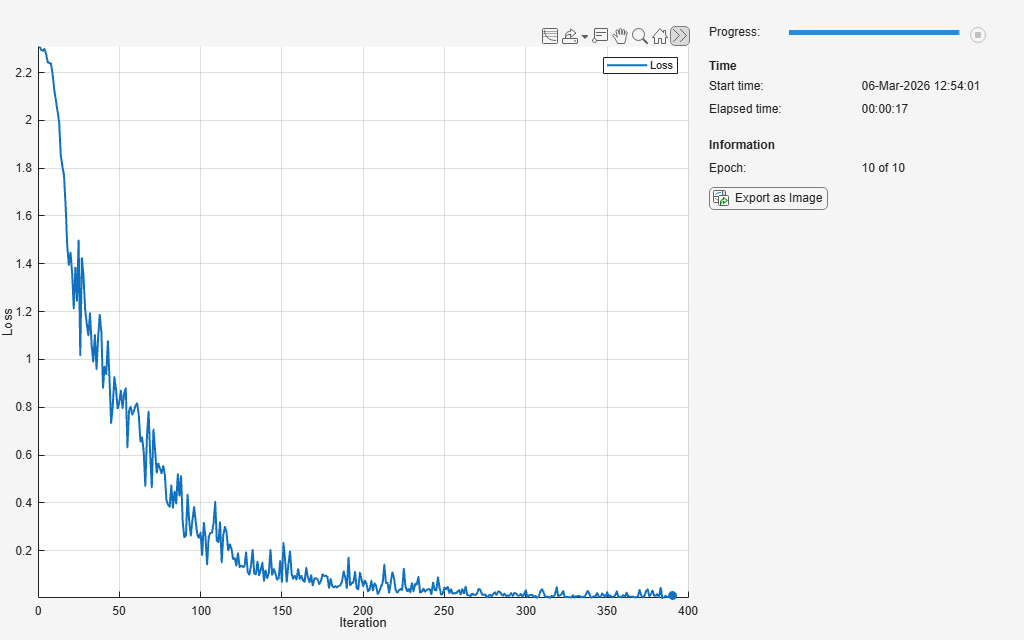
Train the model using a custom training loop. For each epoch, shuffle the data and loop over mini-batches while data is still available in the minibatchqueue. Update the network parameters using the adamupdate function. At the end of each epoch, display the training progress.
Initialize the average gradients and squared average gradients.
averageGrad = []; averageSqGrad = [];
Calculate the total number of iterations for the training progress monitor.
numObservationsTrain = numel(YTrain); numIterationsPerEpoch = floor(numObservationsTrain / miniBatchSize); numIterations = numEpochs * numIterationsPerEpoch;
Initialize the TrainingProgressMonitor object. Because the timer starts when you create the monitor object, make sure that you create the object close to the training loop.
if plots == "training-progress" monitor = trainingProgressMonitor(Metrics="Loss",Info="Epoch",XLabel="Iteration"); end
Train the network.
iteration = 0; epoch = 0; while epoch < numEpochs && ~monitor.Stop epoch = epoch + 1; % Shuffle data. shuffle(mbq); while hasdata(mbq) && ~monitor.Stop iteration = iteration + 1; % Read mini-batch of data. [X,Y] = next(mbq); % Evaluate the model loss and gradients using dlfeval and the % modelLoss helper function. [loss,grad] = dlfeval(@modelLoss,net,X,Y); % Update the network parameters using the Adam optimizer. [net,averageGrad,averageSqGrad] = adamupdate(net,grad,averageGrad,averageSqGrad,iteration); % Update the training progress monitor. if plots == "training-progress" recordMetrics(monitor,iteration,Loss=loss); updateInfo(monitor,Epoch=epoch + " of " + numEpochs); monitor.Progress = 100 * iteration/numIterations; end end end
Model Loss Function
The modelLoss helper function takes as input a dlnetwork object net and a mini-batch of input data X with corresponding labels Y, and returns the loss and the gradients of the loss with respect to the learnable parameters in net. To compute the gradients automatically, use the dlgradient function.
function [loss,gradients] = modelLoss(net,X,Y) YPred = forward(net,X); loss = crossentropy(YPred,Y); gradients = dlgradient(loss,net.Learnables); end
Mini-Batch Preprocessing Function
The preprocessMiniBatch function preprocesses the data using the following steps:
Extract the image data from the incoming cell array and concatenate the data into a numeric array. Concatenating the image data over the fourth dimension adds a third dimension to each image, to be used as a singleton channel dimension.
Extract the label data from the incoming cell array and concatenate along the second dimension into a categorical array.
One-hot encode the categorical labels into numeric arrays. Encoding into the first dimension produces an encoded array that matches the shape of the network output.
function [X,Y] = preprocessMiniBatch(XCell,YCell) % Extract image data from the cell array and concatenate over fourth % dimension to add a third singleton dimension, as the channel % dimension. X = cat(4,XCell{:}); % Extract label data from cell and concatenate. Y = cat(2,YCell{:}); % One-hot encode labels. Y = onehotencode(Y,1); end
Version History
Introduced in R2020bCreate a minibatchqueue object directly from in-memory data arrays
using the X1,...,XN arguments. When you use in-memory data arrays, indicate which
dimension of the arrays corresponds to the batch dimension using the BatchDimension
name-value argument.
Specify which dimensions to use for mini-batch concatenation, categorical encoding,
and sequence padding using the BatchDimension,
ChannelDimension,
and SequenceDimension
name-value arguments, respectively. To further customize categorical encoding options, use
the CategoricalEncoding name-value argument. To further customize the sequence
padding options, use the SequenceLength,
SequencePaddingDirection, and SequencePaddingValue name-value arguments.
Setting the DispatchInBackground property is not recommended. Set
the PreprocessingEnvironment property instead.
The PreprocessingEnvironment property provides the same
functionality and also allows you to use the backgroundPool for
preprocessing when you set PreprocessingEnvironment to
"background".
This table shows how to update your code:
| Not recommended | Recommended |
|---|---|
minibatchqueue(imds,DispatchInBackground=false)
(default) | minibatchqueue(imds,PreprocessingEnvironment="serial")
(default) |
minibatchqueue(imds,DispatchInBackground=true) | minibatchqueue(imds,PreprocessingEnvironment="parallel") |
There are no plans to remove the DispatchInBackground
property.
MATLAB Command
You clicked a link that corresponds to this MATLAB command:
Run the command by entering it in the MATLAB Command Window. Web browsers do not support MATLAB commands.
Seleziona un sito web
Seleziona un sito web per visualizzare contenuto tradotto dove disponibile e vedere eventi e offerte locali. In base alla tua area geografica, ti consigliamo di selezionare: .
Puoi anche selezionare un sito web dal seguente elenco:
Come ottenere le migliori prestazioni del sito
Per ottenere le migliori prestazioni del sito, seleziona il sito cinese (in cinese o in inglese). I siti MathWorks per gli altri paesi non sono ottimizzati per essere visitati dalla tua area geografica.
Americhe
- América Latina (Español)
- Canada (English)
- United States (English)
Europa
- Belgium (English)
- Denmark (English)
- Deutschland (Deutsch)
- España (Español)
- Finland (English)
- France (Français)
- Ireland (English)
- Italia (Italiano)
- Luxembourg (English)
- Netherlands (English)
- Norway (English)
- Österreich (Deutsch)
- Portugal (English)
- Sweden (English)
- Switzerland
- United Kingdom (English)