spectralConvolution3dLayer
Description
A 3-D spectral convolutional layer performs convolution on 3-D input using frequency domain transformations. The layer convolves the input by using the frequency domain representation, where convolution becomes multiplication via the Fourier theorem.
The dimensions that the layer convolves over depends on the layer input:
For 3-D image input (data with five dimensions corresponding to pixels in three spatial dimensions, the channels, and the observations), the layer convolves over the spatial dimensions.
For 3-D image sequence input (data with six dimensions corresponding to the pixels in three spatial dimensions, the channels, the observations, and the time steps), the layer convolves over the spatial dimensions.
For 2-D image sequence input (data with five dimensions corresponding to the pixels in two spatial dimensions, the channels, the observations, and the time steps), the layer convolves over the spatial and time dimensions.
Creation
Syntax
Description
creates a 3-D spectral convolutional layer and sets the layer = spectralConvolution3dLayer(numModes,hiddenSize)NumModes and
HiddenSizes properties.
also specifies options using one or more name-value arguments. For example,
layer = spectralConvolution3dLayer(numModes,hiddenSize,Name=Value)Name="spec" specifies that the layer has the name
"spec".
Input Arguments
Number of modes, specified as one of these:
Vector of two positive integers
[n m k]— Usen,m, andkas the number of modes in the vertical, horizontal, and depth dimensions, respectively.Positive integer — Use the specified value as the number of modes in vertical, horizontal, and depth dimensions.
For each dimension j that the layer operates over, the layer computes
the Fourier transform of the input data, extracts the first NumModes(j) frequency components, and then performs convolution using the
Weights property in the frequency domain.
Each value in numModes must be less than or equal to
(convDimSize + 1)/2, where convDimSize is the
size of the input in the corresponding convolution dimension.
This argument sets the NumModes
property.
Data Types: single | double | int8 | int16 | int32 | int64 | uint8 | uint16 | uint32 | uint64
Hidden size, specified as a positive integer.
The hidden size specifies the number of convolutional filters that the layer applies in the frequency domain.
This argument sets the HiddenSize
property.
Data Types: single | double | int8 | int16 | int32 | int64 | uint8 | uint16 | uint32 | uint64
Name-Value Arguments
Specify optional pairs of arguments as
Name1=Value1,...,NameN=ValueN, where Name is
the argument name and Value is the corresponding value.
Name-value arguments must appear after other arguments, but the order of the
pairs does not matter.
Example: spectralConvolution3dLayer(16,32,Name="spec") creates a 3-D
spectral convolutional layer with 16 modes, a hidden size of 32, and the name
"spec".
Function to initialize the weights, specified as one of these:
"complex-glorot-normal"— Initialize the weights using the complex-valued Glorot initializer [2] (also known as the complex-valued Xavier initializer). This initializer independently samples the real and imaginary parts of the weights from a normal distribution with a mean of zero and a variance of2/(numIn + numOut), wherenumInandnumOutcorrespond to theInputSizeandHiddenSizeproperties, respectively."complex-glorot-uniform-square"— Initialize the weights using the complex-valued Glorot uniform square initializer (also known as the complex-valued Xavier uniform square initializer). This initializer independently samples the real and imaginary parts of the weights from a uniform distribution with bounds at-2/(numIn + numOut)and2/(numIn + numOut), wherenumInandnumOutcorrespond to theInputSizeandHiddenSizeproperties, respectively."complex-he-normal"— Initialize the weights using the complex-valued He initializer [3]. This initializer independently samples the real and imaginary parts of the weights from a normal distribution with a mean of zero and a variance of2/numIn, wherenumIncorresponds toInputSize."complex-he-uniform-square"— Initialize the weights using the complex-valued He uniform square initializer. This initializer independently samples the real and imaginary parts of the weights from a uniform distribution with bounds at-2/numInand2/numIn, wherenumIncorresponds to theInputSizeproperty."complex-narrow-normal"— Initialize the real and imaginary parts of the weights by independently sampling from a normal distribution with a mean of zero and a standard deviation of 0.01."zeros"— Initialize the weights with zeros."ones"— Initialize the weights with ones.Function handle — Initialize the weights with a custom function. If you specify a function handle, then the function syntax must be of the form
weights = func(sz), whereszis the size of the weights. For an example, see Specify Custom Weight Initialization Function.
The layer initializes the weights only when the Weights property
is empty.
This argument sets the WeightsInitializer property.
Data Types: char | string | function_handle
Layer weights for the convolution operation, specified as a
NumModes(1)-by-NumModes(2)-by-NumModes(3)-by-InputSize-by-HiddenSize
numeric array or [].
The layer weights are learnable parameters. You can specify the initial value of the weights
directly using the Weights property of the layer. When
you train a network, if the Weights property of the layer
is nonempty, then the trainnet
function uses the Weights property as the initial value.
If the Weights property is empty, then the software uses
the initializer specified by the WeightsInitializer
property of the layer.
This argument sets the Weights
property.
Data Types: single | double
Complex Number Support: Yes
Learning rate factor for the weights, specified as a nonnegative scalar.
The software multiplies this factor by the global learning rate to determine the learning rate for the weights in this layer. For example, if WeightLearnRateFactor is 2, then the learning rate for the weights in this layer is twice the current global learning rate. The software determines the global learning rate based on the settings you specify using the trainingOptions function.
This argument sets the WeightLearnRateFactor property.
Data Types: single | double | int8 | int16 | int32 | int64 | uint8 | uint16 | uint32 | uint64
L2 regularization factor for the weights, specified as a nonnegative scalar.
The software multiplies this factor by the global L2 regularization factor to determine the L2 regularization for the weights in this layer. For example, if WeightL2Factor is 2, then the L2 regularization for the weights in this layer is twice the global L2 regularization factor. You can specify the global L2 regularization factor using the trainingOptions function.
This argument sets the WeightL2Factor
property.
Data Types: single | double | int8 | int16 | int32 | int64 | uint8 | uint16 | uint32 | uint64
Properties
3-D Spectral Convolution
This property is read-only after object creation. To set this property, use the corresponding
positional input argument when you create the SpectralConvolution3DLayer
object.
Number of modes, specified as a vector of three positive integers [n m
k] — Use n and m values for the
number of modes in the vertical, horizontal, and depth dimensions,
respectively.
For each dimension j that the layer operates over, the layer computes
the Fourier transform of the input data, extracts the first NumModes(j) frequency components, and then performs convolution using the
Weights property in the frequency domain.
Data Types: double
This property is read-only after object creation. To set this property, use the corresponding
positional input argument when you create the SpectralConvolution3DLayer
object.
Hidden size, specified as a positive integer.
The hidden size specifies the number of convolutional filters that the layer applies in the frequency domain.
Data Types: double
This property is read-only.
Input size for the layer, specified as a positive integer or
'auto'. If InputSize is
'auto', then the software automatically determines the input size
during training.
Data Types: double | char
Parameters and Initialization
Function to initialize the weights, specified as one of these:
'complex-glorot-normal'— Initialize the weights using the complex-valued Glorot initializer [2] (also known as the complex-valued Xavier initializer). This initializer independently samples the real and imaginary parts of the weights from a normal distribution with a mean of zero and a variance of2/(numIn + numOut), wherenumInandnumOutcorrespond to theInputSizeandHiddenSizeproperties, respectively.'complex-glorot-uniform-square'— Initialize the weights using the complex-valued Glorot uniform square initializer (also known as the complex-valued Xavier uniform square initializer). This initializer independently samples the real and imaginary parts of the weights from a uniform distribution with bounds at-2/(numIn + numOut)and2/(numIn + numOut), wherenumInandnumOutcorrespond to theInputSizeandHiddenSizeproperties, respectively.'complex-he-normal'— Initialize the weights using the complex-valued He initializer [3]. This initializer independently samples the real and imaginary parts of the weights from a normal distribution with a mean of zero and a variance of2/numIn, wherenumIncorresponds toInputSize.'complex-he-uniform-square'— Initialize the weights using the complex-valued He uniform square initializer. This initializer independently samples the real and imaginary parts of the weights from a uniform distribution with bounds at-2/numInand2/numIn, wherenumIncorresponds to theInputSizeproperty.'complex-narrow-normal'— Initialize the real and imaginary parts of the weights by independently sampling from a normal distribution with a mean of zero and a standard deviation of 0.01.'zeros'— Initialize the weights with zeros.'ones'— Initialize the weights with ones.Function handle — Initialize the weights with a custom function. If you specify a function handle, then the function syntax must be of the form
weights = func(sz), whereszis the size of the weights. For an example, see Specify Custom Weight Initialization Function.
Data Types: char | function_handle
Layer weights for the convolution operation, specified as a
NumModes(1)-by-NumModes(2)-by-NumModes(3)-by-InputSize-by-HiddenSize
numeric array or [].
The layer weights are learnable parameters. You can specify the initial value of the weights
directly using the Weights property of the layer. When
you train a network, if the Weights property of the layer
is nonempty, then the trainnet
function uses the Weights property as the initial value.
If the Weights property is empty, then the software uses
the initializer specified by the WeightsInitializer
property of the layer.
Data Types: single | double
Complex Number Support: Yes
Learning Rate and Regularization
Learning rate factor for the weights, specified as a nonnegative scalar.
The software multiplies this factor by the global learning rate to determine the learning rate for the weights in this layer. For example, if WeightLearnRateFactor is 2, then the learning rate for the weights in this layer is twice the current global learning rate. The software determines the global learning rate based on the settings you specify using the trainingOptions function.
Data Types: double
L2 regularization factor for the weights, specified as a nonnegative scalar.
The software multiplies this factor by the global L2 regularization factor to determine the L2 regularization for the weights in this layer. For example, if WeightL2Factor is 2, then the L2 regularization for the weights in this layer is twice the global L2 regularization factor. You can specify the global L2 regularization factor using the trainingOptions function.
Data Types: double
Layer
This property is read-only.
Number of inputs to the layer, stored as 1. This layer accepts a
single input only.
Data Types: double
This property is read-only.
Input names, stored as {'in'}. This layer accepts a single input
only.
Data Types: cell
This property is read-only.
Number of outputs from the layer, stored as 1. This layer has a
single output only.
Data Types: double
This property is read-only.
Output names, stored as {'out'}. This layer has a single output
only.
Data Types: cell
Examples
Create a 3-D spectral convolution layer with 16 modes and a hidden size of 32.
layer = spectralConvolution3dLayer(16,32)
layer =
SpectralConvolution3DLayer with properties:
Name: ''
Hyperparameters
NumModes: [16 16 16]
InputSize: 'auto'
HiddenSize: 32
Learnable Parameters
Weights: []
Show all properties
Include a 3-D spectral convolution layer in a layer array.
layers = [
image3dInputLayer([32 32 32 3])
spectralConvolution3dLayer(16,32)
reluLayer
fullyConnectedLayer(10)
softmaxLayer];Create a networkLayer object that represents a 3-D Fourier layer.
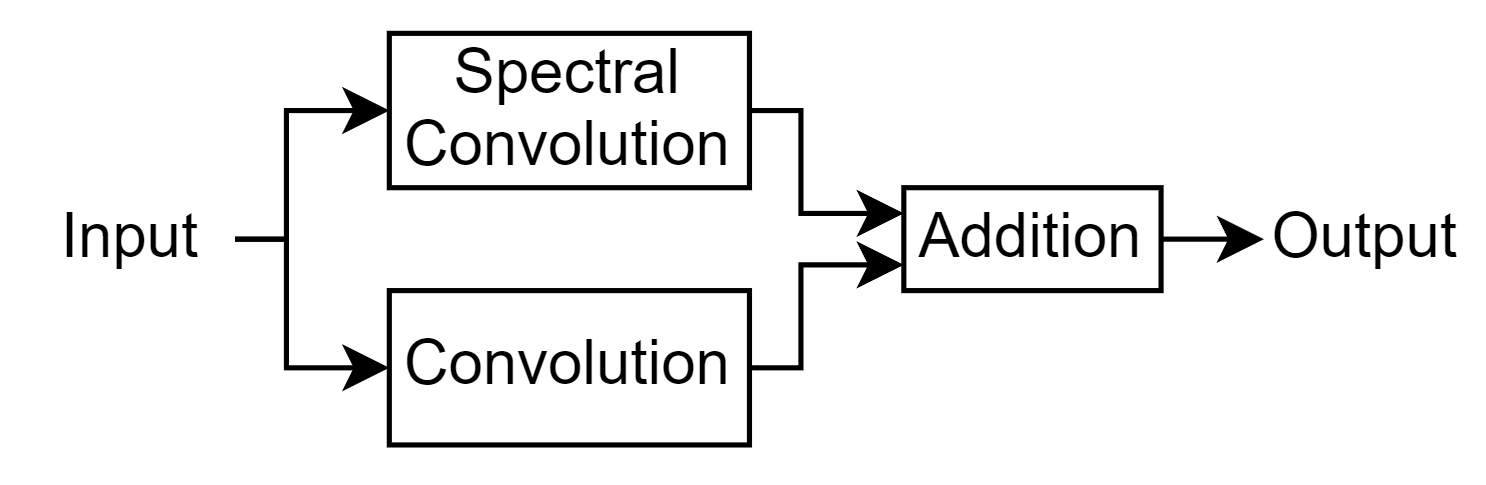
Define a function that creates the network layer.
function layer = fourier3dLayer(numModes,hiddenSize,args) arguments numModes hiddenSize args.Name = "" end name = args.Name; net = dlnetwork; layers = [ identityLayer(Name="in") spectralConvolution3dLayer(numModes,hiddenSize,Name="specConv") additionLayer(2,Name="add")]; net = addLayers(net,layers); layer = convolution3dLayer(1,hiddenSize,Name="fc"); net = addLayers(net,layer); net = connectLayers(net,"in","fc"); net = connectLayers(net,"fc","add/in2"); layer = networkLayer(net,Name=name); end
Create a 3-D Fourier neural operator (FNO) network that contains a Fourier layer.
numModes = 16;
hiddenSize = 64;
layers = [
image3dInputLayer([224 224 224 1])
convolution3dLayer(1,hiddenSize)
fourier3dLayer(numModes,hiddenSize)
reluLayer
convolution3dLayer(1,128)
reluLayer
convolution3dLayer(1,1)]layers =
7×1 Layer array with layers:
1 '' 3-D Image Input 224×224×224×1 images with 'zerocenter' normalization
2 '' 3-D Convolution 64 1×1×1 convolutions with stride [1 1 1] and padding [0 0 0; 0 0 0]
3 '' Network Layer Network with 4 layers, 1 input and 1 output.
4 '' ReLU ReLU
5 '' 3-D Convolution 128 1×1×1 convolutions with stride [1 1 1] and padding [0 0 0; 0 0 0]
6 '' ReLU ReLU
7 '' 3-D Convolution 1 1×1×1 convolutions with stride [1 1 1] and padding [0 0 0; 0 0 0]
Algorithms
A 3-D spectral convolutional layer performs convolution on 3-D input using frequency domain transformations.
For each dimension j that the layer operates over, the layer computes
the Fourier transform of the input data, extracts the first NumModes(j) frequency components, and then performs convolution using the
Weights property in the frequency domain.
The dimensions that the layer convolves over depends on the layer input:
For 3-D image input (data with five dimensions corresponding to pixels in three spatial dimensions, the channels, and the observations), the layer convolves over the spatial dimensions.
For 3-D image sequence input (data with six dimensions corresponding to the pixels in three spatial dimensions, the channels, the observations, and the time steps), the layer convolves over the spatial dimensions.
For 2-D image sequence input (data with five dimensions corresponding to the pixels in two spatial dimensions, the channels, the observations, and the time steps), the layer convolves over the spatial and time dimensions.
Most layers in a layer array or layer graph pass data to subsequent layers as formatted
dlarray objects.
The format of a dlarray object is a string of characters in which each
character describes the corresponding dimension of the data. The format consists of one or
more of these characters:
"S"— Spatial"C"— Channel"B"— Batch"T"— Time"U"— Unspecified
For example, you can describe 2-D image data that is represented as a 4-D array, where the
first two dimensions correspond to the spatial dimensions of the images, the third
dimension corresponds to the channels of the images, and the fourth dimension
corresponds to the batch dimension, as having the format "SSCB"
(spatial, spatial, channel, batch).
You can interact with these dlarray objects in automatic differentiation
workflows, such as those for:
developing a custom layer
using a
functionLayerobjectusing the
forwardandpredictfunctions withdlnetworkobjects
This table shows the supported input formats of SpectralConvolution3DLayer objects and the
corresponding output format. If the software passes the output of the layer to a custom
layer that does not inherit from the nnet.layer.Formattable class, or to
a FunctionLayer object with the Formattable property set
to 0 (false), then the layer receives an unformatted
dlarray object with dimensions ordered according to the formats in this
table. The formats listed here are only a subset of the formats that the layer supports. The
layer might support additional formats, such as formats with additional
"S" (spatial) or "U" (unspecified)
dimensions.
| Input Format | Output Format |
|---|---|
|
|
|
|
|
|
|
|
|
|
|
|
Most layers in a layer array or layer graph pass data to subsequent layers as formatted
dlarray objects.
The format of a dlarray object is a string of characters in which each
character describes the corresponding dimension of the data. The format consists of one or
more of these characters:
"S"— Spatial"C"— Channel"B"— Batch"T"— Time"U"— Unspecified
For example, you can describe 2-D image data that is represented as a 4-D array, where the
first two dimensions correspond to the spatial dimensions of the images, the third
dimension corresponds to the channels of the images, and the fourth dimension
corresponds to the batch dimension, as having the format "SSCB"
(spatial, spatial, channel, batch).
You can interact with these dlarray objects in automatic differentiation
workflows, such as those for:
developing a custom layer
using a
functionLayerobjectusing the
forwardandpredictfunctions withdlnetworkobjects
This table shows the supported input formats of SpectralConvolution3DLayer objects and the
corresponding output format. If the software passes the output of the layer to a custom
layer that does not inherit from the nnet.layer.Formattable class, or to
a FunctionLayer object with the Formattable property set
to 0 (false), then the layer receives an unformatted
dlarray object with dimensions ordered according to the formats in this
table. The formats listed here are only a subset of the formats that the layer supports. The
layer might support additional formats, such as formats with additional
"S" (spatial) or "U" (unspecified)
dimensions.
| Input Format | Output Format |
|---|---|
|
|
|
|
|
|
|
|
|
|
|
|
References
[1] Li, Zongyi, Nikola Kovachki, Kamyar Azizzadenesheli, Burigede Liu, Kaushik Bhattacharya, Andrew Stuart, and Anima Anandkumar. "Fourier Neural Operator for Parametric Partial Differential Equations." arXiv, May 17, 2021. https://doi.org/10.48550/arXiv.2010.08895.
[2] Glorot, Xavier, and Yoshua Bengio. "Understanding the Difficulty of Training Deep Feedforward Neural Networks." In Proceedings of the Thirteenth International Conference on Artificial Intelligence and Statistics, 249–356. Sardinia, Italy: AISTATS, 2010. https://proceedings.mlr.press/v9/glorot10a/glorot10a.pdf
[3] He, Kaiming, Xiangyu Zhang, Shaoqing Ren, and Jian Sun. "Delving Deep into Rectifiers: Surpassing Human-Level Performance on ImageNet Classification." In 2015 IEEE International Conference on Computer Vision (ICCV), 1026–34. Santiago, Chile: IEEE, 2015. https://doi.org/10.1109/ICCV.2015.123
Extended Capabilities
Usage notes and limitations:
You can generate generic C/C++ code that does not depend on third-party libraries and deploy the generated code to hardware platforms.
Usage notes and limitations:
You can generate CUDA code that is independent of deep learning libraries and deploy the generated code to platforms that use NVIDIA® GPU processors.
Version History
Introduced in R2026a
See Also
trainingOptions | trainnet | dlnetwork
Topics
- Solve PDE Using Fourier Neural Operator
- Train Neural ODE Network
- Dynamical System Modeling Using Neural ODE
- Train Neural ODE Network with Control Input
- Initialize Learnable Parameters for Model Function
- Custom Training Loop Model Loss Functions
- Custom Training Loops
- Specify Training Options in Custom Training Loop
- List of Functions with dlarray Support
MATLAB Command
You clicked a link that corresponds to this MATLAB command:
Run the command by entering it in the MATLAB Command Window. Web browsers do not support MATLAB commands.
Seleziona un sito web
Seleziona un sito web per visualizzare contenuto tradotto dove disponibile e vedere eventi e offerte locali. In base alla tua area geografica, ti consigliamo di selezionare: .
Puoi anche selezionare un sito web dal seguente elenco:
Come ottenere le migliori prestazioni del sito
Per ottenere le migliori prestazioni del sito, seleziona il sito cinese (in cinese o in inglese). I siti MathWorks per gli altri paesi non sono ottimizzati per essere visitati dalla tua area geografica.
Americhe
- América Latina (Español)
- Canada (English)
- United States (English)
Europa
- Belgium (English)
- Denmark (English)
- Deutschland (Deutsch)
- España (Español)
- Finland (English)
- France (Français)
- Ireland (English)
- Italia (Italiano)
- Luxembourg (English)
- Netherlands (English)
- Norway (English)
- Österreich (Deutsch)
- Portugal (English)
- Sweden (English)
- Switzerland
- United Kingdom (English)