slreportgen.report.MATLABSystem Class
R2026bNamespace: slreportgen.report
Superclasses: slreportgen.report.Reporter
Description
Use an object of the slreportgen.report.MATLABSystem class to report on a
Simulink®
MATLAB System block.
By default, a MATLABSystem reporter adds this information to a report:
Simulink MATLAB System block properties
A summary of the input and output arguments of the MATLAB System block
MATLAB System block source code
Note
To use a MATLABSystem reporter in a report, you must create the report
using the slreportgen.report.Report class.
The slreportgen.report.MATLABSystem class is a handle class.
Creation
Description
reporter = slreportgen.report.MATLABSystemMATLABSystem reporter based on the default template. Use
the Object
property to specify the Simulink
MATLAB System block.
reporter = slreportgen.report.MATLABSystem(mlSysObj)mlSysObj.
reporter = MATLABSystem(PropertyName=Value)MATLABSystem reporter properties
using name-value arguments. You can specify multiple name-value arguments in any
order.
Properties
MATLAB System to report, specified as one of these values:
Character vector or string scalar that contains the path to a MATLAB System block
Handle to a MATLAB System block
slreportgen.finder.BlockResultobjectslreportgen.finder.DiagramElementResultobject
Note
If you use a finder to find a MATLAB System block and add the
result directly to a report, the finder returns an
slreportgen.report.MATLABSystem reporter instead of a Simulink
object property reporter.
Attributes:
GetAccess | public |
SetAccess | public |
Whether to include object properties, specified as a numeric or logical 1
(true) or 0 (false). When you
specify:
1(true) — Include a table of the properties of the MATLAB System block.0(false) — Omit a table of the properties of the MATLAB System block.
Attributes:
GetAccess | public |
SetAccess | public |
Data Types: logical
Object properties reporter, specified as an mlreportgen.report.BaseTable object. The MATLABSystem reporter
uses this reporter to create a table of the properties of the MATLAB
System block.
To customize the appearance of the object property table and its title, customize
the default BaseTable reporter or replace it with a custom version of the
BaseTable reporter. To customize the title of the object property
table, specify the contents in the Title property of the default or
replacement reporter. The content you specify is placed at the front of the default
title.
Attributes:
GetAccess | public |
SetAccess | public |
Whether to Include an argument summary, specified as a numeric or logical 1
(true) or 0 (false). When you
specify:
1(true) — Include a summary table for the input and outputs arguments of the MATLAB Systemblock. By default, the argument summary table includes the name, scope, port, data type, and size for all the input and output arguments.Use the
ArgumentSummaryPropertiesproperty to customize the set of properties to be reported in the summary table.0(false) — Omit a summary table for the input and outputs arguments of the MATLAB Systemblock.
If true, the report includes a summary table for the input and outputs arguments of the MATLAB Systemblock. By default, the argument summary table includes the name, scope, port, data type, and size for all the input and output arguments.
Use the ArgumentSummaryProperties property to customize the set
of properties to be reported in the summary table.
Attributes:
GetAccess | public |
SetAccess | public |
Data Types: logical
Argument properties to include, specified as a cell array of character vectors or a string array.
Specify any combination of these properties:
NameScopePortData TypeSizeComplexFixed Size
Attributes:
GetAccess | public |
SetAccess | public |
Argument summary reporter, specified as a mlreportgen.report.BaseTable object. This property
specifies the reporter to be used to create the summary table for
the input and output arguments of the MATLAB System
block. The default value of this property is a
mlreportgen.report.BaseTable object. You can
customize the appearance of the table by customizing the default
reporter or by replacing it with a customized version of the
BaseTable reporter. Any content that you specify in
the Title property of the default or the
replacement reporter will appear before the title in the generated
report.
Attributes:
GetAccess | public |
SetAccess | public |
Whether to include a property table with detailed information for each argument,
specified as a numeric or logical 1
(true) or 0 (false). When you
specify:
1(true) — Include a property table with detailed information for each argumentThe argument summary table includes the name, scope, port, data type, and size for all the input and output arguments, as shown below:
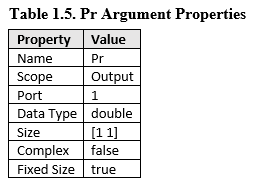
Use the
ArgumentSummaryPropertiesproperty to customize the set of properties to be reported in the summary table.0(false) — Omit a property table with detailed information for each argument.
Attributes:
GetAccess | public |
SetAccess | public |
Data Types: logical
Argument properties reporter, specified as an mlreportgen.report.BaseTable object. This property specifies the reporter to
be used as the basis to create the property tables for the input and output arguments of
the MATLAB System block. The MATLABSystem reporter creates
a copy of this reporter for each argument to be reported and uses the copy to report on
the properties of the argument. The default value of this property is a
mlreportgen.report.BaseTable object. You can customize the appearance
of the table by customizing the default reporter or by replacing it with a customized
version of the BaseTable reporter. Any content that you specify in the
Title property of the default or the replacement reporter will
appear before the title in the generated report.
Attributes:
GetAccess | public |
SetAccess | public |
Whether to include the source code, specified as a numeric or logical 1
(true) or 0 (false). When you
specify:
1(true) — Include the source code of the MATLAB System.0(false) — Omit the source code.
Attributes:
GetAccess | public |
SetAccess | public |
Data Types: logical
Source code reporter, specified as a mlreportgen.report.MATLABCode
object. This is the reporter to be used to report and format the source code of the
MATLAB System. The default value of this property is an object of
MATLABCode reporter type. To customize the code appearance, modify the
properties of the default MATLABCode reporter or replace the reporter
with a custom reporter.
Attributes:
GetAccess | public |
SetAccess | public |
Source code title, specified as a character vector, string scalar, or an
mlreportgen.dom.Paragraph object.
SourceCodeTitle specifies a DOM Paragraph
object for this reporter to fill with the title content for the MATLAB System source code. The default value of this property is an empty
paragraph whose properties specify the appearance of the source code title. By default,
the MATLABSystem reporter generates a title from the MATLAB
System block name and appends it to the paragraph. The generated title
consists of the MATLAB System block name followed by “Source Code”, for
example, "Analysis and Plot Source Code." You can customize the title appearance by
modifying the properties of the default paragraph object or by replacing it with another
paragraph object. The content that you add to the paragraph appears before the title in
the generated report.
Attributes:
GetAccess | public |
SetAccess | public |
Source of the template for this reporter, specified in one of these ways:
Character vector or string scalar that specifies the path of the file that contains the template for this reporter
Reporter or report whose template this reporter uses or whose template library contains the template for this reporter
Document Object Model (DOM) document or document part whose template this reporter uses or whose template library contains the template for this reporter
The specified template must be the same type as the report to which you
append this reporter. For example, for a Microsoft® Word report, TemplateSrc must be a Word reporter template.
If the TemplateSrc property is empty, this reporter uses the
default reporter template for the output type of the report.
Attributes:
GetAccess | public |
SetAccess | public |
NonCopyable | true |
Dependent | true |
Name of the template for this reporter, specified as a character vector or string scalar.
The template for this reporter must be in the template library of the template specified by
the TemplateSrc property of this reporter.
Attributes:
GetAccess | public |
SetAccess | public |
Data Types: char | string
Hyperlink target for this reporter, specified as a character vector or string scalar
that specifies the link target ID, or an mlreportgen.dom.LinkTarget object. A character vector or string scalar
value converts to a LinkTarget object. The link target immediately
precedes the content of this reporter in the output report.
Attributes:
GetAccess | public |
SetAccess | public |
Methods
Examples
Version History
Introduced in R2023a
See Also
Classes
slreportgen.report.Report|slreportgen.report.Reporter|slreportgen.finder.BlockFinder|slreportgen.finder.BlockResult|slreportgen.finder.DiagramElementFinder|slreportgen.finder.DiagramElementResult|slreportgen.finder.StateflowDiagramElementFinder|mlreportgen.report.BaseTable|mlreportgen.dom.Paragraph

