Non linearità
R2026aQuando si risolvono problemi reali nel campo della scienza e dell'ingegneria, spesso è necessario modellare le non linearità. Simulink® fornisce un insieme completo di blocchi lookup table, oggetti e strumenti che è possibile utilizzare per modellare in modo efficiente le non linearità. Le tabelle di ricerca mappano i valori di input di un sistema ai relativi valori di output e memorizzano i dati mappati in una tabella. Durante i calcoli in tempo reale, le tabelle di ricerca utilizzano i dati memorizzati per individuare gli output corrispondenti ai diversi input di un sistema.
È possibile utilizzare blocchi lookup table, oggetti e strumenti per:
Modellare sistemi non lineari senza stato approssimando funzioni matematiche o dati sperimentali utilizzando tabelle di ricerca.
Simulare, analizzare e sincronizzare le tabelle di ricerca all'interno di un workflow di progettazione Model-Based.
Ottimizzare le tabelle di ricerca per bilanciare l'utilizzo della memoria, le prestazioni di esecuzione e la precisione numerica.
Generare codice pronto per la produzione per i linguaggi target supportati con interfacce conformi agli standard del settore.

Blocchi
 | 1-D Lookup Table | Approximate one-dimensional function |
 | 2-D Lookup Table | Approximate two-dimensional function |
 | Direct Lookup Table (n-D) | Index into n-dimensional table to retrieve element, vector, or 2-D matrix |
 | Interpolation Using Prelookup | Use precalculated index and fraction values to accelerate approximation of N-dimensional function |
| Lookup Table Dynamic | ||
 | n-D Lookup Table | Approximate n-dimensional function |
 | Prelookup | Compute index and fraction for Interpolation Using Prelookup block |
 | Sine, Cosine | Implement fixed-point sine or cosine wave using lookup table approach that exploits quarter wave symmetry |
Oggetti
Simulink.LookupTable | Store and share lookup table and breakpoint data, and configure data for ASAP2 and AUTOSAR code generation |
Simulink.Breakpoint | Store and share data for breakpoint set, and configure the data for ASAP2 and AUTOSAR code generation |
Simulink.lookuptable.Evenspacing | Configure evenly spaced breakpoint set for lookup table object |
Simulink.lookuptable.Table | Configure table data for lookup table object |
Simulink.lookuptable.Breakpoint | Configure breakpoint set data for lookup table object |
Simulink.lookuptable.StructTypeInfo | Configure settings for structure type that lookup table object uses in generated code |
Strumenti
| Lookup Table Editor | Create, edit, and manage lookup tables in models (Da R2022a) |
Argomenti
Realizzazioni con le tabelle di ricerca
- Edit and Visualize Lookup Table Data
View, add, delete, or update lookup table data. - Enter Breakpoints and Table Data
Specify breakpoint vectors and table data for a lookup table. - Import Data to Lookup Table
Import table and breakpoint data from MATLAB® workspace and Excel® spreadsheets. - Visualize Lookup Table Data Using Lookup Table Control
Visualize lookup table data. - Configure Lookup Table Block for Logarithmic Operation
Configure an n-D Lookup Table block for logarithmic operation with the common logarithmic base (base 10). - Optimize Generated Code for Lookup Table Blocks
Optimize code for Lookup Table blocks. - Use Row-Major Algorithms for Lookup Table Blocks
Use row-major algorithms for C/C++ code generation from models containing Lookup Table blocks. - Optimize Lookup Tables for Memory-Efficiency (Fixed-Point Designer)
Optimize Lookup Tables using the Lookup Table Optimizer.
Informazioni sulle tabelle di ricerca
- Specify Breakpoint and Table Data with Variable Size and Symbolic Dimensions
Specify breakpoint and table data that changes size during model simulation or represented by symbolic dimensions. - Choose Lookup Table Blocks Based on Input, Breakpoint and Output Data
Select the Lookup Table block best suited for your application. - Common Uses of Prelookup and Interpolation Using Prelookup Blocks
Common use cases of the Prelookup and Interpolation Using Prelookup blocks. - Choose Numerical Methods to Approximate Function Values
Set the method by which Lookup Table blocks approximate function values.
Aggiornamento delle tabelle di ricerca dalla release precedente
- Update Lookup Table Blocks to New Versions
Update existing models to use current versions of lookup table blocks.
Esempi in primo piano
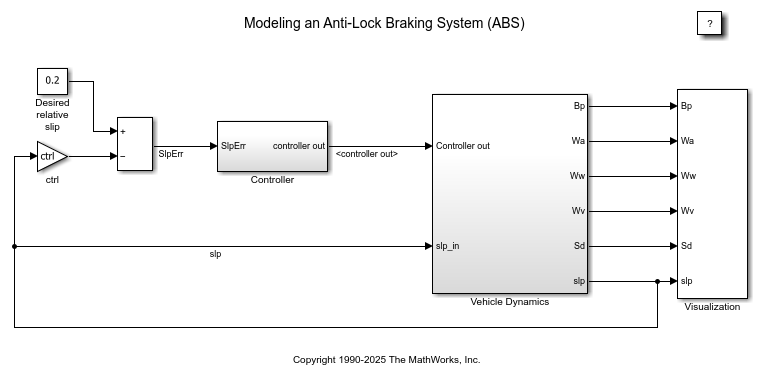
Modellazione di un sistema antibloccaggio dei freni
Questo esempio mostra come modellare un sistema antibloccaggio dei freni (ABS) semplice. Il modello simula il comportamento dinamico di un veicolo in condizioni di frenata brusca. Il modello rappresenta una singola ruota, che può essere replicata più volte per creare un modello di veicolo a più ruote.
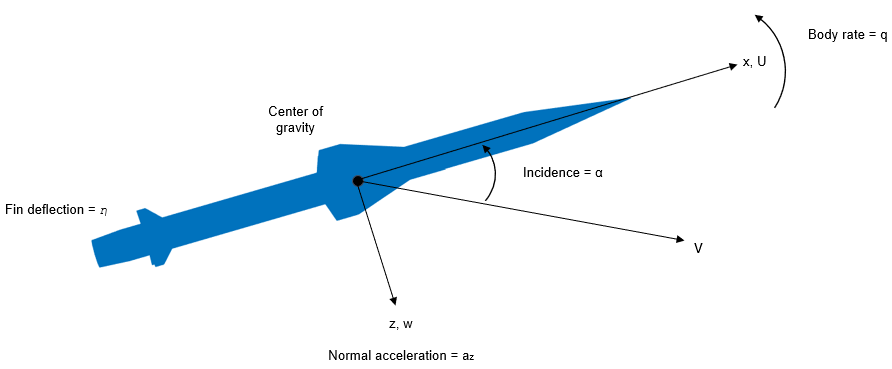
Design a Guidance System in MATLAB and Simulink
Use the model of the missile airframe presented in a number of published papers on the use of advanced control methods applied to missile autopilot design. See [1], [2], and [3]. The model represents a tail-controlled missile traveling between Mach 2 and Mach 4, at altitudes ranging between 10,000 ft (3,050 m) and 60,000 ft (18,290 m), with typical angles of attack ranging between +/- 20 degrees.
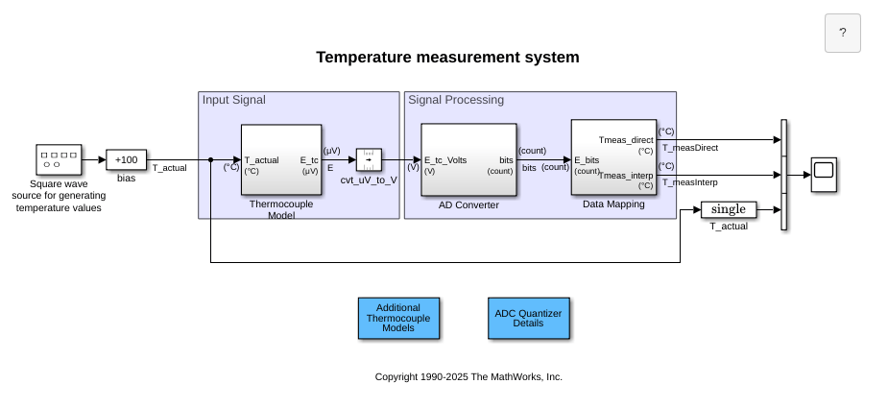
Temperature Measurement System Using Nonlinear Behavioral Data of Type S Thermocouple
Build and simulate a temperature measurement system that uses a nonlinear dataset describing the behavior of a type S thermocouple.
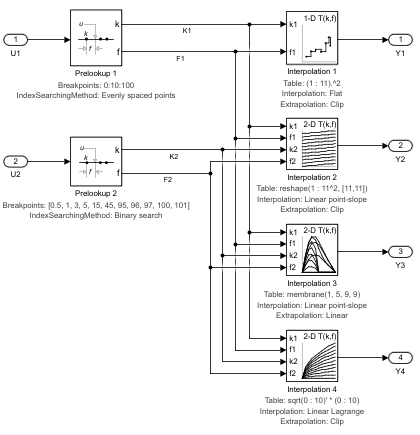
Using the Prelookup and Interpolation Using Prelookup Blocks
Use the Prelookup and Interpolation Using Prelookup blocks.
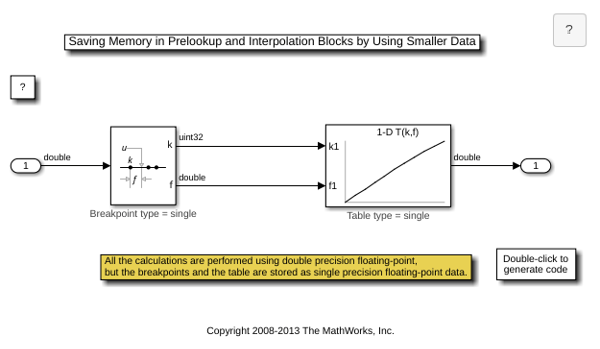
Saving Memory in Prelookup and Interpolation Using Prelookup Blocks by Using Smaller Data
Save memory in Prelookup and Interpolation Using Prelookup blocks. The Prelookup and Interpolation Using Prelookup blocks allow you to explicitly set data type for storing breakpoints and table data, respectively. The Prelookup block allows the breakpoint data to differ from the input data type, and the Interpolation Using Prelookup block allows the table data to differ from the output data type.

