Matrix Concatenate
Concatenate input matrices of same data type for iterative processing
Libraries:
Simulink /
Math Operations
Simulink /
Matrix Operations
DSP System Toolbox /
Math Functions /
Matrices and Linear Algebra /
Matrix Operations
HDL Coder /
Math Operations
Alternative Configurations of Matrix Concatenate Block:
Vector Concatenate
Description
The Matrix Concatenate block concatenates input signals to create a nonscalar signal that you can iteratively process with a subsystem, for example, a for-each, while-iterator, or for-iterator subsystem.
You can use multiple Matrix Concatenate blocks to create the output signal in stages, but the result is flat along each concatenation dimension, as if you used a single block to concatenate the signals.
The signals in the output signal appear in the same order as the input signals for the block along the concatenation dimension. For a description of the port order for various block orientations, see Identify Port Location on Rotated or Flipped Block.
You must use a Vector Concatenate or Matrix Concatenate block to define an array of buses. For more information, see Group Nonvirtual Buses in Arrays of Buses.
Examples
When a Matrix Concatenate block receives 2-D matrices with the same number of rows, you can horizontally concatenate the matrices, placing them side-by-side in the output matrix. To horizontally concatenate the matrices, set the Concatenate dimension block parameter to 2.
For example, simulate the ex_concatenate_horizontal model.
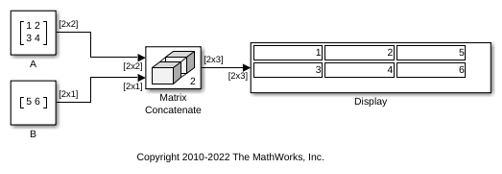
The input matrices [1 2;3 4] and [5;6] are horizontally concatenated to create the output matrix [1 2 5;3 4 6].
When a Matrix Concatenate block receives 2-D matrices with the same number of columns, you can vertically concatenate the matrices, placing them on top of each other in the output matrix. To vertically concatenate the matrices, set the Concatenate dimension block parameter to 1.
For example, simulate the ex_concatenate_vertical model.
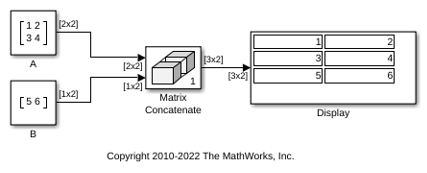
The input matrices [1 2;3 4] and [5 6] are vertically concatenated to create the output matrix [1 2;3 4;5 6].
When a Matrix Concatenate block receives 2-D matrices, you can perform multidimensional matrix concatenation. To do so, set the Concatenate dimension block parameter to 3.
For example, simulate the ex_concatenate_multidims model.
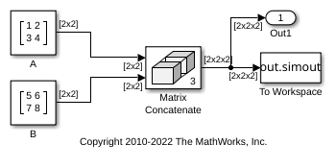
The dimension of each input matrix is [2x2], and the dimension of the output matrix is [2x2x2].
Extended Examples
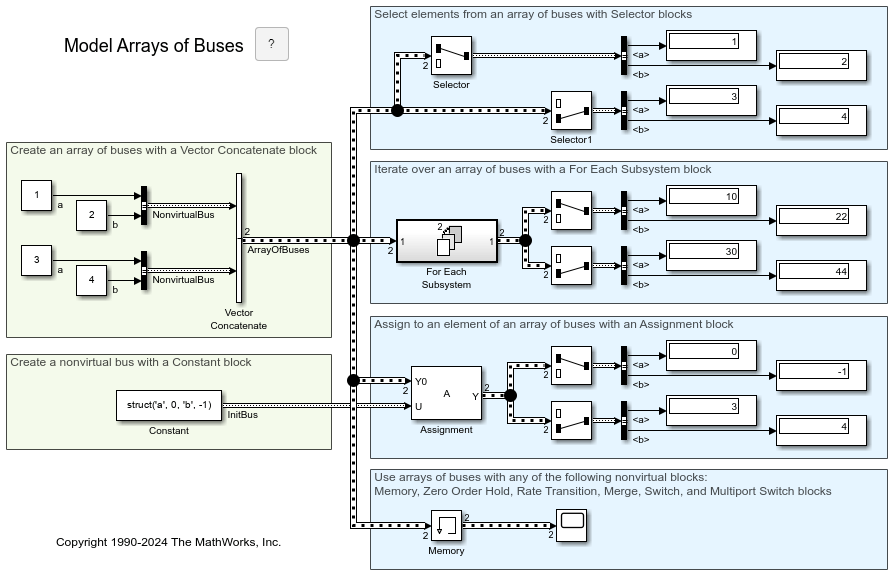
Ports
Input
First input to concatenate, specified as a scalar, vector, matrix, or array.
Inputs must be of the same data type.
Matrix and array inputs are supported only when you set Mode to
Multidimensional array.
When the data type is a Simulink.Bus object, the inputs must be nonvirtual buses.
Data Types: single | double | half | int8 | int16 | int32 | int64 | uint8 | uint16 | uint32 | uint64 | Boolean | fixed point | enumerated | bus | image
Nth input to concatenate, specified as a scalar, vector, matrix, or array.
Inputs must be of the same data type.
Matrix and array inputs are supported only when you set Mode to
Multidimensional array.
Dependencies
To add input ports, set Number of inputs to an integer greater than or equal to 2.
Data Types: single | double | half | int8 | int16 | int32 | int64 | uint8 | uint16 | uint32 | uint64 | Boolean | fixed point | enumerated | bus | image
Output
Concatenation of input signals along specified dimension. Outputs have the same data type as the input.
Data Types: single | double | half | int8 | int16 | int32 | int64 | uint8 | uint16 | uint32 | uint64 | Boolean | fixed point | enumerated | bus | image
Parameters
To edit block parameters interactively, use the Property Inspector. From the Simulink® Toolstrip, on the Simulation tab, in the Prepare gallery, select Property Inspector.
Specify the number of inputs for the block as a real-valued, positive integer, less than or equal to 65536.
Programmatic Use
To set the block parameter value programmatically, use
the set_param function.
| Parameter: | NumInputs |
| Values: | '2' (default) | positive integer in quotes |
| Data Types: | char | string |
Example: set_param(gcb,'NumInputs','3')
Select whether the block operates in vector or multidimensional array concatenation mode. The default Mode of the Vector Concatenate block is Vector. The default Mode of the Matrix Concatenate block is Multidimensional array.
When you select
Vector, the block performs vector concatenation.When you select
Multidimensional array, the block performs matrix concatenation.
| Mode Setting | Input Signals | Output Signal |
|---|---|---|
Vector |
| When all inputs are vectors, the output is a vector. If any of the inputs are row or column vectors, the output is a row or column vector, respectively. |
Multidimensional array | Signals of any dimensionality (scalars, vectors, and matrices) | The output is always an array. Trailing dimensions are assumed to be Concatenation is on the dimension that you specify with the Concatenate dimension parameter. |
Programmatic Use
To set the block parameter value programmatically, use
the set_param function.
| Parameter: | Mode |
| Values: | 'Vector' | 'Multidimensional array' |
Example: set_param(gcb,'Mode','Vector')
Specify the output dimension along which to concatenate the input arrays.
1— Concatenate inputs vertically. The vertical matrix concatenation stacks the input matrices on top of each other in the output matrix. When you insert a Vector Concatenate block and set Mode toMultidimensional array, the default is1.2— Concatenate inputs horizontally. The horizontal matrix concatenation places the input matrices side-by-side in the output matrix. When you insert a Matrix Concatenate block, the default is2.3or more — Perform multidimensional concatenation on the inputs.
The input matrices must have compatible sizes for concatenation. Vertical concatenation requires the input matrices to have the same number of columns. Horizontal concatenation requires input matrices to have the same number of rows.
Dependencies
To enable this parameter, set Mode to Multidimensional array.
Programmatic Use
To set the block parameter value programmatically, use
the set_param function.
| Parameter: | ConcatenateDimension |
| Values: | scalar integer in quotes |
| Data Types: | char | string |
Example: set_param(gcb,'ConcatenateDimension','2')
Block Characteristics
Data Types |
|
Direct Feedthrough |
|
Multidimensional Signals |
|
Variable-Size Signals |
|
Zero-Crossing Detection |
|
Alternative Configurations
The Vector Concatenate block sets Mode to
Vector.
Libraries:
Simulink /
Commonly Used Blocks
Simulink /
Math Operations
Simulink /
Signal Routing
HDL Coder /
Math Operations
HDL Coder /
Signal Routing
Extended Capabilities
C/C++ Code Generation
Generate C and C++ code using Simulink® Coder™.
HDL Coder™ provides additional configuration options that affect HDL implementation and synthesized logic.
This block has one default HDL architecture.
| General | |
|---|---|
| ConstrainedOutputPipeline | Number of registers to place at
the outputs by moving existing delays within your design. Distributed
pipelining does not redistribute these registers. The default is
|
| InputPipeline | Number of input pipeline stages
to insert in the generated code. Distributed pipelining and constrained
output pipelining can move these registers. The default is
|
| OutputPipeline | Number of output pipeline stages
to insert in the generated code. Distributed pipelining and constrained
output pipelining can move these registers. The default is
|
| SynthesisAttributes |
Specifies the synthesis attributes for the blocks and block output signals in the model. The generated HDL code contains these attributes. For more information, see SynthesisAttributes (HDL Coder). |
The block supports these data types for HDL code generation:
| Input Port | Dimension | Fixed-Point | Floating-Point | Built-in Integers | Bus | Boolean | Enumerated | Complex Signal |
|---|---|---|---|---|---|---|---|---|
| Port_1 | Scalar Vector Matrix (up to 2-D) | Yes | Half Single Double | No | Yes | Yes | Yes | Yes |
The block participates in these HDL optimizations to optimize the speed, and area.
Area Optimization
| Optimization | Description |
|---|---|
| Resource Sharing (HDL Coder) | Resource sharing is an area optimization in which HDL Coder identifies multiple functionally equivalent resources and replaces them with a single resource. |
| Streaming (HDL Coder) | Streaming is an area optimization in which HDL Coder transforms a vector data path to a scalar data path (or to several smaller-sized vector data paths). |
Speed Optimization
| Optimization | Description |
|---|---|
| Specify Distributed Pipelining Settings (HDL Coder) | Distributed pipelining, or register retiming, is a speed optimization that moves existing delays in a design to reduce the critical path while preserving functional behavior. |
| Clock-Rate Pipelining (HDL Coder) | Clock-rate pipelining is an optimization framework in HDL Coder that allows other speed and area optimizations to introduce latency at the clock rate. |
| Specify Adaptive Pipelining Settings (HDL Coder) | Adaptive pipelining optimization creates patterns or combination of blocks with registers that can improve the achievable clock frequency and reduce the area usage on the FPGA boards by inserting pipeline registers to the blocks in your design. |
| Critical Path Estimation (HDL Coder) | To quickly identify the most likely critical path in your design, use Critical Path Estimation. Critical path estimation speeds up the iterative process of finding the critical path. To know blocks that are characterized in critical path estimation, see Characterized Blocks (HDL Coder). |
For this block, HDL Coder generates code using FOR-GENERATE loop. For
more information, see Unroll For-Generate Loops (HDL Coder)
PLC Code Generation
Generate Structured Text code using Simulink® PLC Coder™.
Fixed-Point Conversion
Design and simulate fixed-point systems using Fixed-Point Designer™.
Version History
Introduced in R2009bUse the SynthesisAttributes HDL block property to specify the synthesis attributes for the block and its output signals. HDL Coder includes these attributes in the generated HDL code.
See Also
Functions
Blocks
MATLAB Command
You clicked a link that corresponds to this MATLAB command:
Run the command by entering it in the MATLAB Command Window. Web browsers do not support MATLAB commands.
Seleziona un sito web
Seleziona un sito web per visualizzare contenuto tradotto dove disponibile e vedere eventi e offerte locali. In base alla tua area geografica, ti consigliamo di selezionare: .
Puoi anche selezionare un sito web dal seguente elenco:
Come ottenere le migliori prestazioni del sito
Per ottenere le migliori prestazioni del sito, seleziona il sito cinese (in cinese o in inglese). I siti MathWorks per gli altri paesi non sono ottimizzati per essere visitati dalla tua area geografica.
Americhe
- América Latina (Español)
- Canada (English)
- United States (English)
Europa
- Belgium (English)
- Denmark (English)
- Deutschland (Deutsch)
- España (Español)
- Finland (English)
- France (Français)
- Ireland (English)
- Italia (Italiano)
- Luxembourg (English)
- Netherlands (English)
- Norway (English)
- Österreich (Deutsch)
- Portugal (English)
- Sweden (English)
- Switzerland
- United Kingdom (English)
