Train Autoencoders for CSI Feedback Compression
R2026bThis example shows how to train an autoencoder neural network to compress downlink channel state information (CSI) over a clustered delay line (CDL) channel.
In this example, you:
Define and Train Neural Network Model for CSI feedback autoencoding.
Test Trained Network of a complete CSI compression system, which includes preprocessing, encoding, decoding, and postprocessing.
Test the Effect of Quantized Codewords on the system performance.
AI Workflow for CSI Feedback
Steps in the AI-based CSI feedback workflow include data generation, data preparation, model training, and model testing. You can run each step independently or work through the steps in order. Train Model is the focus of this example.
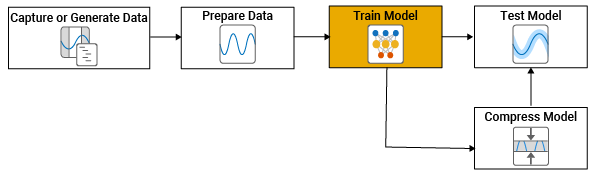
For a description of the CSI feedback process and AI workflow, see AI-Based CSI Feedback. Briefly, the workflow steps are:
1. Generate Data - Generate channel estimate data, as shown in the Generate MIMO OFDM Channel Realizations for AI-Based Systems example.
2. Prepare Data - Data preparation, as shown in the Preprocess Data for AI-Based CSI Feedback Compression example.
3. Train Model - Model training inputs preprocessed channel estimate data to neural networks to reconstruct CSI data, which begins in the Define and Train Neural Network Model section of this example.
4. Test Model - Model testing is the primary focus of the Test AI-based CSI Compression Techniques for Enhanced PDSCH Throughput example.
For a list of additional examples that train, compress, and test autoencoder models, see the Further Exploration section.
Define and Train Neural Network Model
If the required data is not present in the workspace, generate and prepare the data. After preprocessing the data, you can view the system configuration by inspecting outputs (inputData, systemParams, dataOptions, channel, and carrier) of the prepareData function.
if ~exist("inputData","var") || ~exist("systemParams","var") ... || ~exist("dataOptions","var") || ~exist("channel","var") ... || ~exist("carrier","var") numSamples =1000; [inputData,systemParams,dataOptions,channel,carrier] = ... prepareData(numSamples); end
Removing invalid data directory: C:\Users\user\OneDrive - MathWorks\Documents\MATLAB\ExampleManager\user.Bdoc.j3303083\5g-ex25514206\Data
Starting channel realization generation
6 worker(s) running
00:00:14 - 100% Completed
Starting CSI data preprocessing
6 worker(s) running
00:00:02 - 100% Completed
Define Neural Network Model Variables
Initialize variables that define the neural network model. The inputData variable contains samples of -by- -by- 2 arrays.
[maxDelay,nTx,Niq,Nsamples] = size(inputData)
maxDelay =
28
nTx =
8
Niq =
2
Nsamples =
2000
systemParams.MaxDelay = maxDelay;
Separate the data into training, validation, and test sets.
N = size(inputData, 4);
numTrain = floor(N*10/15)
numTrain =
1333
numVal = floor(N*3/15)
numVal =
400
numTest = floor(N*2/15)
numTest =
266
inputDataT = inputData(:,:,:,1:numTrain);
inputDataV = inputData(:,:,:,numTrain+(1:numVal));
inputDataTest = inputData(:,:,:,numTrain+numVal+(1:numTest));
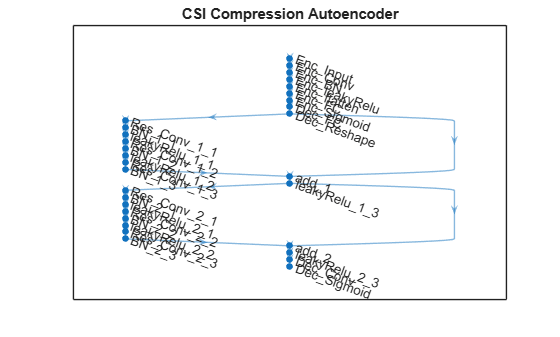
This example uses a modified version of the autoencoder neural network proposed in [1].
inputSize = [maxDelay nTx 2]; % 3rd dim for real and imaginary
nLinear = prod(inputSize);
nEncoded = 64;

autoencoderNet = dlnetwork([ ...
    % Encoder
    imageInputLayer(inputSize, ...
        "Normalization","none","Name","Enc_Input")

    convolution2dLayer([3 3],2, ...
        "Padding","same","Name","Enc_Conv")
    batchNormalizationLayer("Epsilon",0.001,"Name","Enc_BN")
    leakyReluLayer(0.3,"Name","Enc_leakyRelu")

    flattenLayer("Name","Enc_flatten")

    fullyConnectedLayer(nEncoded,"Name","Enc_FC")

    sigmoidLayer("Name","Enc_Sigmoid")

    % Decoder
    fullyConnectedLayer(nLinear,"Name","Dec_FC")

    functionLayer(@(x)dlarray(reshape(x,maxDelay,nTx,2,[]),'SSCB'), ...
      "Formattable",true,"Acceleratable",true,"Name","Dec_Reshape")
    ]);

autoencoderNet = ...
  helperCSINetAddResidualLayers(autoencoderNet, "Dec_Reshape");

autoencoderNet = addLayers(autoencoderNet, ...
    [convolution2dLayer([3 3],2,"Padding","same","Name","Dec_Conv") ...
    sigmoidLayer("Name","Dec_Sigmoid")]);
autoencoderNet = ...
  connectLayers(autoencoderNet,"leakyRelu_2_3","Dec_Conv");

figure
plot(autoencoderNet)
title('CSI Compression Autoencoder')
Train Neural Network
Set the training options for the autoencoder neural network and train the network using the trainnet (Deep Learning Toolbox) function. Training takes less than 13 minutes on an Intel® Xeon® W-2133 CPU @ 3.60GHz with NVIDIA GeForce RTX 3080 GPU. Set trainNow to false to load the pretrained network. Note that the saved network works for the following settings. If you change any of these settings, set trainNow to true.
txAntennaSize = [2 2 2 1 1]; % rows, columns, polarizations, panels
rxAntennaSize = [2 1 1 1 1]; % rows, columns, polarizations, panels
rmsDelaySpread = 300e-9;     % s
maxDoppler = 5;              % Hz
nSizeGrid = 52;              % Number resource blocks (RB)
                             % 12 subcarriers per RB
subcarrierSpacing = 15;
trainNow =false; miniBatchSize = 1000; trainOptions = trainingOptions("adam", ... InitialLearnRate=0.01, ... LearnRateSchedule="piecewise", ... LearnRateDropPeriod=138, ... LearnRateDropFactor=0.7456, ... Epsilon=1e-7, ... MaxEpochs=1000, ... MiniBatchSize=miniBatchSize, ... Shuffle="every-epoch", ... ValidationData={inputDataV,inputDataV}, ... ValidationFrequency=20, ... ValidationPatience=20, ... Metrics="rmse", ... Verbose=true, ... OutputNetwork="best-validation-loss", ... ExecutionEnvironment="auto", ... Plots='none')
trainOptions =
  TrainingOptionsADAM with properties:

             GradientDecayFactor: 0.9000
                       MaxEpochs: 1000
                InitialLearnRate: 0.0100
               LearnRateSchedule: 'piecewise'
             LearnRateDropFactor: 0.7456
             LearnRateDropPeriod: 138
                   MiniBatchSize: 1000
                         Shuffle: 'every-epoch'
         CheckpointFrequencyUnit: 'epoch'
        PreprocessingEnvironment: 'serial'
               TrainingPrecision: 'prioritize-single'
                         Verbose: 1
                VerboseFrequency: 50
                  ValidationData: {[28×8×2×400 single]  [28×8×2×400 single]}
             ValidationFrequency: 20
              ValidationPatience: 20
                         Metrics: 'rmse'
             ObjectiveMetricName: 'loss'
            ExecutionEnvironment: 'auto'
                           Plots: 'none'
                       OutputFcn: []
                  SequenceLength: 'longest'
            SequencePaddingValue: 0
        SequencePaddingDirection: 'right'
                InputDataFormats: "auto"
               TargetDataFormats: "auto"
         ResetInputNormalization: 1
       ResetInverseNormalization: 1
                NormalizeTargets: 0
    BatchNormalizationStatistics: 'auto'
                   OutputNetwork: 'best-validation-loss'
                    Acceleration: "auto"
                  CheckpointPath: ''
             CheckpointFrequency: 1
        CategoricalInputEncoding: 'integer'
       CategoricalTargetEncoding: 'auto'
                L2Regularization: 1.0000e-04
         GradientThresholdMethod: 'l2norm'
               GradientThreshold: Inf
      SquaredGradientDecayFactor: 0.9990
                         Epsilon: 1.0000e-07
lossFunc = @(x,t) nmseLossdB(x,t);
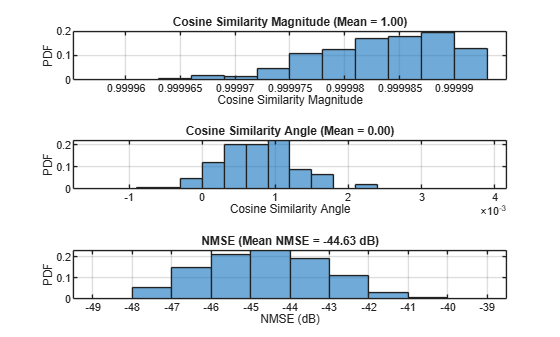
Use the normalized mean squared error (NMSE) between the network inputs and outputs in dB as the training loss function to find the best set of weights for the autoencoder.
if trainNow
  [net,trainInfo] = ...
    trainnet(inputDataT,inputDataT,autoencoderNet,lossFunc,trainOptions); %#ok<UNRCH>
  save("csiTrainedNetwork_" ...
    + string(datetime("now","Format","dd_MM_HH_mm")), ...
    'net','trainInfo','systemParams','dataOptions','trainOptions')
else
  systemParamsCached = systemParams;
load("csiTrainedNetwork202507",'net','trainInfo','systemParams','trainOptions')
  if ~checkSystemCompatibility(systemParams,systemParamsCached)
    error("CSIExample:Missmatch", ...
      "Saved network does not match settings. Set trainNow to true.")
  end
end
Test Trained Network
Use the predict (Deep Learning Toolbox) function to process the test data.
Hhat = predict(net,inputDataTest);
Calculate the cosine similarity and NMSE between the input and output of the autoencoder network. The cosine similarity is defined as
where is the channel estimate at the input of the autoencoder and is the channel estimate at the output of the autoencoder. For more information on cosine similarity, see the Cosine Similarity As a Channel Estimate Quality Metric example. NMSE is defined as
where is the channel estimate at the input of the autoencoder and is the channel estimate at the output of the autoencoder.
cossim = zeros(numTest,1);
nmse = zeros(numTest,1);
for n=1:numTest
    in = inputDataTest(:,:,1,n) + 1i*(inputDataTest(:,:,2,n));
    out = Hhat(:,:,1,n) + 1i*(Hhat(:,:,2,n));

    % Calculate correlation
    cossim(n) = helperComplexCosineSimilarity(in,out);

    % Calculate NMSE
    mse = mean(abs(in-out).^2,'all');
    nmse(n) = 10*log10(mse / mean(abs(in).^2,'all'));
end
figure
tiledlayout(3,1)
nexttile
histogram(abs(cossim),"Normalization","probability")
grid on
title(sprintf("Cosine Similarity Magnitude (Mean = %1.2f)", ...
mean(abs(cossim),'all')))
xlabel("Cosine Similarity Magnitude"); ylabel("PDF")
nexttile
histogram(angle(cossim),"Normalization","probability")
grid on
title(sprintf("Cosine Similarity Angle (Mean = %1.2f)", ...
mean(angle(cossim),'all')))
xlabel("Cosine Similarity Angle"); ylabel("PDF")
nexttile
histogram(nmse,"Normalization","probability")
grid on
title(sprintf("NMSE (Mean NMSE = %1.2f dB)", ...
mean(nmse,'all')))
xlabel("NMSE (dB)"); ylabel("PDF")
Complete CSI Feedback System
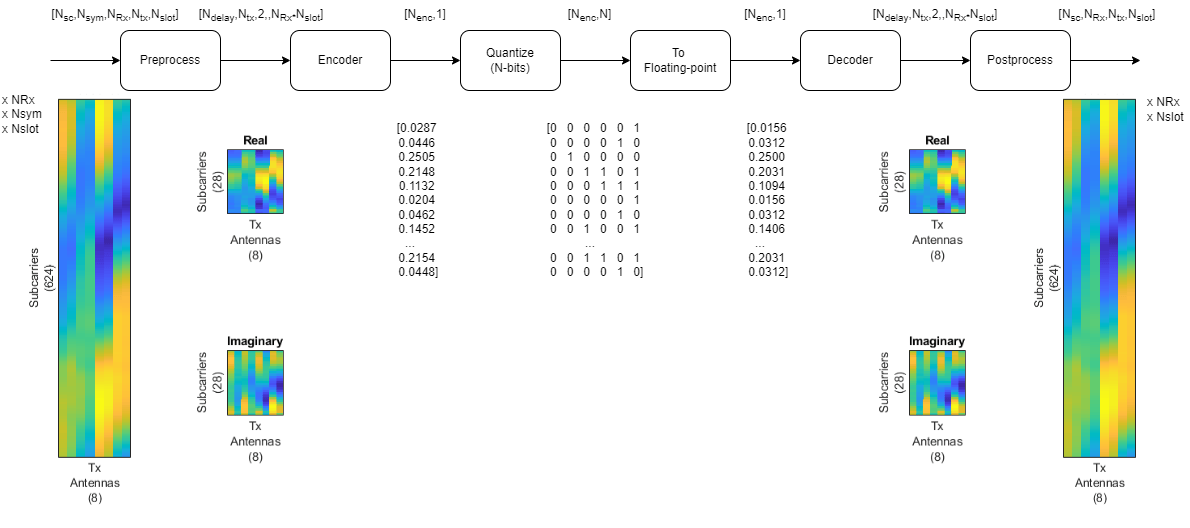
This figure shows the complete processing of channel estimates for CSI feedback. The UE uses the CSI-RS signal to estimate the channel response for one slot, . The preprocessed channel estimate, , is encoded by using the encoder portion of the autoencoder to produce a 1-by- compressed array. The compressed array is decompressed by the decoder portion of the autoencoder to obtain . Postprocessing produces .
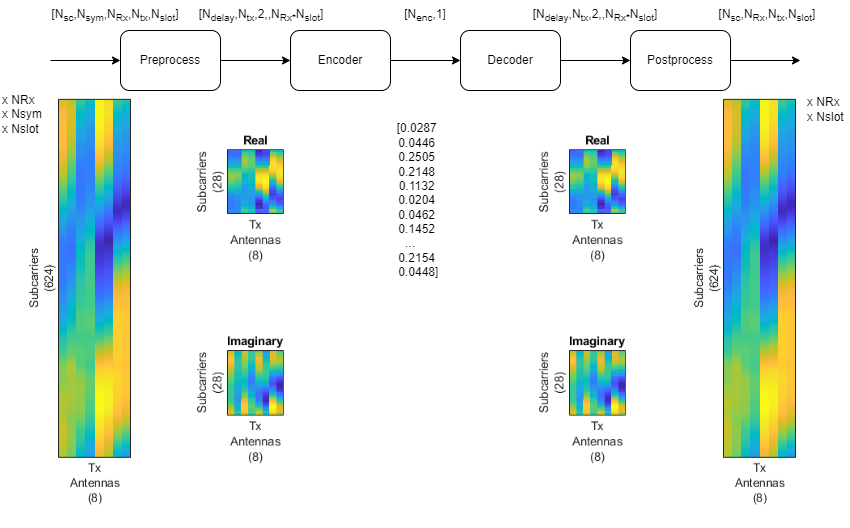
To obtain the encoded array, split the autoencoder into two parts: the encoder network and the decoder network.
[encNet,decNet] = helperCSINetSplitEncoderDecoder(net,"Enc_Sigmoid");
plotNetwork(net,encNet,decNet)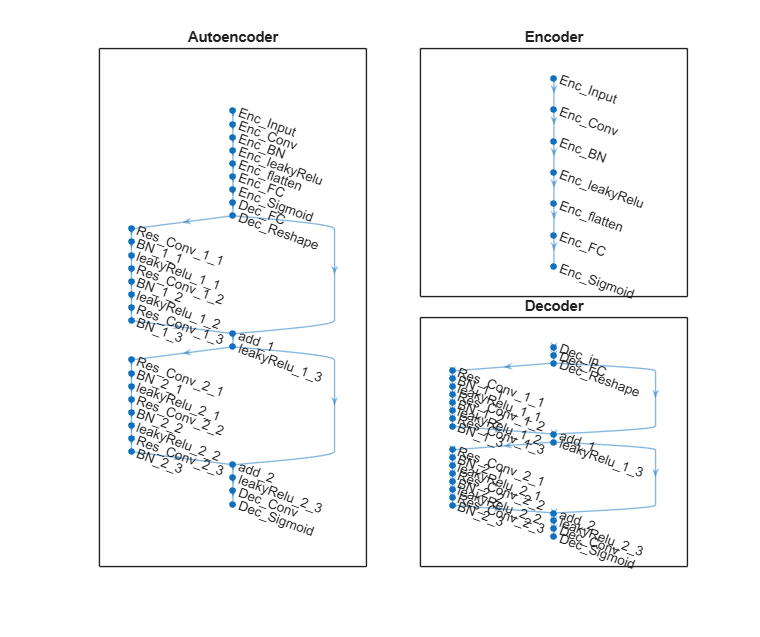
Generate channel estimates.
numFrames = 100;
nRx = prod(systemParams.RxAntennaSize);

Hest = helper3GPPChannelRealizations(...
  numFrames, ...
  channel, ...
  carrier, ...
  UseParallel           = false, ...
  SaveData              = false, ...
  Verbose               = false, ...
  ResetChannelPerFrame  = true, ...
  NumSlotsPerFrame      = 1);
Encode and decode the channel estimates.
codeword = helperCSINetEncode(encNet,Hest,systemParams);
Hhat = helperCSINetDecode(decNet,codeword,systemParams);
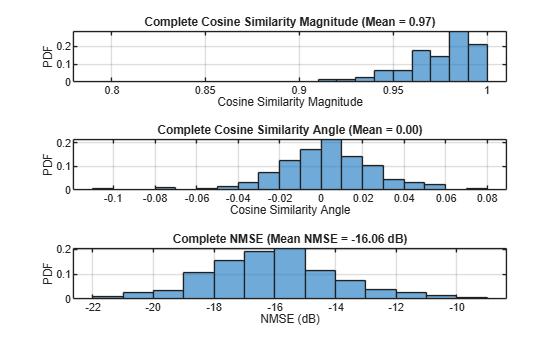
Calculate the cosine similarity and NMSE for the complete CSI feedback system.
H = squeeze(mean(Hest,2));
nmseE2E = zeros(nRx,numFrames);
cossimE2E = zeros(nRx,numFrames);
for rx=1:nRx
    for n=1:numFrames
        out = Hhat(:,rx,:,n);
        in = H(:,rx,:,n);
        cossimE2E(rx,n) = mean(helperComplexCosineSimilarity(in,out));
        nmseE2E(rx,n) = helperNMSE(in,out);
    end
end
figure
tiledlayout(3,1)
nexttile
histogram(abs(cossimE2E),"Normalization","probability")
grid on
title(sprintf("Complete Cosine Similarity Magnitude (Mean = %1.2f)", ...
mean(abs(cossimE2E),'all')))
xlabel("Cosine Similarity Magnitude"); ylabel("PDF")
nexttile
histogram(angle(cossimE2E),"Normalization","probability")
grid on
title(sprintf("Complete Cosine Similarity Angle (Mean = %1.2f)", ...
mean(angle(cossimE2E),'all')))
xlabel("Cosine Similarity Angle"); ylabel("PDF")
nexttile
histogram(nmseE2E,"Normalization","probability")
grid on
title(sprintf("Complete NMSE (Mean NMSE = %1.2f dB)", ...
mean(nmseE2E,'all')))
xlabel("NMSE (dB)"); ylabel("PDF")
Effect of Quantized Codewords
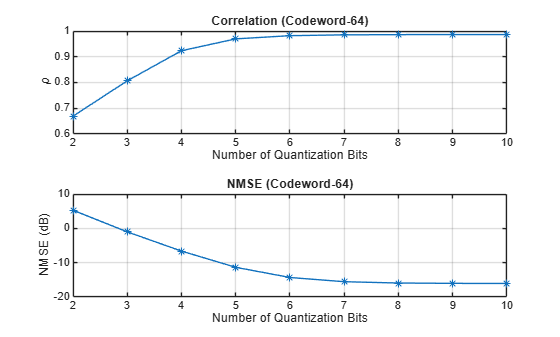
Practical systems require quantizing the encoded codeword by using a small number of bits. Simulate the effect of quantization across the range of [2,10] bits. The results show that 6-bits is enough to closely approximate the single-precision performance.
maxVal = 1;
minVal = -1;
idxBits = 1;
nBitsVec = 2:10;
rhoQ = zeros(nRx,numFrames,length(nBitsVec));
nmseQ = zeros(nRx,numFrames,length(nBitsVec));
for numBits = nBitsVec
disp("Running for " + numBits + " bit quantization")

    % Quantize between 0:2^n-1 to get bits
    qCodeword = uencode(double(codeword*2-1), numBits);

    % Get back the floating point, quantized numbers
    codewordRx = (single(udecode(qCodeword,numBits))+1)/2;
    Hhat = helperCSINetDecode(decNet,codewordRx,systemParams);
    H = squeeze(mean(Hest,2));
    for rx=1:nRx
        for n=1:numFrames
            out = Hhat(:,rx,:,n);
            in = H(:,rx,:,n);
            rhoQ(rx,n,idxBits) = helperCSINetCorrelation(in,out);
            nmseQ(rx,n,idxBits) = helperNMSE(in,out);
        end
    end
    idxBits = idxBits + 1;
end
Running for 2 bit quantization
Running for 3 bit quantization
Running for 4 bit quantization
Running for 5 bit quantization
Running for 6 bit quantization
Running for 7 bit quantization
Running for 8 bit quantization
Running for 9 bit quantization
Running for 10 bit quantization
figure
tiledlayout(2,1)
nexttile
plot(nBitsVec,squeeze(mean(rhoQ,[1 2])),'*-')
title("Correlation (Codeword-" + size(codeword,3) + ")")
xlabel("Number of Quantization Bits"); ylabel("\rho")
grid on
nexttile
plot(nBitsVec,squeeze(mean(nmseQ,[1 2])),'*-')
title("NMSE (Codeword-" + size(codeword,3) + ")")
xlabel("Number of Quantization Bits"); ylabel("NMSE (dB)")
grid on
Further Exploration
The autoencoder compresses a [624 8] single-precision complex channel estimate array into a [64 1] single-precision array with a mean correlation factor of 0.99 and a NMSE of –19.55 dB. Using 6-bit quantization requires only 384 bits of CSI feedback data, which equates to a compression ratio of approximately 800:1.
display("Compression ratio is " + (624*8*32*2)/(64*6) + ":" + 1)
"Compression ratio is 832:1"
Investigate the effect of truncationFactor on the system performance. Vary the 5G system parameters, channel parameters, and number of encoded symbols and then find the optimum values for the defined channel.
The NR PDSCH Throughput Using Channel State Information Feedback example shows how to use channel state information (CSI) feedback to adjust the physical downlink shared channel (PDSCH) parameters and measure throughput. Replace the CSI feedback algorithm with the CSI compression autoencoder and compare performance.
This example shows how to design, train, and evaluate an autoencoder for CSI compression and reconstruction. To explore other task-specific processes, see these examples :
CSI Feedback with Transformer Autoencoder — Design, train, and evaluate a transformer autoencoder for CSI compression and reconstruction.
Optimize CSI Feedback Autoencoder Training Using MATLAB Parallel Server and Experiment Manager — Accelerate determining the optimal training hyperparameters of an autoencoder model that simulates channel state information (CSI) compression by using a MATLAB® Parallel Server™ and the Experiment Manager app.
CSI Feedback with Autoencoders Implemented on an FPGA (Deep Learning HDL Toolbox) — Deploy an implemented CSI autoencoder to an FPGA by using the Deep Learning HDL Toolbox™.
You can also explore how to train and test MATLAB-hosted PyTorch and Keras based neural networks:
Helper Functions
Explore the helper functions to see the detailed implementation of the system.
Training Data Generation
helper3GPPChannelRealizations
Network Definition and Manipulation
helperCSINetDLNetwork
helperCSINetAddResidualLayers
helperCSINetSplitEncoderDecoder
CSI Processing
helperPreprocess3GPPChannelData
helperPostprocess3GPPChannelData
helperCSINetEncode
helperCSINetDecode
Performance Measurement
helperComplexCosineSimilarity
helperNMSE
Appendix: Optimize Hyperparameters with Experiment Manager
Use the Experiment Manager app to find the optimal parameters. CSITrainingProject.mlproj is a preconfigured project. Extract the project.
projectName = "CSITrainingProject";
if ~exist(projectName,"dir")
  projRoot = helperCSINetExtractProject(projectName);
else
  projRoot = fullfile(exRoot(),projectName);
end
To open the project, start the Experiment Manager app and open the following file.
disp(fullfile(".","CSITrainingProject","CSITrainingProject.prj"))
.\CSITrainingProject\CSITrainingProject.prj
Save input data and autoencoder options to use during hyperparameter optimization.
dataDir = fullfile(pwd,"Data","processed");
if ~isfolder(dataDir)
  mkdir(dataDir)
end
save(fullfile(dataDir,"nr_channel_preprocessed.mat"), ...
    "inputData","systemParams")
save('data_folder.mat', "dataDir");
The Optimize Hyperparameters experiment uses Bayesian optimization with hyperparameter search ranges specified as in the following figure. After you open the project, you can use the experiment setup function CSIAutoEncNN_setup and the custom metric function is E2E_NMSE.
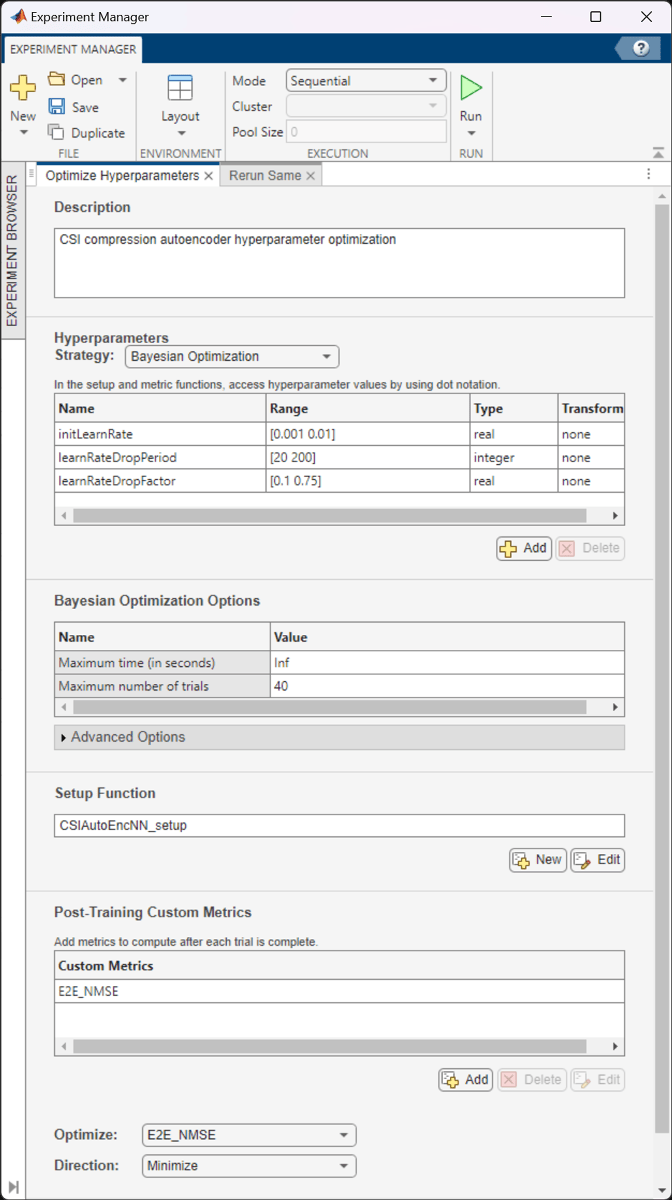
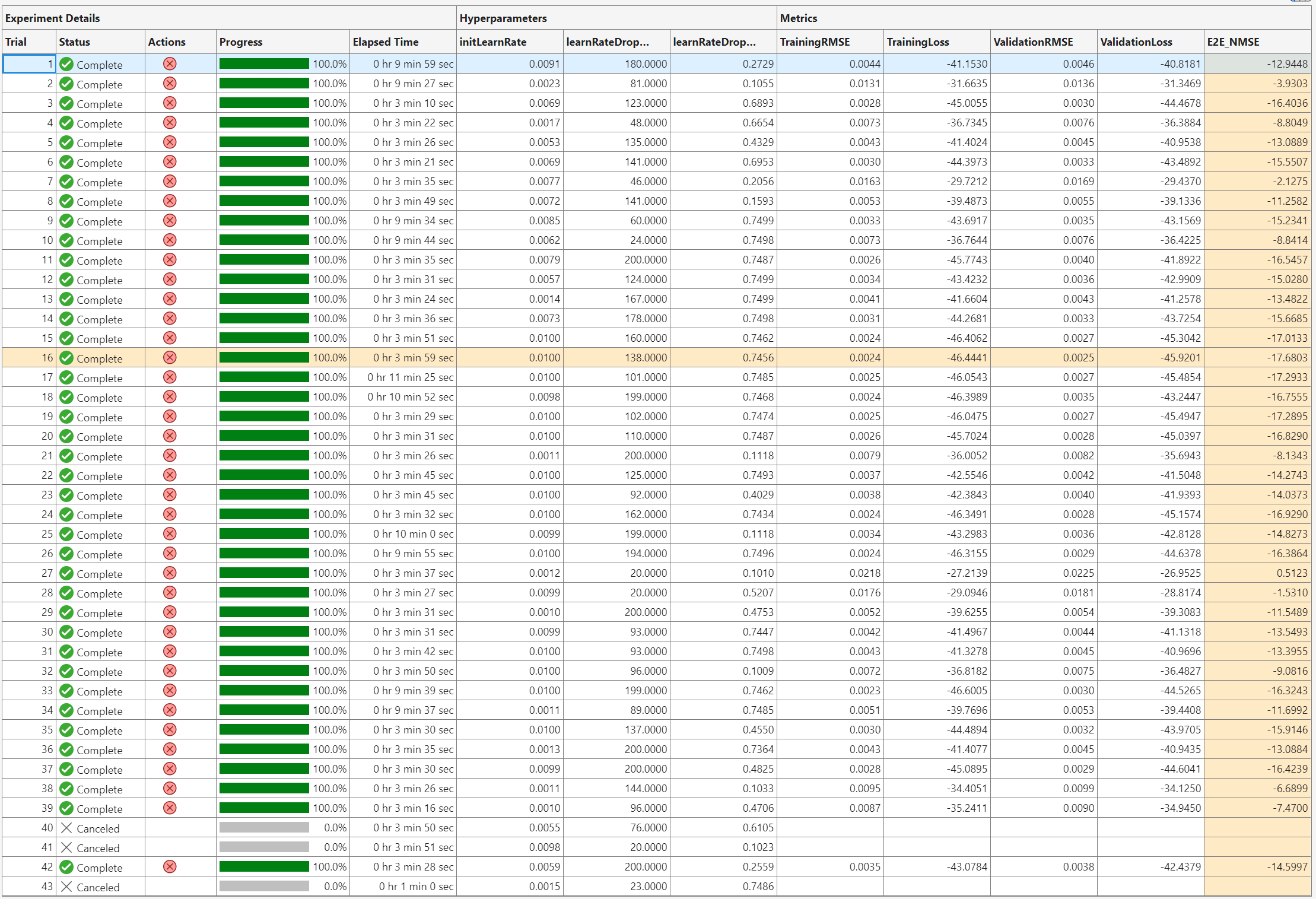
The optimal parameters are 0.01 for initial learning rate, 156 iterations for the learning rate drop period, and 0.5916 for learning rate drop factor. After finding the optimal hyperparameters, train the network with same parameters multiple times to find the best trained network.
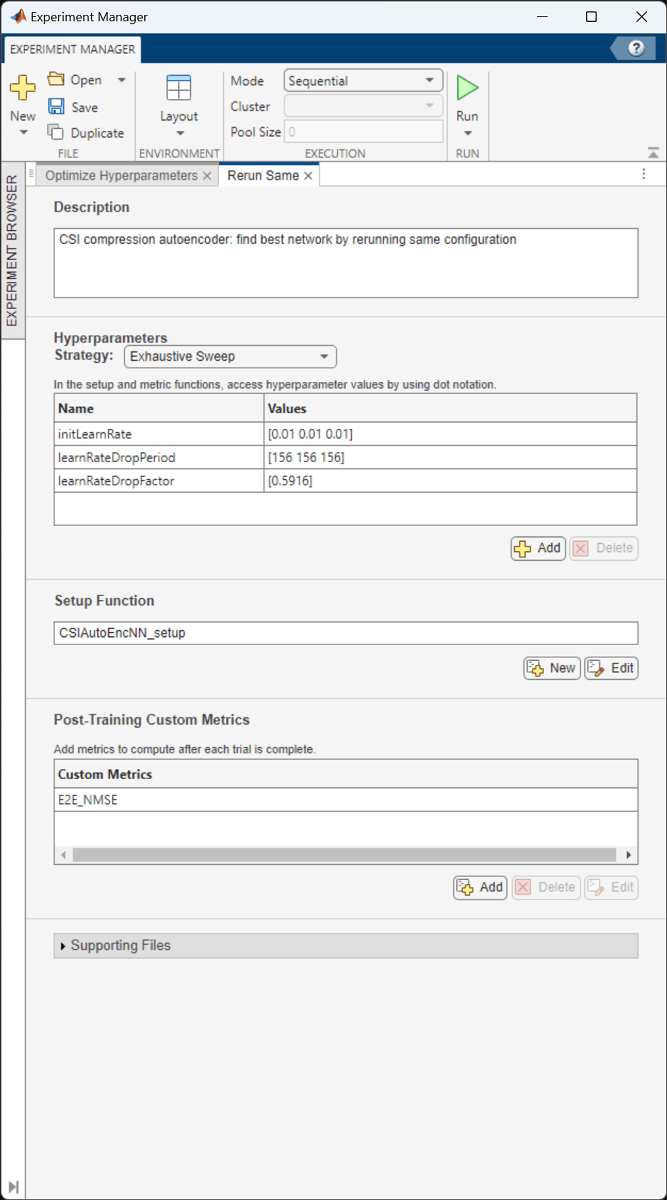
The ninth trial produced the best E2E_NMSE. This example uses this trained network as the saved network.

Configuring Batch Mode
When execution Mode is set to Batch Sequential or Batch Simultaneous, training data must be accessible to the workers in a location defined by the dataDir variable in the Prepare Data in Bulk section. Set dataDir to a network location that is accessible by the workers. For more information, see Offload Experiments as Batch Jobs to a Cluster (Deep Learning Toolbox).
Local Functions
function [inputData,systemParams,dataOptions,channel,carrier] = prepareData(numSamples) carrier = nrCarrierConfig; nSizeGrid = 52; % Number resource blocks (RB) systemParams.SubcarrierSpacing =15; % 15, 30, 60, 120 kHz carrier.NSizeGrid = nSizeGrid; carrier.SubcarrierSpacing = systemParams.SubcarrierSpacing; waveInfo = nrOFDMInfo(carrier); systemParams.TxAntennaSize = [2 2 2 1 1]; % rows, columns, polarization, panels systemParams.RxAntennaSize = [2 1 1 1 1]; % rows, columns, polarization, panels systemParams.MaxDoppler = 5; % Hz systemParams.RMSDelaySpread = 300e-9; % s systemParams.DelayProfile =
"CDL-C"; % CDL-A, CDL-B, CDL-C, CDL-D, CDL-D, CDL-E systemParams.NumSubcarriers = carrier.NSizeGrid*12; channel = nrCDLChannel; channel.DelayProfile = systemParams.DelayProfile; channel.DelaySpread = systemParams.RMSDelaySpread; % s channel.MaximumDopplerShift = systemParams.MaxDoppler; % Hz channel.RandomStream = "Global stream"; channel.TransmitAntennaArray.Size = systemParams.TxAntennaSize; channel.ReceiveAntennaArray.Size = systemParams.RxAntennaSize; channel.ChannelFiltering = false; channel.SampleRate = waveInfo.SampleRate; samplesPerSlot = ... sum(waveInfo.SymbolLengths(1:waveInfo.SymbolsPerSlot)); channel.NumTimeSamples = samplesPerSlot; % 1 slot worth of samples systemParams.NumSymbols = 14; useParallel =
true; saveData =
true; dataDir = fullfile(pwd,"Data"); dataFilePrefix = "nr_channel_est"; numSlotsPerFrame = 1; resetChannel = true; sdsChan = helper3GPPChannelRealizations(... numSamples, ... channel, ... carrier, ... UseParallel=useParallel, ... SaveData=saveData, ... DataDir=dataDir, ... dataFilePrefix=dataFilePrefix, ... NumSlotsPerFrame=numSlotsPerFrame, ... ResetChannelPerFrame=resetChannel); dataOptions.DataDomain =
"Frequency-Spatial (FS)"; dataOptions.TruncationFactor =
10; Tdelay = 1/(systemParams.NumSubcarriers*carrier.SubcarrierSpacing*1e3); rmsDelaySpreadSamples = channel.DelaySpread/Tdelay; [data,dataOptions] = helperPreprocess3GPPChannelData( ... sdsChan, ... TrainingObjective = "autoencoding", ... AverageOverSlots = true, ... TruncateChannel = true, ... ExpectedDelaySpreadSamples = rmsDelaySpreadSamples, ... TruncationFactor = dataOptions.TruncationFactor, ... DataComplexity = "real (2D)", ... IQDimension = 3, ... DataDomain = dataOptions.DataDomain, ... UseParallel = useParallel, ... SaveData = false); meanVal = mean(data{1},'all'); stdVal = std(data{1},[],'all'); inputData = (data{1}-meanVal) / stdVal; targetStd = 0.0212; inputData = inputData*targetStd+0.5; systemParams.Normalization = "mean-variance"; systemParams.MeanValue = meanVal; systemParams.StandardDeviationValue = stdVal; systemParams.TargetStandardDeviation = targetStd; systemParams.ExpectedDelaySpreadSamples = dataOptions.ExpectedDelaySpreadSamples; end function compatible = checkSystemCompatibility(systemParams,systemParamsCached) compatible = false; if systemParams.SubcarrierSpacing ~= systemParamsCached.SubcarrierSpacing return end if any(systemParams.TxAntennaSize ~= systemParamsCached.TxAntennaSize) return end if any(systemParams.RxAntennaSize ~= systemParamsCached.RxAntennaSize) return end if systemParams.MaxDoppler ~= systemParamsCached.MaxDoppler return end if systemParams.RMSDelaySpread ~= systemParamsCached.RMSDelaySpread return end if systemParams.DelayProfile ~= systemParamsCached.DelayProfile return end if systemParams.NumSubcarriers ~= systemParamsCached.NumSubcarriers return end if systemParams.NumSymbols ~= systemParamsCached.NumSymbols return end if abs(systemParams.MeanValue - systemParamsCached.MeanValue) > 3e-2 return end if (systemParams.StandardDeviationValue - systemParamsCached.StandardDeviationValue) > 3e-2 return end if systemParams.TargetStandardDeviation ~= systemParamsCached.TargetStandardDeviation return end if systemParams.ExpectedDelaySpreadSamples ~= systemParamsCached.ExpectedDelaySpreadSamples return end if systemParams.MaxDelay ~= systemParamsCached.MaxDelay return end compatible = true; end function plotNetwork(net,encNet,decNet) %plotNetwork Plot autoencoder network % plotNetwork(NET,ENC,DEC) plots the full autoencoder network together % with encoder and decoder networks. fig = figure; t1 = tiledlayout(1,2,'TileSpacing','Compact'); t2 = tiledlayout(t1,1,1,'TileSpacing','Tight'); t3 = tiledlayout(t1,2,1,'TileSpacing','Tight'); t3.Layout.Tile = 2; nexttile(t2) plot(net) title("Autoencoder") nexttile(t3) plot(encNet) title("Encoder") nexttile(t3) plot(decNet) title("Decoder") pos = fig.Position; pos(3) = pos(3) + 200; pos(4) = pos(4) + 300; pos(2) = pos(2) - 300; fig.Position = pos; end function rootDir = exRoot() %exRoot Example root directory rootDir = fileparts(which("helperCSINetDLNetwork")); end function loss = nmseLossdB(x,xHat) %nmseLossdB NMSE loss in dB in = complex(x(:,:,1,:),x(:,:,2,:)); out = complex(xHat(:,:,1,:),xHat(:,:,2,:)); nmsePerObservation = helperNMSE(in,out); loss = mean(nmsePerObservation); end
References
[1] Wen, Chao-Kai, Wan-Ting Shih, and Shi Jin. “Deep Learning for Massive MIMO CSI Feedback.” IEEE Wireless Communications Letters 7, no. 5 (October 2018): 748–51. https://doi.org/10.1109/LWC.2018.2818160.
See Also
Topics
- AI-Based CSI Feedback
- Neural Network for Beam Selection
- Deep Learning in MATLAB (Deep Learning Toolbox)

