Generazione di codice HDL per FPGA
I modelli o i sottosistemi che richiedono tempi di campionamento rapidi possono trarre vantaggio dalla simulazione su FPGA. Se si dispone di HDL Coder™, è possibile convertire il proprio modello dell'impianto Simscape in un modello di implementazione HDL, che potrà poi essere utilizzato per la generazione di codice HDL per la distribuzione su un FPGA. Per distribuire il modello o il sottosistema di Simscape su un FPGA:
Utilizzare la funzione
sschdladvisorper avviare lo strumento HDL Workflow Advisor di Simscape, che fornisce una guida attraverso il processo di creazione del modello di implementazione HDL.Convertire il modello di implementazione in codice HDL utilizzando lo strumento HDL Workflow Advisor.
Utilizzare Simulink® Real-Time™ per distribuire il codice HDL su un FPGA.
È possibile utilizzare la sintesi del modello per prevedere il passo temporale raggiungibile dall'hardware.

Funzioni
sschdladvisor | Open Simscape HDL Workflow Advisor |
simscape.findNonlinearBlocks | Check model for blocks with nonlinear equations |
sschdl.updateRuntimeParameters | Generate updated tunable parameter data file for Simscape model (Da R2024a) |
sschdl.generateOptimizedModel | Replace Simscape switches and converter blocks with dynamic switches optimized for FPGA deployment (Da R2024a) |
Argomenti
- Get Started with Simscape Hardware-in-the-Loop Workflow (HDL Coder)
Simscape™ Hardware-in-the-Loop workflow modeling guidelines and restrictions.
- Linearize a Simscape Model to Prepare for HDL Code Generation
Learn how to linearize a model that uses the Backward Euler solver for HDL deployment.
- Generate HDL Code for FPGA Platforms from Simscape Models
Learn how to convert Simscape models to HDL Code for FPGA Deployment.
- Generate Optimized HDL Implementation Model from Simscape (HDL Coder)
Optimize area and timing of HDL implementation model generated from Simscape by using HDL Coder optimizations.
- Generate and Validate HDL Code for Simscape Model (HDL Coder)
Generate HDL code from Simscape switched linear models.
- Generate HDL Code for Simscape Models with Multiple Networks (HDL Coder)
Split a large Simscape network into multiple networks and generate HDL implementation model.
- Generate HDL Code for Simscape Three-Phase PMSM Drive Containing Averaged Switch (HDL Coder)
Generate HDL code and synthesize the results for a three-phase PMSM Simscape models with converter blocks that have averaged switches and deploy onto the FPGAs.
- Simulate Large Time Steps Using Trapezoidal Rule Solver for Real-Time FPGA Deployment (HDL Coder)
Generate HDL code for a Simscape model by using the Trapezoidal Rule solver and deploy it onto a Speedgoat® FPGA I/O module.
- Generate HDL Code for Simscape Models by Using Dynamic Switch Approximation (HDL Coder)
Generate HDL code and synthesize the results for a three-phase PMSM drive using Dynamic Switch Approximation method.
- Improve FPGA Sampling Frequency of HDL Implementation Model Generated from Simscape Algorithm (HDL Coder)
Oversampling in generated HDL implementation model, and relation between model sample time and sample time of original Simscape algorithm.
- Validate HDL Implementation Model to Simscape Algorithm (HDL Coder)
Validate and resolve simulation mismatch between Simscape algorithm and HDL implementation model.
- Synthesis Results for Simscape Hardware-in-the-Loop Workflow (HDL Coder)
Access synthesis results for Simscape hardware-in-the-loop workflow example models.
Risoluzione dei problemi
Resolving Issues with Nonlinearities
Troubleshoot simulation and code generation issues associated with nonlinearities.
Troubleshooting Real-Time Hardware Deployment Issues in Simscape Hardware-in-the-Loop Workflow (HDL Coder)
Troubleshoot real-time hardware deployment issues in Simscape Hardware-in-the-Loop workflow.
Troubleshoot Validation Errors in Simscape Hardware-in-the-Loop Workflow (HDL Coder)
Troubleshoot validation mismatches in Simscape Hardware-in-the-Loop workflow.
Esempi in primo piano
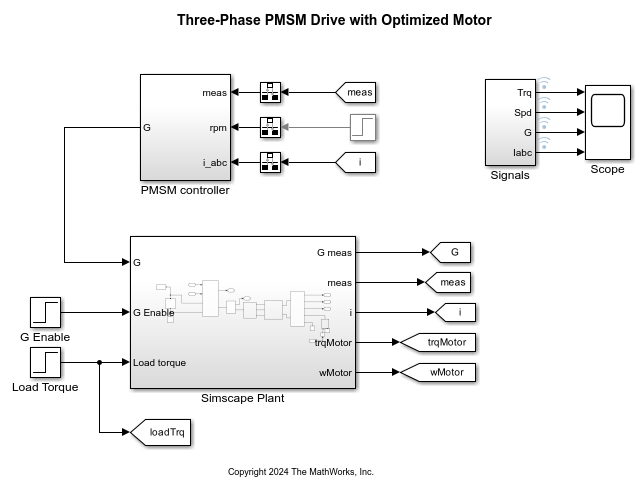
Generate Optimized Simscape Three-Phase PMSM Drive Model for Real-Time FPGA HIL Deployment
Optimize three-phase PMSM model from a Simscape model for HDL code generation and FPGA deployment.
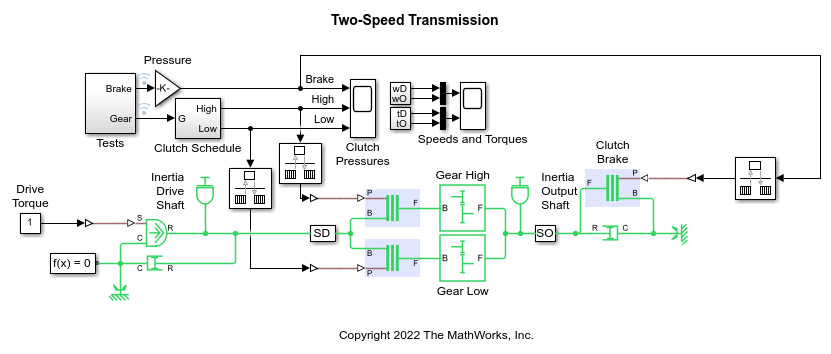
Generate HDL Code for Two-Speed Transmission Model Containing Mode Charts
Generate HDL code and synthesize the results for a two-speed transmission model with braking that contains mode charts.

Rettificatore a ponte full-wave
Questo esempio mostra come dimensionare un condensatore per un carico specifico in un trasformatore che converte 120 V in CA in 12 V in CC. Il sistema è modellato come un trasformatore CA ideale abbinato a un rettificatore a ponte full-wave.

